Manipulating Waveforms
Creating Waveforms
In yesterday's lab, we learned that we represent sound waves as vectors of floating-point numbers in the range -1.0 to 1.0.
Thus, to generate sounds, we simply need to provide such a vector to the sample-node function of the audio library.
For example, we saw how to generate white noise by randomly generating either 1.0 or -1.0 for each sample:
(import audio)

; The default sample rate for sample-node is 16000 hz
(define sample-rate 16000)
(define duration 2)
(define num-samples (* sample-rate duration))

(define index->noise-sample
  (lambda (i)
    (- (random 3) 1)))

(let* ([samples (vector-range num-samples)])
  (begin
    (vector-map! index->noise-sample samples)
    (sample-node samples)))
In this code snippet, we create a vector of numbers from 0 to num-samples - 1.
Think of these numbers as the index i of each sample from the sound wave.
We then transform each index into an appropriate random number by using random.
Note that we use mutation via vector-map! to avoid creating excess vectors.
If we used vector-map, we would have created an extra vector on top of the vector created by vector-range.
Since many samples are necessary to synthesize sound, e.g., 16000 * 2 = 32000 samples for a two-second clip at low-quality, it is prudent to avoid creating copies of these vectors whenever possible.
This is precisely a use case where mutation is necessary to write performant code!
Example: a square wave
We perceive tones as sound waves with patterns occurring at a particular frequency. We, therefore, can create a tone by constructing a sound wave with a regularly occurring pattern. There are a number of fundamental waveforms in digital audio.
As an example of this, let's review how we created a sound wave consisting of a square waveform from yesterday's lab. Within a single occurrence of the square waveform pattern:
- The first half of the samples are the minimum possible amplitude,
-1.0. - The second half of the samples are the maximum possible amplitude,
1.0.
Let's write a function that mutates a vector of indices into appropriate samples for a square wave.
We'll decompose this problem by writing a function that transform one index into a square wave sample and then use vector-map! to apply that function to mutate every element of our vector.
(define index->square-sample
  (lambda (i total-samples)
    (if (< i (/ total-samples 2))
        -1.0
        1.0)))

(define make-square-samples
  (lambda (sz)
    (let* ([samples (vector-range sz)])
      (begin
        (vector-map! (section index->square-sample _ sz) samples)
        samples))))

(display (make-square-samples 2))
(display (make-square-samples 10))
Observe in that output that the first half vector values is -1.0 and the other half is 1.0.
Note that vector-map! expects a function of one argument which we obtain by sectioning index->square-sample, provided the intended size of the vector as the second argument.
To apply index->square-sample to create a clip that consists of many square waves, we can think of replicating a single square wave as many times as needed.
This is the role of the vector-replicate function that we wrote.
(vector-replicate n vec) creates a new vector that consists of n copies of vec joined together.
We can view this problem as a sort of mapping problem between indices of the source vector vec and the larger vector we wish to return ret.
Suppose vec is (vector "a" "b") and we want to replicate this 5 times.
The vector ret we will produce has length 5 * 2 = 10.
Let's imagine creating this vector with a call (vector-range 10) so ret initially contains the numbers 0 ... 9.
We need to map these values, i.e., indices, into valid indices of vec:
 0   1   2   3   4   5   6   7   8   9
 ↓   ↓   ↓   ↓   ↓   ↓   ↓   ↓   ↓   ↓
"a" "b" "a" "b" "a" "b" "a" "b" "a" "b"
What function when given the top number gives you the bottom number?
It turns out this is the remainder function!
(remainder n k) returns the remainder of .
(let ([ret (vector-range 10)])
  (begin
    (vector-map!
      (lambda (i) (remainder i 2))
      ret)
    ret))
In general, remainder allows us to perform "modulo" arithmetic where we want to consider numbers up
to a certain value (2 in this case) and "wrap around" when we reach either range of values.
Let's combine these two concepts to implement vector-replicate and put it together with index->square-sample to generate a square wave at 440 Hz (concert A pitch):
(import audio)

(define index->square-sample
  (lambda (i total-samples)
    (if (< i (/ total-samples 2))
        -1.0
        1.0)))

(define vector-replicate
  (lambda (n vec)
    (let* ([vec-len (vector-length vec)]
           [sz (* n vec-len)]
           [ret (vector-range sz)])
      (begin
        (vector-map!
          (lambda (i)
            (vector-ref vec (remainder i vec-len))) ret)
        ret))))

(define sample-rate 16000)
(define duration 2)
(define frequency 440)

(let* ([samples-per-wave (/ sample-rate frequency)]
       [waves-per-clip (* duration frequency)]
       [wave (vector-range samples-per-wave)])
  (begin
    (vector-map!
      (section index->square-sample _ samples-per-wave)
      wave)
    (sample-node
      (vector-replicate waves-per-clip wave))))
Waveform Processing
Because our audio clips are simply vectors of floats, processing audio clips amounts to transforming these vectors of numbers, typically with vector-map!
There are many operations that we can perform over our audio clips, e.g.,
- Combine clips so that the sounds play at the same time.
- Take a single clip and modify it to have pulses, giving the effect of discrete notes between played.
- Adding effects to the clip such as echo and reverb.
As an example, we'll describe a simple technique to modify a sound clip to give it a pulse. You'll implement part of this technique for the reading question and then finish it off in lab!
ASDR Envelopes
So far, our sound waves have been continuous tones. How might we synthesize notes or pulses of sound? We can do so by applying an envelope to our wave which will control its volume. Sound envelopes are a very simple example of an effect we can apply to a wave of sound.
Recall that the amplitude of a wave determines its volume. To create the effect of a "note," we want to control the amplitude of the wave over time to simulate how the volume changes over the lifetime of a note. The standard ADSR envelope recognizes four such stages in the lifetime of a note:
- Attack: the period where the wave ramps up from zero amplitude to its peak amplitude.
- Decay: the period when the wave ramps down from its peak to a designated sustained volume.
- Sustain: the period when the wave maintains its designated sustained volume.
- Release: the period when the wave moves from its sustain level back to zero amplitude.
Here is a diagram illustrating the different portions of the ADSR envelope (from the Wikipedia article on the subject):

Relative to the sound samples, we can think of each individual point in the envelope as a multiplier. For the th sample of the sound clip, we would multiply it by the th point of the envelope to moderate its volume.
There is an art to picking appropriate values for each of these stages to create a realistic sound note. For our purposes, let's first create a simple envelope that:
- Has an instantaneous attack, i.e., the pulse starts at maximum volume.
- Has no decay or sustain; the remaining portion of the envelope releases from maximum volume back to rest.
This envelope might look like this:
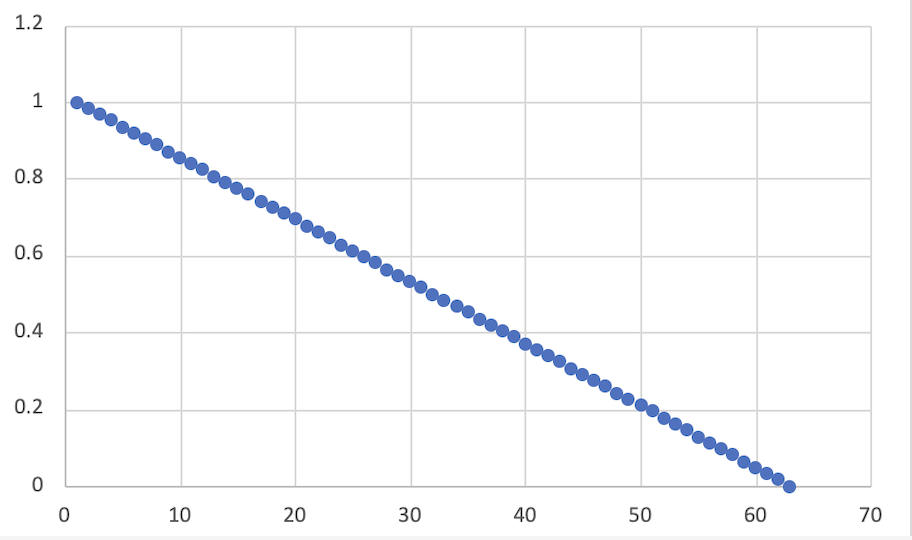
With the start of the envelope being 1.0 decreasing linearly to 0.0 by the end of the envelope.
If we take our sine wave from before:
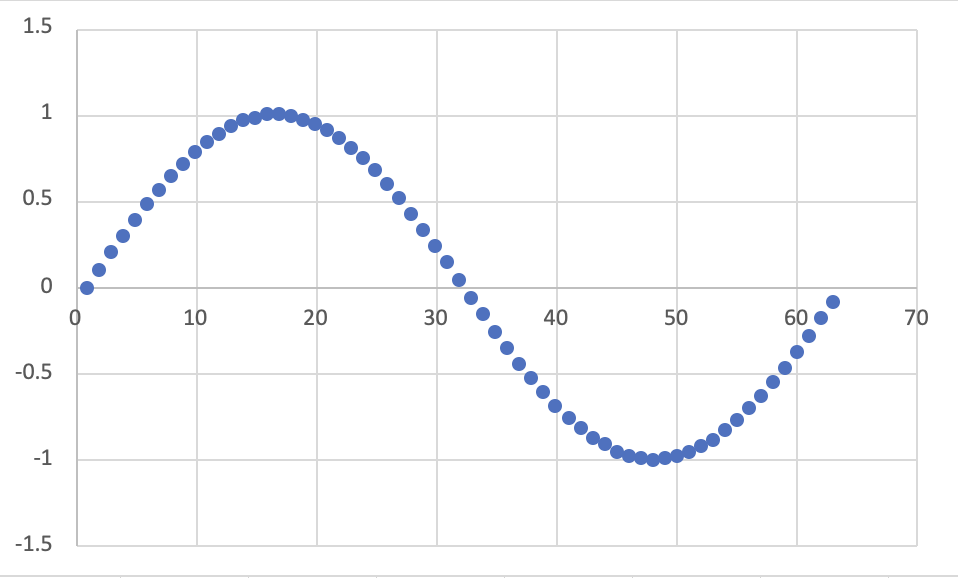
We can apply the envelope by taking the th sample and multiplying it by the th point of the envelope.
This results in a modified sine wave:
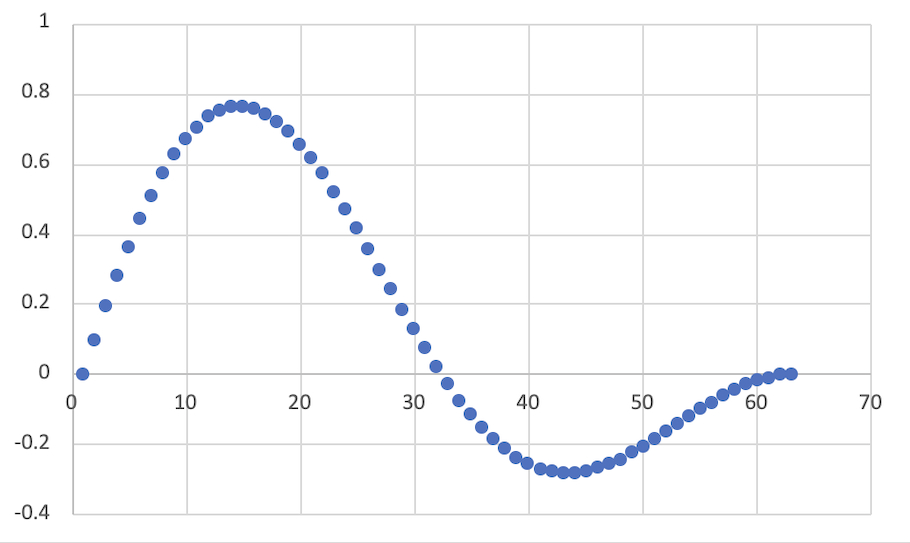
The result is a pure sine tone that is initially loud and then decays over the duration of the clip to no volume.
ASDR envelopes are a great example of the power of manipulating sound as vectors of floating-point numbers. We can do lots of interesting transformation over sounds just by applying our big-ticket operations over the samples!
Self-Checks
Problem: Making the Envelope (‡)
Create a function simple-envelope that takes total-samples, the total number of samples in the clip as input.
The function then outputs the envelope described above:
- The envelope starts at
1.0and linearly decays to0.0over its lifetime.
Here is an example of its usage for reference:
> (simple-envelope 1)
(vector 1.0)

> (simple-envelope 5)
(vector 1.0 0.8 0.6 0.4 0.2)

> (simple-envelope 10)
(vector 1 0.9 0.8 0.7 0.6 0.5 0.4 0.3 0.2 0.1)
In lab, you'll apply this function to your synthesized sounds to make notes!