From C to Java
In order to attract developers, the Java creators gave the language a C/C++-like syntax. While we ultimately have to be mindful that C favors one programming paradigm---procedural programming---and Java favors another---object-oriented programming, we can leverage our knowledge of C syntax to quickly ramp up to Java.
In this chapter, we introduce the procedural programming elements of C programming that translate directly to Java. Recall that procedural programming is a programming paradigm where a program is composed of procedural calls, i.e., functions with side effects. Once we understand how procedural programming is realized in Java, we can better understand what object-oriented programming is and how the two styles of programming contrast and complement each other.
Statements and Expressions
A programming language is made up different language constructs that we can put together in different ways. In C as well as Java, we use two particular sorts of constructs extensively in our programs:
-
Expressions are programming language constructs that evaluate to a value. A value is an expression that can no longer take any more steps of evaluation.
-
Statements are programming language constructs that carry out one or more side effects. Side effects are any effects that a program produces that are specifically not expressions-evaluating-to-values. These include reading from a file, printing to the console, or mutating a variable.
An example of an expression is an arithmetic expression, e.g., 3 + 5 * (4 - 2), which evaluates to the value 13.
An example of a statement is a variable assignment, e.g., x = 5 + 3, which has the effect of copying the value 8 into the variable x.
Note that the variable assignment statement contains an expression, 5+3, inside of it.
The grammar of a language specifies the valid ways we can put together a language construct, frequently in terms of other other language constructs that the language provides.
We combine statements and expressions to create programs that do meaningful work. For example, the for-loop:
int prod = 1;
for (int i = 1; i <= 10; i++) {
    prod = prod * i;
}
Repeatedly updates the prod variable with the results of the expression prod * i.
After the loop is done, prod effectively contains the result of evaluating 1 * 1 * 2 * ... * 10 or .
Expressions
Java inherits a large part of its expression language from C. Expressions include literals for several types:
- Integers, e.g.,
5, - Floating-point values, e.g.,
3.5, - Booleans, e.g.,
true, - Characters, e.g.,
’c’, and - Strings, e.g.,
"hello world".
We can also perform:
- Arithmetic over integer and floating-point expressions with
+,-,*,\, and%. - Comparisons over integers and floating-point expressions with
>,>=,<,<=,==, and!=. - Boolean arithmetic over booleans with
!,&&, and||. - Bitwise operations over integer values with
&,|,^,~,>>,<<, and>>>. - Function calls that produce or return values.
Expressions generalize arithmetic expressions, computing by repeated evaluation and substitution. Arithmetic expressions evaluate by repeatedly:
- Finding the next sub-expression to evaluate by applying rules of precedence, e.g., multiplication comes before addition, parenthesized expressions take precedence over non-parenthesized expressions.
- Evaluating that sub-expression to a value.
- Substituting the newly acquired value for that sub-expression.
This process continues until the resulting expression is a value. A value is an expression that takes no further steps of evaluation. In this context, a number itself is an expression that does not evaluate further, so it is considered a value.
Arithmetic expressions consist of a single type, e.g., integers, and a small set of expression forms, e.g. addition and subtraction, that produce integers. Expressions in Java expand on the set of possible types as well as expression forms. Otherwise, they behave exactly like arithmetic expressions with respect to how they compute. For example, here is a more complex expression and its step-by-step evaluation to a final value:
    !(5 * 3 > 3 + 2 && !true || false)
--> !(  15  > 3 + 2 && !true || false)
--> !(  15  >   5   && !true || false)
--> !(    true      && !true || false)
--> !(    true      && false || false)
--> !(    true      &&     false     )
--> !(            false              )
--> true
Note the rules of precedence at play.
For example, with the subexpression !true || false, the ! unary operator has higher precedence than the || binary operator, so we evaluate the expression as if it was (!true) || false rather than !(true || false).
Statements
Java also inherits much of its statement language from C. In particular, Java features:
-
Local variable declaration statements, e.g.,
int x;. -
Variable assignment statements, e.g.,
x = 5;. Note that we can combine variable declaration and initial assignment statements, e.g.,int x = 5;, and like C, we favor always initializing our locals when they are declared. Java also features the same set of "shortcut" assignment statements as C, e.g., "assign equals" operators such as+=and pre- and post-increment and decrement operators++and-–. -
Conditional statements, e.g.,
if (x < 5) {
    System.out.println("less than five");
} else {
    System.out.println("not less than five");
}
Where the statements constituting the
if-branch are executed if the guard of the conditional (here,x < 5) evaluates totrue. Otherwise, the guard evaluates tofalseand the statements of theelse-branch are executed. Like C, you can elide theelsebranch or introduce multiple branches usingelse if. -
While-loop statements, e.g.,
while (x != 0) {
    System.out.println(x);
    x += 1;
}
Where the statements that constitute the body of the loop are executed until the guard of the loop evaluates to
false. Java also has the do-while loop statement where the while-loop body is evaluated once before the guard is evaluated. -
For-loop statements, e.g.,
for (int i = 0; i < 10; i++) {
    System.out.println(i);
}
Which act like while-loops but combine initialization and updating of a variable along with repeated execution of the loop body.
-
Switch statements, e.g.,
switch (x) {
    case 0:
        return 1;
    case 1:
        return 1;
    default:
        return x * 2;
}
Which perform case analysis on an integral value and jumps to the statement after that value's corresponding
caselabel. Like C, we have to be careful about fall-through with cases.cases are not genuine branches like a conditional; they are merely labels. So unless you use abreakstatement to exit theswitch, execution flows through subsequent cases.For example, consider the following switch statement:
switch (x) {
    case 0:
        x = x + 1;
    case 1:
        x = x + 1;
    default:
        x = x + 1;
}
If
xcontains the value0, then the switch statement will incrementxthree times, eventually storing the value3in the variable. To fix this problem, the switch-statement should includebreakstatements at the end of each case "block" as follows:switch (x) { case 0: x = x + 1; break; case 1: x = x + 1; break; default: x = x + 1; break; }
Unlike expressions, statements do not evaluate to a value.
Instead, they produce side effects on the program.
A side effect is any change of state to the program visible to the outside world.
For example: The canonical example of this is variable mutation, e.g., x = 5 changes the value stored at x to 5.
But "state" is not restricted only to the mutation of variables.
For example:
- Mutating a variable, e.g.,
x = 5, changes the value stored atxto5. - Printing text to the console changes the state of the screen.
- Reading data from the network consumes buffered data that has been sent over the wire.
- Invoking a timer requires state to be changed behind the scenes to track how long the timer has elapsed.
In short, anything that is not simply an expression producing a value is a side effect of one sort or another!
Types
Like C, Java is a statically-typed language. That is, every expression in our program has a type which classifies the value that it produces. This type is known to the compiler before you run a program, and the compiler performs an analysis called type checking to ensure that all values in our program are used consistently. Such programs are called well-typed. Programs that do not have this property are called ill-typed and produce type errors at compilation time.
Types themselves can be divided into two sorts: primitive and compound types. Compound types are made up of other, smaller types. In contrast, primitive types are atomic, they cannot be decomposed into smaller types like with compound types. Java shares a number of primitive types with C although the set of values they classify differ slightly:
long: the type of 64-bit (8 byte) signed integers.int: the type of 32-bit (4 byte) signed integers.short: the type of 16-bit (2 byte) signed integers.byte: the type of 8-bit (1 byte) signed integers.double: the type of 64-bit (8 byte) floating point values.float: the type of 32-bit (4 byte) floating point values.boolean: the type of boolean values, i.e.,trueandfalse.char: the type of single 16-bit Unicode characters.
Notably, Java has a richer type system than C in the sense that a boolean is not simply an integer; a boolean is a distinguished type that cannot be interchanged with integers.
In particular, in C, the expression 1 + true is well-typed (although its resulting value is undefined) whereas in Java, the expression is ill-typed and would be rejected at compile time.
In C, aggregate types includes arrays, pointers (which generalize arrays), and structs.
Java differs from C with respect to all three of these language features:
-
In Java, arrays are their own type distinct from pointers, written
T[]for an array ofTs. To create an array, we use anewarray expression which creates an array on the heap of the specified size. The syntax of thenewarray expression is:new <type>[<size>]. For example the variable declarationint[] arr = new int[100]declares a variable calledarrthat references an array (ofints) of size 100 on the heap.Indexing into an array in Java is identical to C with an array indexing expression, e.g.,
arr[4]to retrieve the element at index 4 (the fifth element) of the array. Unlike C, Java performs bounds checking to ensure that the index provided to an array indexing expression is in range. If an invalid index is accessed of an array, rather than performing undefined behavior, a Java program will throw an exception signifying that an erroneous condition has occurred. Consequently, this means that a Java array must store its length in addition to its element to perform this run-time check. We can access the length of an array directly by using a field access expression to access thelengthfield of the array. Combining all this together, the following code snippet sums up the elements of an integer array calledarr:int[] arr = new int[100]; /* Load arr with some values... */ int sum = 0; for (int i = 0; i < arr.length; i++) { sum += arr[i]; } -
Java does not explicitly have a pointer type although certain types in Java that we will discuss later (so-called "reference types") are always implicitly handled through a pointer.
-
Java does not have a
structconstruct. It instead has aclassconstruct which you can think of as astructwith additional features.classdeclarations are the cornerstone of Java programming in an object-oriented style, so we'll defer our discussion of classes to later.
Function Declarations
The basic programming-in-the-small constructs of Java are very similar to C. However, the way that we organize our Java programs differs significantly from C programs. Recall that the canonical "Hello World!" program in C is written as:
// In hello.c
int main(void) {
printf("Hello World!\n");
return 0;
}
In contrast, the equivalent Java program is written as:
// In Hello.java
public class Hello {
    public static void main(String[] args) {
        System.out.printf("Hello World!\n");
    }
}
Note the differences:
- The "function"
mainis wrapped in a public class declaration calledHello. The name of the file,Hello.java, is the same as the class name,Hello. - Function declarations are prepended with the modifiers
public static. - The function signature for the
mainfunction in Java isvoid main(String[]). That is,mainmust be a function that takes an array of strings (the command-line arguments to the program) and returns nothing. - To print text to the console, we use
System.out.printfrather than simplyprintf. Alternatively, and more standard, we can also useSystem.out.printlnwhich prints a string to the console and also adds a newline character (’’) to the end of the string.
All of these additional pieces of syntax---the class declaration, the public static modifiers---have important meaning to our program.
However, they do not directly impact our ability to write basic procedural programs in Java, so we'll defer discussion of them to later chapters.
For now, we will write our Java programs as follows:
- All functions are wrapped in a public class declaration whose name is the same as the source filename (minus the
.javapart). - All function headers are prepended with the
public statickeywords.
Here is a basic template for you to utilize for your starting Java programs:
// In MyProg.java
public class MyProg {
    public static void main(String[] args) {
        // My main function code goes here
    }
}
Procedural Programming
With all of these elements---expressions, statements, and functions---we can adapt our procedural programming model of programming in C to Java.
Procedural programming is a programming paradigm where our programs are composed of procedures---functions with side effects.
If our program solves a problem, we decompose that problem into smaller problems to solve, reflecting this decomposition in the functions that we author.
For example, the program SumArgs found below prints the sum of the command-line arguments given to the program.
public class SumArgs {
    public static int[] transformArgs(String[] args) {
        int[] ret = new int[args.length];
        for (int i = 0; i < args.length; i++) {
            ret[i] = Integer.parseInt(args[i]);
        }
        return ret;
    }

    public static int sum(int[] arr) {
        int ret = 0;
        for (int i = 0; i < arr.length; i++) {
            ret += arr[i];
        }
        return ret;
    }

    public static void main(String[] args) {
        System.out.println(sum(transformArgs(args)));
    }
}
The program decomposes the problem of printing the sum of the command-line arguments by first transforming the arguments from an array of strings to an array of integers (transformArgs) and then summing up the elements of an array of integers (sum).
This decomposition is reflected in main by the order of the calls to the helper functions.
In our procedural style, we ideally want our main functions to directly reflect our high-level strategy for solving the problem at hand.
Even though we will ultimately program in an object-oriented style in Java, we will still use these procedural decomposition techniques to structure how our top-level main function looks and behaves.
Program Compilation
We used the GNU Compiler Collection (gcc) to compile our C programs to executable programs.
Recall that compilation is the process of translating a program between different forms, in this case, from textual source code to executable machine code.
To compile our Java programs, we invoke the Java compiler, javac, from the command-line similarly to gcc.
If the Hello.java source file is in the current directory, we can compile it using javac as follows:
> ls
Hello.java
> javac Hello.java
> ls
Hello.class Hello.java
However, javac does not produce a program that we can run directly!
Note that the output of compiling Hello.java is a class file called Hello.class.
Class files are compiled Java programs in an intermediate instruction set called Java bytecode.
These class files are not directly executable; instead, we must use an interpreter program, java, which executes the program contained in the class file.
> java Hello
Hello World!
Why does Java produce class files rather than executable machine code directly?
Java bytecodes are a machine-independent representation of a Java program.
This allows us to compile a Java program once locally and then distribute the resulting class files that constitute our program to anyone, irrespective of the operating system they are running.
As long as they have an appropriate version of the Java runtime on their machine (which contains the java program), they can execute our program without any additional steps of compilation or configuration!
Finally, note that when we need to pass command-line arguments to a Java program, e.g., with SumArgs above, we specify them after the class name when invoking the java program:
> java SumArgs 1 2 3
6
As you learn new programming languages, you should develop a list of simple canonical programs that cover the breadth of possible programming scenarios that you might encounter. You can then implement as part of your learning, potentially translating them from a language you do know.
An example canonical program I like to write is a program that prints out its command-line arguments, one argument per line. This program helps me figure out:
- How to access command-line arguments.
- How to iterate over a list or array.
- How to print to the screen.
Write a Java program in a file called Args.java that implements this functionality.
Try to implement this program cold, but if you need help, SumArgs is an excellent place to start!
Here is an example execution of the program:
> java Args foo bar zip zoop zoom
foo
bar
zip
zoop
zoom
Use this simple program to ensure that you understand how a Java program is organized and that you can compile a program from the command-line properly. Make sure that you save this program as a template for future Java programs that you write!
Using Objects
Previously, we studied programming-in-the-small in Java, mapping our knowledge of C into this new, C-like language. Next, we will explore object-oriented programming in Java and how this style of programming is fundamentally different from writing programs in C.
What is an Object?
You may have heard the term "object" used in Racket or C as a synonym for "data". However, in an object-oriented programming language like Java, object refers to a very specific kind of program entity:
So far we have seen two types of objects in Java:
- Strings: A string's state is the (immutable) sequence of characters it contains.
An example of its behavior is the
trim()method which produces a new string that is identical to the old string except the whitespace on either end is removed. - Arrays: An array's string is the sequence of elements it contains (accessed with index notation) along with its length (accessed via dot notation, i.e.,
arr.length). It has no associated behavior.
In Java, we realize the state of an object as fields or instance variables of an object.
Recall that a C struct is a collection of a data fields.
The instance variables of an object are analogous to these data fields of a struct.
We realize the behavior of an object with methods.
A method is a function that we "call on" a particular object.
For example with the trim() method above, if we have a variable s of type String, then we can call its trim method as follows: s.trim().
An Example of Object-oriented Design: a Student
When we design a program in an object-oriented style, we think about modeling the data of our program as a collection of objects that interact with each other through their methods. For example, in a program that manages a course registration database, we will likely need to model a student. In this context, what are the state and behavior of a student? Here are some examples:
- State: First name, last name, birthday, gender, age.
- Behavior: Register (for a course), drop (from a course), withdraw (from the semester).
And we can consider other pieces of state and behavior as our problem demands it.
The state of the student becomes fields or instance variables of our student objects.
The behavior becomes methods, e.g., we might realize the register behavior as the method void register(Course c) which takes a Course object (yet to be defined) as input, registers the student for the course, and returns nothing.
But which student is registered for the course?
The student that we call the method on, for example:
Student s = /* Some initialization... */ ;
Course csc207 = /* Some more initialization... */ ;

// Registers student `s` for csc207!
s.register(csc207);
We use dot notation to invoke a method on an object, just like how we use dot notation to access a field of an object, e.g., the length field of an array.
Unlike field access, however, we do not provide only the name of the method of interest, we also provide the list of arguments to pass to the method.
In effect, the student s is the implicit first argument to the method---it is neither specified in the method declaration nor provided in list of arguments to the method.
Note that we have not chosen all the possible pieces of state and behavior for our student objects. For example, a student certainly has a height. However, we likely do not need to know a person's height to manage their course registration. This is the fundamental design question of object-oriented programming: how do we best and most concisely represent the salient features of the data in our program? To answer this question, we must take into account the context in which we are designing the object, what types best capture our requirements, and whether we can be clever about our representation to avoid unneeded complexity.
The Author and Client Perspective on Objects
Another way to look at objects is from two dual perspectives. Someone is responsible for designing the objects we use, i.e., deciding what the state and behavior of that object is. We call this party the author of the object. Once we have a definition of an object, people can then use those objects in their own program. We'll call these people clients of the object.
These two perspectives on objects are especially important for understanding the relationship between author and client when interfaces are involved. There are potential obligations on either side of the object line---author or client---that must be met to guarantee that the program works correctly. We'll discuss these various sorts of pre-conditions, post-conditions, and invariants in the next chapter.
For now, this division is important for our purposes because it outlines our trajectory for discussing objects.
We'll first talk about using objects as clients: creating already-defined objects, accessing their state, and invoking their behavior.
All of this will feel eerily like using structs in C.
Then we'll talk about all the details of authoring objects---defining templates for objects called classes as well as all features we can throw into our objects to make them robust abstractions for others to use.
The Client Perspective on Objects
As a client of objects, there are three fundamental operations we can perform:
-
We create or instantiate objects.
-
We access the state or instance variables of objects.
-
We invoke the behavior or methods of objects.
We'll explore how we do each of these three operations in Java.
Object Instantiation
For the two objects that we've seen so far, arrays and strings, we saw special syntax for their creation. For arrays, we could either:
-
Instantiate an array of a given size and type whose elements are initialized to be the default values of that type or
-
Instantiate an array to an initial set of contents with special array initialization syntax.
int[] arr1 = new int[20];                     // initialized to an array of 20 zeros.
int[] arr2 = new int[] { 0, 1, 2, 3, 4, 5 };  // initialized to an array containing 0--5
For strings, we used string literals to create strings, e.g., "Hello World!".
However, we have already learned of an alternative way to create a string.
We can create a string from an array of characters as follows:
char[] arr = new char[] { 'h', 'e', 'l', 'l', 'o' };    // Note: no null character!
String s = new String(arr);                             // The string "hello"
This is an example of the primary way of creating objects: new expressions. In general, a new expression has the following form:
new <class name>( <parameters> )
This syntax invokes the constructor of an object which:
-
Allocates the memory for that object.
-
Initializes that object given the arguments to the constructor.
Here, the expression new String(arr) creates a new string object by invoking the String constructor that takes a char[] as input.
The result is a string containing the characters found in that array.
Another example of object instantiation that we've seen is the Scanner:
Scanner in = new Scanner(System.in);
new Scanner(System.in) creates a new Scanner object by invoking the constructor that takes an InputStream object as input.
(It turns out that System.in is an object of type InputStream.
More specifically, in is the object, and it is a static member of the System class, an important distinction we'll discuss shortly.)
Accessing State
To access the state of an object, we use dot notation. It has the following syntax:
<object>.<field name>
An example of this syntax is accessing the length of an array:
int[] arr = new int[5];
System.out.println(arr.length);
Think of the dot ('.') as a binary operation like addition, except that the left-hand side of the dot is an expression that must evaluate to an object and the right-hand side is the name of the field of the object that we would like to access.
Normally, we would be able to mutate or change a field that we have access to, just like how we can modify the fields of structs in C.
However, if we try to do this to an array we get the following error:
arr.length = 6
/* ERROR: cannot assign a value to final variable length */
This is because the length field of the array is constant or final; it cannot be changed.
Invoking Behavior
Recall that the behavior of an object corresponds to the set of methods that the object exposes to a client. To invoke a method on an object, we also use dot notation:
<object>.<method name>(<parameters>)
For example, we used the charAt method of String objects extensively in previous labs and homework:
String isbn = "123456789X";
System.out.println(isbn.charAt(9));   // 'X'
s.charAt(n) fetches the nth character from the string s.
Here, the object is s, a string, and the name of the method is charAt.
The single parameter to charAt is the index of the char we wish to fetch.
Method invocation looks a lot like function calls and indeed they are very similar.
If we're not being ultra-precise about our language, we may call charAt a function call or function call-looking thing a method invocation, and that is fine when discussing code casually.
However, let's make the distinction between the two explicit, especially since we are coming from a C background:
-
A method invocation is always invoked on a particular instance of an object, namely, the object that appears to the left of the dot.
-
A function call or application is not invoked on a particular object. It looks like the normal C function calls that you are used to.
As we transition into the world of objects, it'll be important to keep the two types of function-like calls straight in our head.
In a class called StringMethods, write a static method called endsWithRep with method signature:
public static boolean endsWithRep(String s1, String s2, int n)
That returns true if s1 ends with n repetitions of s2.
Here are some example invocations of endsWithRep:
endsWithRep("foobarbar", "bar", 2);    /* returns true  */
endsWithRep("foobarbar", "baz", 1);    /* returns false */
To write this method, you can use string concatenation (the + operator) to build up a string that is n repetitions of s2 and the boolean endsWith(String suffix) method of the String class which returns true if suffix is indeed a suffix of the string the method is called on.
In the main method of StringMethods, demonstrate that your method works by printing the results of the two examples above to the console.
Object-oriented Modeling
Now that we have seen how to interact with objects from the client perspective, let's now discuss how to specify objects. To do this, we'll formally introduce the class construct that has been in every one of our Java programs so far.
Anatomy of a Class
Recall that an object is a programming entity that contains state and behavior. To specify what kinds of state and behavior an object contains, we use classes. We say that an object is an instance of some class. For example, recall from the previous section we defined a Student and defined the following pieces of state and behavior for it:
- State: First name, last name, and age.
- Behavior: Register, drop, and withdraw.
Here is how we would take these pieces of state and behavior and define them in a Java class:
public class Student {
    public String firstName;
    public String lastName;
    public int age;

    public Student (String firstName, String lastName, int age) {
        /* ... */
    }

    public boolean register(String course) {
        /* ... */
    }

    public void drop(String course) {
        /* ... */
    }

    public void withdraw() {
        /* ... */
    }
}
For the time being, we've elided the implementations of the constructor and methods. But regardless, we can use this class as follows:
Student s = new Student("Ada", "Lovelace", 23);
s.register("csc 207");
The state of an object translates into field or instance variable declarations in our class.
You should recognize these from C; these look and behave the like the field declarations of a struct definition.
The behavior of an object translates into method definitions.
These are like function declarations but appear within the class definition without the static modifier.
Adding static no longer associates the function with an instance of the class---a distinction that made the function a method---but rather with the class itself.
We'll explore this distinction in more detail later as it is one of the greatest points of confusion for students transitioning from the programming-in-the-small world of C to the object-oriented world of Java.
The public annotations on the class, the fields, and the methods determine the visibility of that particular program entity.
Keeping the client versus author distinction in mind, an entity marked public is usable to everyone---clients and author alike.
In contrast, an entity marked private is usable only by the author.
This is useful for hiding fields and methods that concern the implementation of the class, e.g., auxiliary functions and state that we don't want the outside world to know about.
A class is a sort of swiss-army knife in object-oriented languages like Java; it does a bunch of stuff:
-
Classes act as a blueprints for objects as we discussed before.
-
Classes are the way of defining user-defined types in Java.
-
Classes act as a namespace for collections of
staticfunctions and variables. -
Classes act as an abstraction mechanism separating features from implementation through interfaces.
It is easy to conflate all of these features together, especially if Java is your first language. However, with multiple languages under our fingertips, we can see that all of these features serve their own distinct purposes.
Class Declaration Syntax
Class declarations take on the following form:
<visibility modifier> class <class name> {
    <field and method declarations>
}
A program in Java is defined to be a collection of class declarations.
The class declaration may optionally be preceded by a visibility modifier, e.g., public or private.
The visibility modifier may be left out which turns out to have a different meaning from public or private ("package"-protected which we'll discuss later when we talk about Java's package system).
A class definition contains a number of declarations:
-
Field declarations.
-
Method declarations.
-
Constructor declarations.
Field declarations look like local variable declarations but exist outside of any particular method but inside a class definition:
<visibility modifier> <type> <name>;
For example, public String name; in the declaration of Student above declares a field of type String named name.
Every instance of a Student has their own name field.
Method declarations look a lot like the function declarations we have seen so far:
<visibility modifier> <type> <name>( <arguments> ) {
    <statements>
}
Except that there is no static in the signature of the method.
As discussed earlier, this is the distinction between a method, a function tied to a particular object, and a static function, a function not tied to a particular object but the overall class.
Constructors
Recall that fields and methods gives us way of using objects. Constructors give us ways of creating objects, a process called instantiation. The constructor defines how we should initialize a freshly-created object of the given class. We define a constructor in a class similarly to how we define a method except:
-
The name of the method is the name of the class.
-
There is no return type.
For example, recalling the constructor of our Student class above:
public Student (String firstName, String lastName, int age) {
    /* ... */
}
This is a constructor that takes three arguments: two strings corresponding to the person's name as well as their age.
This constructor allows us to create a Student using a new expression as follows: new Student("Ada", "Lovelace", 23).
The "this" Keyword
In the example above, we have omitted the implementation of the constructor.
What should the constructor do to initialize a new Student?
A sensible sketch of an approach is:
public Student (String firstName, String lastName, int age) {
    // Initialize the firstName field of Student with the parameter firstName
    // Initialize the lastName field of Student with the parameter lastName
    // Initialize the age field of Student with the parameter age
}
However, how do we access the fields of the object that we are creating?
Recall that the syntax of a field access is <object>.<field name>, but what goes to the left-hand side of the dot?
If we need to refer to the object that we are currently instantiating (in a constructor) or called the method on, we use the this keyword:
public Student (String firstName, String lastName, int age) {
    this.firstName = firstName;
    this.lastName  = lastName;
    this.age       = age;
}
In a method or constructor, this is an expression that evaluates to the object that is the subject of the constructor or method call.
An Example: The Counter Class
As a complete example to study, let's consider creating a class that represents a simple counter that we can increment. What is the state and behavior of a counter?
- State: The current value of the counter, an integer.
- Behavior: Incrementing the counter.
Now let's translate this into a simple class:
public class Counter {
    public int value;

    public Counter() {
        this.value = 0;
    }

    public void increment() {
        this.value += 1;
    }
}
Here's an example of using this Counter class:
Counter c1 = new Counter();
Counter c2 = new Counter();
System.out.println(c1.value);   // 0
System.out.println(c2.value);   // 0
c2.increment();
c1.increment();
c1.increment();
c2.increment();
c2.increment();
System.out.println(c1.value);   // 2
System.out.println(c2.value);   // 3
Note that each instance of the Counter possesses a distinct value field.
So each call to increment() increments the value field of the counter that the method is called on.
A final note: because we annotated value with the public visibility modifier, anyone can change the value of a counter.
For example:
c1.value = 5;
System.out.println(c1.value);   // 5
System.out.println(c2.value);   // 3
This may be fine for our simple purposes, but we may want to hide this field so that non-counter code cannot change the value directly.
We can accomplish this by marking the field private instead of public.
We'll discuss the design considerations that may compel to choose one modifier over the other in more detail shortly.
Define a class called Dog in an appropriately named Java file that defines a class that represents dogs.
Define your Dog so that it has at least three fields, a constructor, and a method.
You may define whatever fields and methods for your Dog class that you would like.
(I didn't give you any additional parameters so you can design your class within any context you desire).
If you are at a loss for creativity, one recommendation is to define your method to be a bark method which returns nothing and makes the dog bark the value of its properties to the console.
Thinking with Objects
In Java, we decompose our problems not in terms of mathematical functions---a functional style---as in Racket, not in terms of procedures (functions with side effects)---a procedural style---as in C but in terms of objects---an object-oriented style. At a first glance, the differences between functional or procedural and the object-oriented programming seem insignificant. We still have to think about both data and functions in either a functional or procedural style, and we frequently reason about them together. However, in Java, we unite data and methods together under the all-encompassing object construct. This simple change in code organization fundamentally changes the way that we approach program design in Java.
The classes that we identify, design, and implement in order to solve our problem become little packages of code. Ideally, these little packages satisfy a few properties:
- They are small and as simple as possible. It would defeat the purpose of decomposing a problem into classes if the classes were as complex as the original problem!
- Related, they are limited in scope, ideally, serving only a single distinct purpose in the overall program.
- They function as independent units (as much as possible). This allows us to reason about the packages for correctness independently, either during debugging or testing.
- They possess a well-defined interface with clear guarantees about inputs and outputs.
- We are able to hide the details of the package that are unnecessary for clients of the package to know about, i.e., its implementation details.
The process of bundling data and behavior together into packages that satisfy these properties is called encapsulation. Java allows us to accomplish this with the class construct. However, classes alone only allow us to bundle code; it is up to us to enforce these properties through good object-oriented design principles.
Abstraction
The first three properties imply that our classes should be kept small and specific in their purpose.
The final two properties deal with abstraction, the hiding of a system's implementation through an interface.
For example, consider the Counter class we've used as our running example so far:
public class Counter {
    public int value;

    public Counter() {
        this.value = 0;
    }

    public void increment() {
        this.value +=1 ;
    }
}
The interface that a class specifies (for one of its instances) contains all (accessible) fields and methods of that class.
For example, the Counter class exposes:
- A way to construct an instance via a no-argument constructor,
- A
valuefield that is the current value of the counter, and - An
increment()method to increment the counter.
These three things constitute a user's interface to a counter.
One suspicious design decision here is that we have exposed the value field to the user by marking it public.
This may be undesirable because a user can set the value of a counter to any value that they want, e.g.,
Counter counter = new Counter();
counter.value = -42;
If we wished to restrict the counter from ever going negative or more specifically, only allow a user to change the value of the counter through increment() then this choice of interface is not sufficient.
However, we can't simply remove value from the class because it needs it to keep track of the number of calls to increment()!
We need some mechanism to hide value from clients but still keep it around so that a counter can use it internally.
In Java, we accomplish this sort of hiding of members with privacy modifiers.
So far, we have seen the public privacy modifier which makes a member visible to everyone.
We fix this problem by modifying the value field with the private modifier which makes a member visible to only the class containing the member.
public class Counter {
    private int value;

    public Counter() {
        this.value = 0;
    }

    public void increment() {
        this.value +=1 ;
    }
}
Now, with the value field marked as private, clients of the class can no longer access it.
In particular, the code above that changes the counter's value to -42 produces the following compiler error:
Counter.java:16: error: value has private access in Counter
        c.value = -42;
         ^
1 error
This is what we want!
But there is one problem: we cannot access value at all!
For example, if we wanted to print out value:
System.out.println(counter.value);
We receive the same error.
So how do we fix this problem?
We create an alternative route to access value: a public method that simply returns value:
public class Counter {
    private int value;

    public Counter() {
        this.value = 0;
    }

    public void increment() {
        this.value +=1 ;
    }

    public int getValue() {
        return value;
    }
}
Now, we can use getValue() to retrieve value without exposing a way to change it via assignment.
System.out.println(counter.getValue());
Such a kind of method that simply returns the value of a field is so commonplace in Java that we have a special name for it: a getter method. If we also wanted to enable a client to change a field, we could create a corresponding setter method:
// In Counter...
public void setValue(int value) {
    this.value = value;
}
A getter and setter method combined provides all functionality that a public field provides but does not actually expose the field itself. So why would we want to create both a getter and setter? There may be an invariant of the counter---a property---that we would like to preserve, e.g., that the counter should never be negative:
// In Counter...
public void setValue(int value) {
    if (value >= 0) {
        this.value = value;
    } else {
        throw new IllegalArgumentException();
    }
}
We can use setValue to enforce this property. If the user provides an inappropriate argument, then we signal an error with an exception. We'll discuss these mechanics and design considerations when we talk about interfaces in the next chapter.
Comments and Style
When designing abstractions, we rely on our type system (when available) to enforce those abstractions.
Take a look at the signature of setValue(value) again:
public void setValue(int value) { /* ... */ }
Java enforces that we must call setValue with exactly one argument and that argument must be an int.
However, the signature alone does not tell the user that they are not allowed to provide a non-negative argument.
The exception we threw in the implementation signals to the user that they messed up, but at runtime.
Ideally we would like to catch these sorts of errors at compile time, but we have no way of enforcing these properties with Java.
Instead, we must resort to documenting them with comments.
Java provides excellent facilities for commenting code: Javadocs. Here is an example of using the Javadoc facilities in Java:
/**
 * Sets the value of the counter.  This value must be non-negative.
 *
 * @param value the new, non-negative value the counter.
 * @throws IllegalArgumentException if a non-negative value is given.
 */
public void setValue(int value) { /* ... */ }
Javadocs are special comments above declarations of program elements (e.g., classes or methods).
They start with /** and end with */ delimeters.
They include special tags for various parts of the documentation.
The most important of these for methods are:
@param <name> <description>: Used to document a method parameter.@return <description>: Used to document a return value.- `@throws
: Used to document an exception the method may throw.
When building rich abstractions, comments become a necessary tool to ensure people know how to use your code and what to expect from it!
Fix the version of the Student class below so that it (a) does not expose its fields directly and (b) has appropriate Javadoc comments.
Your updated class should use privacy modifiers and setter and getter methods to expose read/write access to fields as necessasry.
Your Javadoc comments should contain tags for the return values and parameters of any methods or constructors that you document.
public class Student {
    public String firstName;
    public String lastName;
    public int id;
    public int age;

    public Student (String firstName, String lastName, int id, int age) {
        this.firstName = firstName;
        this.lastName  = lastName;
        this.id        = id;
        this.age       = age;
    }
}
Correctness
One of the most appealing aspects of computer programs is that they have a close connection to mathematics, in particular, logic. We use these connections implicitly every day when designing our programs. However, it is worthwhile to deeply understand them so that we can use them to formally reason about our programs and their behavior.
When applying formal reasoning to computer programs, we are interested in determining if a property holds of a particular program. There are many sorts of properties about programs that we care to analyze; the two we'll focus on in this course are:
- Correctness: does the program produce the desired output?
- Complexity: how many resources does the program consume?
Correctness should be important to everyone that writes programs as we care deeply that our program accomplishes the task we set out to do! Previously, you checked the correctness of your program by testing it, i.e., running the program on particular inputs and ensured that it produced the output that you expected. Testing is a powerful methodology for ensuring program correctness but it has its downsides. In particular:
- In certain situations, e.g., programs that control rocket ships or automated cars, the cost of testing is prohibitive either in terms of money (the rocket can blow up) or risk (the car could hit someone).
- When developing a large-scale application, we may develop a small piece of it and want to have some assurances that we have done the right thing, but the application is not close to a state in which we can run.
- We would like guidance on how to write our programs beyond simply knowing correlations between inputs and outputs.
As a complement to testing, we can use mental models of computation to reason about the behavior of our programs for all possible inputs and without running them explicitly.
Mental Models of Computation
One view of mathematics is that it is the study of abstractions for the purpose of modeling real-world phenomena. With these models, we can compare, categorize, and predict the behavior of these phenomenon. However, because these models are formed through observations of the phenomenon, there is the potential for disconnects between the models and reality, e.g., in physics, classical mechanics breaks down in the presence of objects approaching the speed of light. In contrast, the behavior of programming languages are usually designed with a mathematical model of computation in mind. Thus there is no disconnect between how a programming language behaves and our own mental model operates, as long as we have the correct model in mind!
To practice the skill of programming, we write software artifacts, and we stress that the process of developing these artifacts is invaluable in your development as a computer scientist. Likewise, to practice mathematics, we write stuff down on paper, whether that is diagrams, mathematical definitions, or proofs. Treat any mathematical paper exercise like programming by actually doing said exercise in full detail: pull out paper and write stuff down! It turns out that resorting to paper is also a great way to work out a programming problem, so it's a good habit to get into now if you are not doing it already!
The Substitutive Model of Computation
Recall that in most programming languages, there are two kinds of program fragments:
- Expressions which evaluate to a value.
- Statements that do not evaluate to a value but, otherwise, do some meaningful work.
Let's focus on building a model for this first class of program fragments.
You are already familiar with this model of computation: it's what you do when you evaluate mathematical expressions.
For example, evaluation of the expression 12 + 6 * (4 - 2) proceeds as follows:
    12 + 6 * (4 - 2)
--> 12 + 6 *    2
--> 12 +    12
-->     24
Each line represents one step of evaluation we take to evaluate the expression.
The final result, 24, is a value: an expression for which we can no longer take any evaluation steps.
To find and carry out the next step of evaluation, we do the following:
- Find the next sub-expression to evaluate based off of precedence rules.
- Carry out the evaluation of that sub-expression to a value.
- Substitute the value for that sub-expression.
Finally, we repeat this process until we arrive at a final value.
With programming language expressions, the process is identical except that we extend this sort of reasoning to other sorts of expressions, not just arithmetic ones.
For example, using the rules of precedence, we know that when evaluating the expression arr.length > i - 1, we know that - has higher precedence than >, so we evaluate i - 1 first rather than arr.length > i.
If we evaluated arr.length > i first, we would encounter a type error because the result of arr.length > i is a boolean, but then we try to subtract one from it.
Functions only add a slight complication to this model. For now, we'll only consider pure functions, i.e., functions that only return a value and do not produce any side-effects like mutating (re-assigning) global variables or printing to the console. An example of a pure function is this simple increment function:
public static int inc(int x) {
    return x + 1;
}
When evaluating an expression containing a function call, we follow the steps above as normal. However, when we evaluate a function, we do the following:
- Evaluate the arguments to the function call down to values.
- Substitute the actual values passed to the function for the formal parameters (i.e., variables) of the function.
- Evaluate the body of the function to a final value.
- Substitute this resulting value for the function call.
As a second example, consider evaluating the expression, inc(1) + inc(5*2):
    inc(1)  + inc(5*2)
--> (1 + 1) + inc(5*2)
-->    2    + inc(5*2)
-->    2    + inc(10)
-->    2    + (10 + 1)
-->    2    +    11
-->        13
Observe how, for example, inc(5*2) steps to inc(10) (argument evaluation) and then 10 + 1 (substitution).
The Stack and Heap Model of Computation
The substitutive model of computation is a simple model to work with. And indeed, we can use it to reason about our programs when there are no side-effects (which is one of the reasons why we try to minimize the number of variables and assignments in our code). However, we inevitably need to deal with side-effects whether it is dealing with variable that change values, printing text to the console, or reading input from the user. The substitutive model does not deal with side-effects as it deals exclusively with expressions instead of statements whose purpose is to produce side-effects.
We therefore introduce another model of computation, the stack and heap model, which will allow us to reason about side-effects, in particular, variables whose values change over time. Recall that the stack contains activation records of each currently active function call in the program. These records contain the parameters and local variables for that function. A stack is an appropriate data structure for capturing function calls because function calls obey a first-in-first-out (FIFO) discipline:
- The most recently called function is always the currently active function call.
- When we return from a function, we always return from the most recently called function first.
The heap on the other hand is where all of our dynamically allocated memory resides.
In C, we dynamically allocated memory when ever we called malloc.
In Java, all non-primitive data is allocated on the heap---the most critical difference between Java and C is that you don't have control of where your data resides in memory!
How does the stack and the heap model work? Let's demonstrate it with a step-by-step example. Consider the following program:
public class Program {
    public int inc(int x) {
        int y = x + 1;
        return y;
    }
    public static void main(String[] args) {
        int x = 0;
        System.out.println(x);
        System.out.println(inc(x));
        x = inc(x+1);
        System.out.println(x);
        System.out.println(inc(x));
    }
}
First, read the code and try to guess what the output of the program will be.
Now, we’ll verify your hypothesis by tracing through the execution of the program using the stack and heap model of evaluation.
We first start by calling the main method which takes as a parameter an array of strings collected from the command-line invocation of the program. Our stack and heap at the top of start look as follows:
Stack        Heap
=====        ====
<main>
args [o]----->[]
The stack contains a single frame recording that we are in main.
The one parameter to main, args, is a reference to an empty array.
We then begin executing the statements of main line by line.
The next line is a variable declaration.
We add this entry to the stack:
Stack        Heap
=====        ====
<main>
args [o]----->[]
   x [0]
Because x has a primitive type, int, the variable on the stack holds the integer value directly rather than holding a reference to a value stored on the heap.
On the next line, we print out the current value of x which is 0:
Stack        Heap       Output
=====        ====       ======
<main>                    0
args [o]----->[]
   x [0]
Next, we call inc passing in the current value of x which is 0.
Calling inc creates a new frame on the stack which contains the lone parameter for x.
This parameter is loaded with the value of x.
Note that the xs refer to distinct memory locations here.
Stack        Heap       Output
=====        ====       ======
<main>                    0
args [o]----->[]
   x [0]
<inc>
   x [0]
Inside the function, we declare a local variable y, adding it to inc’s stack frame.
y is initialized to be one greater than x.
Again, it is the local x value in inc that we use rather than main's x because inc is the currently active function.
Stack        Heap       Output
=====        ====       ======
<main>                    0
args [o]----->[]
   x [0]
<inc>
   y [1]
The function ends by returning the current value of y which is 1.
When we return, the stack frame for inc is deleted, leaving the stack frame for main, and we continue execution of the program where we left off in main.
Returning from a function works just like the substitutive model: we substitute the result of the function call for the function call itself and continue evaluating the expression.
This means that we print out 1 next.
Stack        Heap       Output
=====        ====       ======
<main>                    0
args [o]----->[]          1
   x [0]
Next, we re-assign the value of x.
To do this, we call inc again passing in x + 1.
Note that the value of x in main did not change as a result of the previous function call!
This is because inc only changes the value of its local variables; it is unable to affect the local variable of main directly.
Therefore, when we call inc a second time, we pass 1.
Walking through the execution of the function, we return from inc in the following state:
Stack        Heap       Output
=====        ====       ======
<main>                    0
args [o]----->[]          1
   x [0]
<inc>
   x [1]
   y [2]
From this, we see that we return 2 from the call to inc.
This value is then stored in x (in main) as the result of the assignment:
Stack        Heap       Output
=====        ====       ======
<main>                    0
args [o]----->[]          1
   x [2]
We then we print out the current value of x which is 2.
Stack        Heap       Output
=====        ====       ======
<main>                    0
args [o]----->[]          1
   x [2]                  2
And finally, we print out the result of calling inc on x one last time.
The call from inc returns with the following state:
Stack        Heap       Output
=====        ====       ======
<main>                    0
args [o]----->[]          1
   x [2]                  2
<inc>                     3
   x [2]
   y [3]
And so we return 3 from inc and immediately print that result.
Thus, the final state of the stack and heap as well as our output as we leave main is:
Stack        Heap       Output
=====        ====       ======
<main>                    0
args [o]----->[]          1
   x [2]                  2
                          3
This seems like a lot of work to trace through such simple code, but all these details are necessary to ensure that we arrive at the correct result. This sort of attention to detail is critical for trying to reason about more complicated code where lots of variables and complex data structures are at play.
Objects and the Heap
Recall that values of strings and arrays are allocated on the heap rather than on the stack. Variables of these types are actually references, pointers that cannot be changed, to these heap-allocated values. For example, after executing the following code snippet:
String s = "hello world!";
int[] arr = new int[] { 2, 4, 6 };
The state of the stack and heap are:
Stack            Heap
=====            ====
s   [ ]-----> "Hello world!"
arr [ ]-----> { 2, 4, 6 }
This logic applies to all objects. All objects are allocated on the heap and variables of these types are actually references to these values.
For example, consider a Counter class:
public class Counter {
    public int value;

    public Counter() {
        this.value = 0;
    }

    public void increment() {
        this.value += 1;
    }
}
Let's step through some code using Counter and explore how the stack and heap change over time.
First, let's initialize a counter:
Counter c1 = new Counter();
We create a local variable for c1 on the stack.
Its eventual value is the result of the right-hand side of the assignment which is a new expression.
When evaluating a new expression, the following happens:
- We evaluate the arguments of the
newexpression down to a value. - We allocate space on the heap for a
Counter. - We then invoke the constructor of the
Counterlike a method or function. - We return a reference to the newly allocated and initialized
Counterwhen exiting the constructor.
After the second step of this process, we enter the Counter constructor with the following stack and heap:
Stack               Heap
=====               ====
c1   [ ? ]
<Counter>          ------------
this [   ]-------> | Counter  |
                   | value: 0 |
                   ------------
We allocate a stack frame for the constructor call.
The constructor has no arguments, but recall that we use this to refer to the newly created Counter within the constructor.
We realize this by treating this as a variable---think of it as a hidden, first parameter to the constructor.
This variable is loaded with a reference to the newly allocated Counter on the heap.
Note that the heap allocation is a chunk of memory containing not only a field for the value field of the Counter but also a tag stating that the chunk of memory is indeed a Counter.
Therefore, each object has a notion of its own type at runtime which we can query using the instanceof operator:
System.out.println(c1 instanceof Counter); // prints "true"
After returning from the constructor, the stack and heap look like this:
Stack               Heap
=====               ====
                 ------------
c1 [o]---------> | Counter  |
                 | value: 0 |
                 ------------
Let's create another Counter:
Counter c2 = new Counter();
After executing the constructor, we arrive at the following stack and heap:
Stack               Heap
=====               ----
                 ------------
c1 [o]---------> | Counter  |
                 | value: 0 |
                 ------------

                 ------------
c2 [o]---------> | Counter  |
                 | value: 0 |
                 ------------
Note that c1 and c2 each have their own distinct value field, reinforcing the idea that each object has their own copy of the fields specified by their associated class.
Next, let's increment c1:
c1.increment();
Method invocations operate similarly to functions: we evaluate arguments, create a stack frame, and copy over arguments.
The stack and heap look like this after entering the increment method:
Stack               Heap
=====               ----
                 ------------
c1 [o]---------> | Counter  | <---
                 | value: 0 |    |
                 ------------    |
                                 |
                 ------------    |
c2 [o]---------> | Counter  |    |
                 | value: 0 |    |
                 ------------    |
                                 |
<increment>                      |
this [o]-------------------------|
While increment takes no parameters, the this variable is available in increment just like how it is available in the constructor.
We load the this variable with (a reference to) the Counter object that we called increment on; in this case it is c1.
Therefore, the effect of the single statement in Counter is to mutate c1's value field.
After returning from increment, we arrive at this stack and heap state:
Stack               Heap
=====               ----
                 ------------
c1 [o]---------> | Counter  |
                 | value: 1 |
                 ------------

                 ------------
c2 [o]---------> | Counter  |
                 | value: 0 |
                 ------------
Note again that value fields of c1 are distinct: we only incremented c1 with that call to increment and did not modify c2.
Consider the following code that utilizes the Counter class:
public class Program {
    public void doWork(Counter c) {
        c.increment();
        c = new Counter();
        // Point A
        c.increment();
        c.increment();
    }

    public static void main(String[] args) {
        Counter c = new Counter();
        doWork(c);
        // Point B
    }
}
- Give a stack-and-heap diagram describing the state of memory at
/* Point A */in the code above. - What is the value of
c'svaluefield at/* Point B */?
Pre-Conditions, Post-Conditions, and Invariants
With appropriate mental models of computation, we can now reason about the behavior of our code. To do so, we specify properties about how our programs should behave and then prove that our programs obey those properties. Because our programs are complex, it is usually infeasible to directly prove their correctness. Instead, we usually define and prove several properties that, when taken together, imply the correctness of our program, or at the very least, give us high confidence that our program is performing as desired.
Reasoning about program correctness is particularly important for a pair of reasons
-
Ensuring quality code. Bugs cost money, and bugs cost more money the later they are found in the development process. Finding a logic bug in our reasoning during program development is less costly than discovering it once the product has been deployed.
-
Driving program design. It is instrumental in program design to have a crisp idea of how your program ought to behave. This knowledge helps concretely when actually designing and writing the program.
As a simple example, suppose that you are writing a function that sums up the elements of an array. You might have the following set up:
int sum = 0;
for (int i = 0; i < arr.length; i++) {
    // ??
}
If you recognize the loop invariant that sum always contains the sum of the numbers we've seen so far, then writing the loop in such a way to maintain the invariant is easy:
int sum = 0;
for (int i = 0; i < arr.length; i++) {
    sum += arr[i];
}
Furthermore, you know your loop does the right thing because your loop invariant that you've ensured guarantees that
sumcontains the desired value.
Pre-Conditions and Post-Conditions
We can view the signature of a function or a method as a contract between the user of the function, the caller, and the and implementor of the function, the callee.
In this view, a pre-condition of a function is an obligation that the caller must fulfill.
In contrast, a post-condition of a function is an obligation that the callee must fulfill provided that the caller fulfills the pre-conditions of the function.
For example, consider a function that computes called factorial:
  /**
   * @param n the input where n >= 0
   * @return n!
   */
  public static long factorial(int n) { /* ... */ }
The pre-conditions to factorial are:
- The caller provides a single argument.
- That argument is an integer.
- That argument must be non-negative.
If the user meets these requirements, then the post-condition to factorial is the function produces as expected.
Note that some of the pre-conditions and post-conditions are enforced by Java's type system, e.g., the function takes one argument that is an int and returns a long.
Others are not enforced by the type system and are documented explicitly, e.g., the argument must be non-negative and the function produces n!.
Still others are not even documented as they are understood by convention.
For example, because factorial returns a long, it will only work as long as (because , the maximum value a long can hold).
From the caller's perspective, pre-conditions and post-conditions inform the caller how to use a function and what to expect.
From the callee's perspective, pre-conditions and post-conditions inform the callee what cases their function must be able to handle.
In particular, by specifying a series of pre-conditions, the callee restricts these cases, making their job of implementation more manageable.
In the extreme case, pre-conditions keep the callee from having to "make up" outputs in the presence of invalid inputs such as negative values of for factorial.
Small-Scale Reasoning
Pre-conditions and post-conditions allow us to reason about the correctness of using a method. However, how do we reason about correctness within a method? To do so, we must apply similar sorts of reasoning to program constructs other than method invocations.
Initial Values
Let's start with the top of a method declaration, e.g.:
public void foo(int x, String s) {
    // ???
}
What can we say about the possible values of x and s as we enter the method?
In the absence of any pre-conditions, the variables can take on any valid value that their types allow.
This means that x can be any integer (recall that integers in Java are signed, 32-bit values) and s can be any string or null (as strings are a reference type).
We frequently will want to avoid having to consider that an object may be null by assigning the function an appropriate pre-condition, for example:
/**
 * ...
 * @param s a non-null input string
 */
public void foo(int x, String s) {
    // ???
}
Assignments, Initialization, and Sequencing
Consider the variable initialization/assignment statement:
int y = 5;
What do we learn about our program after execution of the initialization?
Variable initialization introduces a new variable along with a value for that variable.
So after the initialization, we know that y is 5.
However, what if we do the following assignment instead?
int y = x;
From above, we know that x is any integer.
Therefore, after the assignment, y is equal to x, also any integer.
Whatever value y had before is now gone; y now has the value 5.
This seems like a trivial discovery, but this sort of reasoning gets more complicated as we chain together statements. For example, what about the following chain of assignments?
int y = 5;
x = x + y;
On the first line, we establish that y is 5.
On the second line, we add y to x, so now what can we say about x?
We can say several things:
- Coarsely speaking,
xis still any integer value. - More specifically,
xis5greater than it originally was. - In terms of ranges,
xis any integer value in the rangeInteger.MIN_VALUE + 5toInteger.MAX_VALUEassuming that we do not overflowx.
Note that to arrive at these conclusions, we compose our reasoning between the two statements.
We analyze the first statement and then take what we learn from that statement (y is 5) and use it to analyze the second statement (x is incremented by 5).
This composition of reasoning between statements is the cornerstone of reasoning about imperative programs.
Conditional Statements
Consider a basic conditional statement:
if (x < 5) {
    // ??
} else {
    // ??
}
What can we say about x during execution of the conditional?
If we happen to go into the if-branch, we know because of how the conditional operates, that the boolean expression must have evaluated to true.
This means that inside the if-branch, x is certainly less than 5.
Likewise, if we go into the else-branch, we know that the boolean expression must have evaluated to false.
This means that inside the else-branch, x is certainly equal to or greater than 5.
Thus we can note that:
if (x < 5) {
    // Here, x < 5
    // ...
} else {
    // Here, x >= 5
    // ...
}
Regardless of the branch we go into, we know that control flows to the line after the if-statement. Therefore, the if-statement can introduce some uncertainty into what we know about our variables. Let's now make our conditional slightly more interesting.
if (x < 5) {
    y = 0;
} else {
    y = x + 1;
}
Now what can we say?
If x < 5, then y is set to 0.
Otherwise, if x >= 5, then y is set to 1 greater than x.
Combining both pieces of information, we can conclude that after the if-statement that y is either 0 or it is at least 6.
Generalizing, we note that x < 5 could be any boolean expression b.
Therefore, we can reason about the conditional as follows:
if (b) {
    // we know b is true...
} else {
    // we know b is false...
}
// we know either the if-branch or the else-branch happened...
Importantly, after the conditional, we know that we entered one of the two branches. Therefore, after the conditional, we need to consider both situations in which we entered either the if-branch or the else-branch.
We can generalize this behavior to the alternative forms of conditional statements that Java offers. For example with multiple else-if branches, we can reason as follows:
if (b1) {
    // we know b1 is true...
} else if (b2) {
    // we know b1 is false, b2 is true...
} else if (b3) {
    // we know b1, b2 is false, b3 is true...
} else {
    // we know b1, b2, b3 is false...
}
Note how this contrasts with the absence of else-branches:
if (b1) {
    // we know b1 is true...
}
if (b2) {
    // we know b1 is true, nothing about b1...
}
if (b3) {
    // we know b3 is true, nothing about b1, b2...
}
As a concrete example, we'll commonly want to establish that a reference type is non-null before using it.
The following snippet of code guarantees this:
if (s == null) {
    s = "default";
}
In the absence of a pre-condition or some other knowledge about s, it could have any string value, including null.
If s is null, we enter the if-branch and assign it a non-null value.
Otherwise, s was already non-null by definition, and we skip the conditional altogether.
Loops
How do we reason about loops? Unlike conditionals, they do not have "straight-line" behavior---by definition, they loop! What can we say about a program after a loop terminates?
We establish such properties as loop invariants. Loop invariants are properties that hold:
- Before execution of the loop.
- After each iteration of the loop
- After execution of the loop.
Note that the first two conditions imply the third. If a property holds before we enter a loop and then holds for each iteration of the loop, then it must hold after the loop finishes---the proof of this fact follows by induction on the number of iterations of the loop.
As an example, consider our motivating example from the beginning of this chapter. Suppose that we have the code:
int[] arr = /* ... */ ;
int sum = 0;
for (int i = 0; i < arr.length; i++) {
    sum += arr[i];
}
Let our loop invariant be that "sum contains the sum of the numbers of arr that we have visited so far".
Our loop invariant holds initially---we haven't seen any numbers yet so the sum is zero.
On every iteration of the loop, we add the current number in the array to the sum.
This maintains the invariant that the sum is indeed the sum of the numbers we have seen so far.
Therefore, we know that the invariant is preserved and sum indeed contains the sum of the numbers found in the array.
Class Invariants
Loop invariants are properties that are always true of a loop. We verify that they hold by ensuring that the property holds initially and then on every iteration of the loop. We can extend similar sorts of reasoning to verify the class invariants that we discussed when we talked about classes earlier. A class invariant is like a loop invariant except that instead of being true of a loop, it is true of any instance of a class.
As an example of a class invariant, suppose that we are writing a weight-tracking application and want to represent a person in this application as a class, Person.
We might begin the definition of the class as follows:
public class Person {
    private int weight;
    // ...
}
One immediate class invariant on Person is that weight should never go negative, that is weight >= 0.
Like loop invariants, we verify that the class invariant holds initially upon creation of the object.
We then verify that every method preserves the class invariant thereby ensuring that the invariant always holds.
Note that our particular invariant relies critically on weight being private so that arbitrary clients cannot simply mutate weight to be negative.
For example, the constructor of the Person might look like:
public Person(int weight) {
    this.weight = weight;
}
The weight field is initialized by whomever calls the constructor.
However, if they pass in a negative weight, this will violate our class invariant.
To prevent this, we can guard against a negative weight and either (1) set the weight to 0 or (2) throw an exception.
public Person(int weight) {
    if (weight < 0) {
        throw new IllegalArgumentException();
    }
}
An exception signals an exceptional case in the execution of our code that we may (or may not) be able to recover from.
In this case, the user of the Person class has violated our class invariant by giving an inappropriate weight.
We signal an error by throwing an exception object.
The syntax of a throws statement is:
throw <expr>;
Where <expr> is an expression that evaluates to an Exception object.
There are a number of such objects available in the standard library to represent a wide variety of common scenarios.
IllegalArgumentException represents the situation where a caller of a method or constructor has passed along illegal values.
Note that here we are constructing a new IllegalArgumentException object with a parameterless constructor.
The IllegalArgumentException class also specifies a one-argument constructor that is a string that documents more precisely the error that occurred, e.g.,
throw new IllegalArgumentException("Negative weight given");
With this guard, we ensure that if we successfully create a Person object, then we know the class invariant holds.
Now we just need to verify that each method of the Person class preserves this class invariant.
For example, consider a method to update the person's weight:
public void updateWeight(int delta) {
    weight -= delta;
    if (weight < 0) { weight = 0; }
}
updateWeight simply subtracts its argument from weight.
However, our class invariant becomes broken if weight - delta is negative.
The method fixes this up by setting the weight to zero in this case.
Note that a class invariant may be broken in the middle of a method.
However, the class invariant must hold true by the time the method exits.
Invariants and Program Design
So far, we have reasoned about programs using pre-conditions, post-conditions, and invariants. We did this in order to convince ourselves that our programs were correct; usually these conditions implied the overall correctness property of our program that we wanted to enforce. However, these reasoning tools are not just useful for ensuring that a created program is correct after-the-fact. We can use them—in particular, loop invariants—to decompose problems and write solutions to them that are correct by construction.
Iterative Design with Loop Invariants
As discussed previously, loop invariants are properties that obey three rules:
- A loop invariant is true entering the loop.
- A loop invariant is true at the end of every iteration of the loop.
- A loop invariant is true after execution of the loop.
Where the first two rules imply the third. If we identify that a solution requires a repetitive action to be performed, we can summarize the results of this repetitive action into a loop invariant that our loop will need to fulfill. By doing this, designing the loop becomes significantly easier.
As an example, consider the simple problem of writing a non-recursive version of the function int factorial(int n) that returns .
For now, we'll assume as a pre-condition that the user only passes n >= 0 so that we do not need to worry about error-handling.
This function clearly requires repetitive behavior, multiplying successive numbers from 1 to n, insinuating that a for-loop is a good construct to use.
int factorial(int n) {
    // ...
    for (int i = 1; i <= n; i++) {
        // ...
    }
    // ...
}
However, how do we fill in this skeleton?
First we note that we need to perform some calculation on each number "visited" in the for-loop.
This requires an additional local variable that we'll call ret.
We initialize ret before the loop and return it afterwards.
int factorial(int n) {
    int ret = // ...
    for (int i = 1; i <= n; i++) {
        // ...
    }
    return ret;
}
Now, what loop invariant shall we enforce of our program?
It needs to deal with the contents of ret and the behavior of the program we want to write.
If our program needs to calculate and proceeds through the numbers 1 through n to do so, the following is a reasonable loop invariant to enforce:
retcontains the product of the numbers from1tokwherekis the count of numbers we have seen so far.
In light of this, we can apply our three rules of loop invariants to design our program:
- Entering the loop.
When we first enter the loop, we haven't seen any numbers yet.
Therefore, we need to choose an initial value for
retthat reflects this. We know that0! = 1, therefore we chooseretto be0. - At the end of iteration of the loop.
On the
i-th iteration of the loop, we see numberi. How do we updateretso that our loop invariant holds? We merely multiplyretbyiand store the result back inret! - After execution
By satisfying the two previous rules---preserving the invariant while entering the loop and on every iteration---we know that the loop invariant is preserved when the loop exits.
Interpreting the loop invariant, we see that this implies that
retcontainsn!!
This invariant-driven design results in the following program:
int factorial(int n) {
    int ret = 1
    for (int i = 1; i <= n; i++) {
        ret *= i;
    }
    return ret;
}
Of course, you could have written this loop without explicitly going through process. But by following this invariant-driven design process mechanically, we can consistently produce loops that are correct, especially when the programs themselves get more complicated!
Consider the following implementation of the max function:
public static int max(int[] arr) {
    int ret = arr[0];
    for (int i = 1; i < arr.length; i++) {
        if (arr[i] < ret) {
            ret = arr[i];
        }
    }
    return ret;
}
Give an appropriate loop invariant for max in terms of ret that implies the correctness of the max function if it holds.
Does the max function enforce this loop invariant properly?
Scientific Debugging
We have a variety of tools to reason about programs:
- Two kinds of mental models of computation—a substitutive model and a stack-heap model—that allow us to simulate execution of a program.
- A vocabulary of preconditions, postconditions, and invariants that allow us to state properties of our program's behavior.
We can use these tools to verify the correctness of our programs either before program execution or after program execution. In particular, let's focus first on how we might use these tools after program process, i.e., during the debugging process. By doing so, we can systematize the debugging process so that we can rapidly find errors in our code.
Hypothesis-driven Debugging
When debugging, it is easy to immediately dive into the code, especially with a debugger, and try to ferret out the problem. However, by doing so in an ad hoc, unfocused manner, we might waste time looking at areas of our program that, with a bit of thought, we can rule out. In the worst case, we might myopically focus on the wrong part of our code, blinding us to a more obvious, direct solution.
The debugging method we introduce in this reading, hypothesis-driven debugging, is inspired by the scientific method. In the scientific method, you don't immediately jump into the lab. You first make observations of the world and form a hypothesis that you wish to test. Only at this point do you perform experiments, and you do so specifically to verify or refute your hypothesis.
Likewise, hypothesis-driven debugging has the following steps:
- Observe an error and gather data.
- State assumptions about how your program ought to be working.
- Predict what the root cause is.
- Use debugging tools to verify or refute your prediction.
- Analyze your results.
In this reading, we'll go through the first three steps and in lab, we'll introduce two debugging tools, print statements and the debugger, to complete the process.
Observation and Data Collection
Consider the following method which performs the selection sort algorithm on an array of numbers:
public static void selectionSort(int[] arr) {
    for (int i = 0; i < arr.length; i++) {
        int minIdx = i;
        for (int j = i + 1; j < arr.length; j++) {
            if (arr[j] < arr[minIdx]) {
                minIdx = j;
            }
        }
        int tmp = arr[i];
        arr[minIdx] = arr[i];
        arr[i] = tmp;
    }
}
Create a sample program that utilizes this function. What error arises when you use this function?
Perhaps obvious, but it needs to said: in order to debug code, we must first observe something problematic about our program! This is the "bug" in the debugging process. We can observe bugs in our code at two points:
- Before program execution. These bugs are called static bugs.
- During program execution. These bugs are called dynamic bugs.
Errors in our program observed before program execution come from the tools that we use during development. Our compiler is typically the tool that performs most of this work. However, we may rely on other tools, especially in more real-world contexts, such as linters and static analysis tools. In modern development environments, your editor itself may perform some amount of code checking, independent of the compilation process.
Nevertheless, these static errors come in a few varieties:
- Syntax errors where the code is malformed in some way.
- Unbound variable errors where a variable is used before it is defined.
- Type errors where the values of a program are used in an inconsistent manner, e.g., adding a number and a boolean together.
Our tools usually produce error messages in response to static errors. The quality of these error messages is sometimes suspect, but we must extract as much value from them as possible! Each kind of error message begets its own interpretation and different tools have their own idiosyncrasies that we must account for. For example, interpreting a C type error message requires similar but different trains of thought versus interpreting a Java type error message.
If an error is not one of these static errors, then it is a dynamic error! Dynamic errors come in many varieties:
- Exceptions where the program raises an error during the course of execution. Exceptions are thrown in response to bad situations detected as runtime, e.g., indexing outside the bounds of an array. Additionally, most languages use exceptions as the primary method for programmers to signal exceptional error conditions in their programs.
- Logic errors where the program is semantically correct, i.e., language constructs are used consistently, but the program produces incorrect output or performs unintended behavior.
Exceptions, by their nature, produce error messages, usually accompanied by a stack trace denoting the precise stack of function calls and code locations that caused the exception. Logic errors in contrast are usually silent. We only observe logic errors by running our code and interpreting its results!
The following main function exercises selectionSort on an unsorted array of numbers.
It also features a helper function that uses a StringBuffer to incrementally build up a formatted string for the given array.
public static String arrToString(int[] arr) {
    StringBuffer buf = new StringBuffer(arr.length * 2);
    buf.append("[");
    if (arr.length > 0) {
        buf.append(arr[0]);
        for (int i = 1; i < arr.length; i++) {
            buf.append(",");
            buf.append(" ");
            buf.append(arr[i]);
        }
    }
    buf.append("]");
    return buf.toString();
}

public static void main(String[] args) {
    int[] arr = { 3, 8, 5, 2, 1, 0, 6, 9, 4, 7 };
    selectionSort(arr);
    System.out.println(arrToString(arr));
}
The program outputs [3, 8, 5, 5, 8, 5, 6, 9, 8, 9] which is certainly not correct!
State Assumptions
Inspect the following version of the incorrect selectionSort implementation and fill in the comments:
public static void selectionSort(int[] arr) {
    for (int i = 0; i < arr.length; i++) {
        // 1. What is invariant about minIdx with respect
        //    to the computation of the nested for-loop?
        int minIdx = i;
        for (int j = i + 1; j < arr.length; j++) {
            if (arr[j] < arr[minIdx]) {
                minIdx = j;
            }
        }

        // 2. What ought to be true about about arr[i]
        //    and arr[minIdx] after execution of
        //    the following three lines?
        int tmp = arr[i];
        arr[minIdx] = arr[i];
        arr[i] = tmp;
    }
}
If our initial observation phase is about collecting data about our error, then the assumption phase is about collecting data about the remainder of our program. In other words, we need to explicitly state what the program was trying to do in the first place! This allows us to focus the remainder of our debugging process on answering the following question:
Why did the program behave in the way we observed when it should have behaved in the way that we predicted?
In program design, we emphasize breaking up a bigger problem into smaller parts for the purposes of making the work tractable. Likewise, when we state assumptions about our program, we need to decompose our assumptions so that they are actually usable in the debugging process.
For example, consider writing a program that calculates a student's grade. While it is factually correct to say:
Given a concrete set of scores, the program should output the student's grade.
This stated assumption is too high level to be of use when reason about how specific lines of code failed to operate! We must think about how our code is supposed to be accomplishing this goal in order to gain traction on our problem.
At this point, this is where we use the language of preconditions, postconditions, and invariants to state usable assumptions about the behavior of our program. In particular:
- Preconditions and postconditions allow us to state contracts about the relationship between caller and callees of functions. In other words, they specify what a caller must provide as input and what the function guarantees will be true about its behavior if the contract is satisfied.
- Invariants allow us to characterize repetitive behavior, e.g., loops, or stateful behavior, e.g., methods of objects.
- Inside the inner for-loop, we see that
minIdxis assignedjwheneverarr[j] < arr[minIdx].jeffectively runs fromito the end of the array sinceminIdxis initially loaded withiand the loop starts atj = i + 1, so it appears thatminIdxwill be loaded with the index of the smallest value found in the array fromito the end of the array. If you recall the high-level description of selection sort, you may recognize this invariant as the key property that selection sort maintains during its execution. - Without thinking too hard about it, you might recognize this particular 3 statement-sequence as the array swap pattern which involves using a temporary variable to hold one of the values being swapped.
Thinking about the overall problem the function is trying to solve, it becomes clear that the intended effect of this swap is to put the minimum value of the array from
ito the end of the array in positioni. If we repeatedly select and swap each minimum value in this manner, we should have a sorted array by the end of the function!
Predict the Root Cause
In the previous question, we established invariants about minIdx (point A) and the swapping code at the end of the for-loop (point B).
Now it is time to make a prediction!
Which of the two invariants do you believe is broken about this function?
public static void selectionSort(int[] arr) {
    for (int i = 0; i < arr.length; i++) {
        // Point A
        int minIdx = i;
        for (int j = i + 1; j < arr.length; j++) {
            if (arr[j] < arr[minIdx]) {
                minIdx = j;
            }
        }

        // Point B
        int tmp = arr[i];
        arr[minIdx] = arr[i];
        arr[i] = tmp;
    }
}
With our data about the error (what we observed) and surrounding program (what we believe should have happened), we can now attempt to predict what went wrong. It is tempting to skip this prediction step since we have the data, but I argue that making an explicit statement of prediction is the key to taming complexity in the debugging process. In the scientific method, if we don't make an explicit prediction and begin to experiment, we run the ethical risk of predicting what we observe which is not a valid way to establish the validity of a prediction! We don't encounter that problem with debugging, but we run the risk of our attention being fragmented when we dive into the code. In other words, it would be a shame to do all this work to gather data in a systematic fashion only to lose sight of the bigger picture once we're using the debugger!
In this sense, predictions are a key focusing tool in the debugging process. As you may have noticed, as our programs get more and more complex, it is harder to keep track of how all the different pieces work together. This knowledge of how "it all works" is integral to reconciling the observed bug, but if we don't put guard rails in place, we may, by distraction or by force, have to try to keep too much of our program in our head at one time. Good program design alleviates this problem by quite a bit, but explicit predictions help us be even more razor-focused in our search.
That being said, what do these predictions look like?
Simply put, if we've done a good job of capturing our assumptions about how our program works, we should predict that one or more of these assumptions is incorrect!
For example, if we establish a class invariant that a field of an object is non-null our prediction can simply be that this invariant was broken!
When convenient, we can try to be more refined in our prediction, e.g., the field in question is non-null because we didn't initialize it in a particular situation.
However, we should not enter decision paralysis when debugging!
Sometimes it is more prudent to make a simple, almost trivial prediction, verify it, and then use the information we gather during the verification phase to make a more refined prediction!
One way to approach the business of predicting the problem is to use our mental models of computation to head-verify whether the invariants hold.
By doing so, you will likely notice that minIdx code seems to be doing its job and perhaps the swap code is suspect!
Subsequently, our prediction can be as simple as:
The swapping portion of
insertionSortis not doing the right thing.
However, you may not see this is the problem just yet, and that's fine!
A prediction is just that: something for us to verify in the following steps.
So it is equally valid to predict that minIdx is being computed incorrect:
The invariant on
minIdxis not being preserved appropriately.
Consider the following buggy Java implementation of a function that makes change. It does so by returning an array of four integers that reports the amount of cents (¢1), nickels (¢5), dimes (¢10), and quarters (¢25) used to make change for the given amount (in cents).
public static int[] makeChange(int cents) {
    int[] change = new int[] { 0, 0, 0, 0 };
    change[3] = cents / 25;
    cents     = cents % 25;
    change[2] = cents / 25;
    cents     = cents % 10;
    change[1] = cents / 10;
    cents     = cents % 5;
    change[0] = cents;
    return change;
}
Go through the first three steps of the hypothesis-driven debugging process to identify a problem in the method and eventually make a prediction as to why this method is incorrect.
Counting Operations
To analyze the correctness of a computer program, we reasoned about the flow of variable values throughout that program and verified logical properties using this information. In addition to correctness, another key property of computer programs we wish to understand is their complexity. We can break up complexity into two components:
- Temporal Complexity. How long does a program take to execute?
- Spacial Complexity. How much memory does a program take to execute?
To get a handle on how to analyze the complexity of our programs, we'll build up an appropriate mathematical model of our programs that accounts for complexity. First, we'll study how to identify and count the important operations that our programs perform in terms of their inputs. Then we'll learn how to characterize how these amounts change as the size of our inputs grow.
Real-world Measurement Versus Mathematical Models
To measure the amount of time that a program takes, we can simply use a clock and measure execution of a program from start to finish. In practice, this is only true way get a sense of what the real execution time of a program, independent of any mathematical models we develop about our program. Such a mathematical model is necessarily incomplete, it cannot capture all the effects that go into the performance of a program, so it is an approximation of the true run time of a program. However, even though this is the case, mathematical models are usually preferable to work with than with the physical process of time itself. This is due to a variety of reasons:
- Computers are fast enough that virtually all algorithms on small inputs perform identically.
- At the same time, developing large enough inputs that deviations appear in a program may be impractical for certain problems.
- To see trends in particular programs, we must run performance tests over many sorts of inputs which can be time-consuming, especially if the programs take a long time to run.
- The parts of a program that we want to analyze may not be amendable to real-world timing, e.g., because that portion of the code is deeply intertwined in the system and cannot be isolated.
- Mathematical models can be platform-independent, or to put it another way, the actual run time of a particular program on a particular machine depends on that machine's configuration which may not be easily duplicable.
To this end, we develop and study mathematical models for understanding the complexity of our programs. Even though our focus is on these models rather than real-world measurement, it is important to keep in mind that such models are not the end-all-be-all of understanding program performance. These models are just one additional tool in your toolbox that you should be able to use when appropriate.
Identifying Relevant Operations
Each of the operations that our programs perform costs time which contribute to the overall run time of the program. Therefore, rather than measuring the actual time a program takes, we can count the number of operations the program performs. However, different operations take different amounts of time, e.g., the cost of function call is (usually) more than accessing an element of an array. Rather than trying to get a more precise characterization of the run time of a program in terms of all the operations it performs, we can approximate its behavior by only counting the most "interesting" operations it performs.
For example, consider the following method:
public static boolean contains(int[] arr, int k) {
    for (int i = 0; i < arr.length; i++) {
        if (arr[i] == k) {
            return true;
        }
    }
    return false;
}
This method performs a variety of potentially-interesting operations: variable initialization and assignments, comparisons of integers and returning values.
In contrast, the variable initializations (the parameters arr and n and the local i) are uninteresting because:
- They don't directly deal with what the function is computing (whether
nis contained inarr). - The number of times they occur does not vary with the size of
arrandn.
In contrast, the array accesses (arr[i] == n) are interesting precisely because they are the heart of the contains operation, and the number of such operations depends on the size of the input array.
Consequently, reporting the number of variable initializations that contains performs is less interesting than the number of array accesses because it doesn't give us an accurate sense of how the method behaves.
Thus, we would build our model of the method around the number of array accesses instead.
In summary, to build a model of the complexity of our program, we must identify which operations we wish to count as relevant. Such relevant operations (usually) directly perform the computation that is the intent of the program and they have dependence on the input in some way, e.g., the size of some input integer or array.
When there are multiple relevant operations, our choice of which operations to count is arbitrary. Therefore, we choose the operation that makes our further calculations easier. For example, consider the following method:
public static int addAdjacentPairs(int[] arr) {
    int sum = 0;
    for (int i = 0; i < arr.length - 1; i++) {
        sum = sum + arr[i] + arr[i + 1];
    }
}
Two choices of relevant operations to count are:
- The number of assignments to
sum. - The number of array accesses.
Clearly there is a relationship between the two operations—for every assignment to sum there are two array accesses.
However, we ought to choose assignments for the simple reason that there are less of them to count.
Counting Operations
Once we have identified which operations we wish to count, then we need to go about the business of counting them. For example, consider the following method:
public static void swap(int[] arr, int i, int j) {
    int temp = arr[i];    // read
    arr[i] = arr[j]       // read, write
    arr[j] = temp;        // write
}
If we identify that we wish to count array accesses—both reads and writes to the input array—then this swap method performs 4 such operations, annotated in the comments above.
Note that because our programs execute in a sequential manner, we simply count up the number of operations that occur in each statement.
If we wanted to count the number of array operations of the following code snippet:
int[] arr = new int[10];
// ...
swap(arr, 0, 1);    // 4 ops
swap(arr, 10, 20);  // 4 ops
It would be the sum of the two swap calls—8 array operations overall.
Note that these counts so far have not depended on the size of the array. In contrast, consider the following method:
public static int sum(int[] arr) {
    int sum = 0;
    for (int i = 0; i < arr.length; i++) {
        sum += arr[i];
    }
    return sum;
}
The number of array operations sum performs is the number of times the for-loop runs times the number of array operations performed in each iteration.
One array access is performed during each iteration and we iterate through the loop arr.length number of times.
Therefore, the sum method performs operations where is arr.length.
We express the number of operations formally as a mathematical function where is the size of the input that we have identified in our method. Note that the name of the function and the input are arbitrary. We could name them anything, e.g., is a more traditional notation for an arbitrary function. Throughout, we'll use the convention of to represent a time complexity function, to be a space complexity function, and the input of these functions to be .
This function serves as our model of our method's behavior.
For example, we may describe the sum method as performing operations where is the size of the input array.
Analogously, the function describing the run time of the swap function is where is the size of the input array.
Note that while swap has three parameters—arr, i, and j—we only identify the length of arr as the input to our model.
Like choosing which operations to count, we must also ensure that we choose appropriate inputs to our mathematical function so that our model is accurate.
Counting Operations in Loops
Because a loop, by design, performs repetitive behavior, we can derive a formula for the number of operations any loop performs:
Where is the total number of operations, is the number of operations and is the number of operations performed in the loop.
This is an instance of the product rule from a field of a mathematics called combinatorics, the study of counting.
We saw how to apply this with the sum function:
Where is the size of the input array. This formula generalizes to loops with irregular bounds and odd numbers of operations per loop, for example:
for (int i = arr.length - 1; i >= 2; i -= 3) {
    arr[i] = arr[i-1] - arr[i-2];
}
Here, the total number of iterations is difficult to see at first glance because the termination condition and decrement step are non-standard. If we write a few examples down:
- ,
- ,
- ,
- ,
- ,
- ,
- ,
- ,
- ,
We can derive an explicit formula for the number of iterations: where is the floor function which rounds its argument down to the next whole number. Thus, our formula for the total number of operations is because the loop performs three array accesses—two reads and one write—with each iteration.
The formula also works for nested loops where we simply calculate the total number of iterations of the inner-most loop and work outwards from there. For example, consider the following doubly-nested for-loop:
int sum = 0;
for (int i = 0; i < arr.length; i++) {
    for (int j = 0; j < arr.length; j++) {
        sum = sum + i + j;
    }
}
We know that the inner for-loop performs additions (two in the update of sum and one to increment ) where is the length of the input array.
Thus, we know that the outer for-loop performs such operations by accounting for the operations done by the inner loop and the increment of i.
The same technique applies when the bounds of the loops are different, for example, the slightly modified example:
int sum = 0;
for (int i = 0; i < arr.length; i++) {
    for (int j = 0; j < i; j++) {
        sum = sum + i + j;
    }
}
Now the inner loop's range depends on the current value of the outer loop variable. Again, going through examples to get a sense of the pattern of iteration:
- ,
- ,
- ,
- ,
Thus, if the length of the array is , the inner loop will perform iterations. We can use summation notation to concisely write down this pattern:
Euler gives us an explicit formula for this summation:
Thus, the total number of additions performed by this loop is
Where every iteration of the inner loop produces three additions and there are such iterations. The additional comes from the increments of the outer loop variable.
Indeed, with arbitrary nestings of loops and bounds, we'll sometimes derive complicated nestings of summations. For example, we can express the number of array operations of the following triply-nested loop:
for (int i = 0; i < arr.length; i++) {
    for (int j = i / 2; j < arr.length - 1; j++) {
        for (int k = arr.length - 1; k > j; k--) {
            // 1 array operation performed
        }
    }
}
With a straightforward translation of loop bounds to summation bounds:
Note how the bounds of the for-loops translates directly into the bounds of the summations. The only complication to consider is that our for-loop bounds are typically exclusive on the upper bound whereas a summation is inclusive. In this particular case, we set up our summations to match the values that the iteration variables of the loops take, for example, to in the case of the outermost for-loop. In general, though, we may find it more convenient to choose different, yet equivalent range of numbers, for example, to in order to match a summation identity that we know of.
Frequently, this results in summations that are not trivial to simplify without summation identities and algebraic manipulation. Luckily, for the purposes of asymptotic analysis which we discuss shortly later, we don't need to be so precise with our counting because we are concerned more about the trend in the number of operations performed as the input size increases rather than the exact amount.
Eventually, we will reach the point where we can apply informal reasoning to our analysis and note that there are simply three nested for-loops with linear-like behavior and conclude that the number of operations behaves like . However, it is important to understand the fundamental mathematics involved in this analysis so that you can understand its corresponding strengths and weaknesses.
Cases of Execution
With this machinery in place, let's revisit our contains function:
public static boolean contains(int[] arr, int k) {
    for (int i = 0; i < arr.length; i++) {
        if (arr[i] == k) {
            return true;
        }
    }
    return false;
}
What is our model of the time complexity of this function?
Again, we choose to model the complexity by counting the number of array accesses of arr so is the size of the input array.
However, the analysis here is slightly trickier than swap and sum.
This is because the number of array accesses depends not just on but ultimately where the contained element is in the array, if it is in the array at all.
How can we reconcile this problem?
To do this, we need to perform case analysis on the execution of the function. More specifically, we'll define three interesting cases—the best case, the worst case, and the average case—make assumptions about the input based on these cases, and then proceed to build our model.
The best case assumes that our input is set up in a way that leads to the fastest execution of the program possible.
In the case of contains, this occurs whenever the requested element k is at the front of the array.
In this situation, our best-case model for the function is because our for-loop only runs for one iteration.
The worst case assumes that our input is set up in the worst way possible, leading the slowest execution of the program.
With contains, this occurs when the requested element k is either the last element in the array or is not in the array at all.
In either case case, the for-loop runs times (where is the length of the input array), resulting in the model: .
The average case assumes something between the best and worst case.
On average, what does the input look like and thus what sort of performance can we usually expect from the function?
For contains, if our element has equal probability of being in any position in the array, its expected index is .
In this situation, the for-loop runs times resulting in the model: .
The case that we want to use depends on the circumstances and the questions that we are asking about our program. Furthermore, analyzing the cases may be trivial in some cases and non-trivial in others. For example, while the average case may be desirable in most circumstances, it may be difficult to assess the "average" case for a particular problem. In these situations, we may have to resort to using the best and worst cases to put a lower and upper bound on the performance of our program.
Consider the following method:
public static int max(int[] arr) {
    if (arr.length == 0) {
        throw new IllegalArgumentException();   // ignore this case
    } else {
        int ret = arr[0];
        for (int i = 1; i < arr.length; i++) {
            if (ret < arr[i]) {
                ret = arr[i];
            }
        }
        return ret;
    }
}
Build three mathematical models of the max method describing its best, worst, and average case performance.
Identify the relevant inputs to the method, operations to count, and give functions that describes the number of operations the method performs in terms of the inputs that you identify.
Asymptotic Analysis
So far we built up intuition about what it means to perform complexity analysis and learned how to model the number relevant operations a program performs using mathematical functions. However, as mentioned previously, computers are fast enough that on small inputs, virtually any set of algorithms that solve the same problem will perform identically. Rather than worry about small inputs, we would like to understand how our program behavior scales when it is given larger inputs. The study of this scaling behavior is called the asymptotic analysis of algorithms, and the main tool we use to express this behavior is Big-O notation. In this section we'll study this mathematical formalism and tie it back to the informal reasoning we will need to perform on a day-to-day basis.
Growth of Functions
We model the complexity of computer programs using mathematical functions. And we can categorize the different mathematical functions in terms of how their outputs grow relative to their inputs.
-
Constant Functions are those functions that do not depend on their input. For example is a constant function that evaluates to , irrespective of its input. A function that swaps two indices of an array always writes twice to an array no matter what the length of the array is or what indices are given.
public static void swap(int[] arr, int i, int j) { int tmp = arr[i]; arr[i] = arr[j]; arr[j] = tmp; } -
Linear Functions take the form where and are constants. They correspond to lines. For example, walking an array, e.g., to find a given element, takes linear time.
public static boolean contains(int [] arr, int k) { for (int i = 0; i < arr.length; i++) { if (arr[i] == k) { return true; } } return false; } -
Quadratic Functions take the form where , , and are constants. They correspond to curves. Functions with quadratic complexity arise, for example, when we must perform an operation involving all possible pairs of a collection of objects. For example, consider a function that computes the Cartesian product, i.e., set of all possible pairs, of an array of elements.
class Point {
    public int x;
    public int y;
    public Point(int x, int y) {
        this.x = x;
        this.y = y;
    }
}

public static Point[] cartesianProduct(int[] arr) {
    Point[] result = new Point[arr.length * arr.length];
    for (int i = 0; i < arr.length; i++) {
        for (int j = 0; j < arr.length; j++) {
            result[arr.length * i + j] = new Point(arr[i], arr[j]);
        }
    }
    return result;
}
If there are objects, then there are operations that must be performed.
-
Cubic Functions take the form where , , , and . They correspond to curves with an inflection point and have a slope greater than a quadratic function. Functions with cubic complexity arise, for example, when we must perform an operation involving all possible triples of a collection of objects. You can imagine generalizing the Cartesian product code above to produce all three-dimensional points drawn from an input array. Like the quadratic case, if there are objects, then there are operations to be performed.
-
Polynomial Functions generalizes all the previous functions discussed so far! A polynomial has the form where each and are constants. In practice, we'll distinguish between constant time (), linear time (), and polynomial time () functions.
-
Exponential Functions take the form where and are constants. They correspond to curves but with a steeper slope than any polynomial function. Exponential functions arise, for example, when we have to consider all possible subsets of a collection of objects. For a collection of objects, there are possible such subsets.
A common "exponential" we'll encounter in computer programming is the factorial function, . corresponds to the number of possible orderings or permutations of elements. By Stiring's approximation:
This term's growth is dominated by the term which is exponential.
-
Logarithmic Functions take the form . When using we usually assume the base of the logarithm is 10 (so that ). However, in computer science, we usually assume is base 2. It turns out the base of the logarithm is usually irrelevant for our purposes of asymptotic analysis because via the change-of-base rule:
Logarithms of different bases only differ by a constant amount (the term in the denominator of the fraction).
Logarithmic functions arise when we are able to divide a problem into sub-problems whose size is reduced by some factor, e.g., by half. When these problems are smaller versions the original problem, we call them "divide-and-conquer" problems and frequently use recursive design to solve them. The canonical logarithmic function is binary search where, instead of removing one element from consideration on every iteration, we remove half of the elements of the (sub-)array we are examining.
-
Linearithmic Functions are "linear-like" functions multiplied by some logarithmic factor, i.e., have the form . Linearithmic functions arise when a divide-and-conquer sub-problems requires a linear amount of work. For example, the most efficient general-purpose sorting algorithms have this runtime.
Big-O Notation
When we perform complexity analysis, we would like to classify the growth behavior of our program according to one of the classes of functions listed above. We use Big-O notation to capture this fact. When we write for some function , we refer to the set of functions that are all in the same growth class as . For example, where , refers to the class of linear functions such as:
If we, therefore, think of as a set of functions, we can write to mean that function belongs to the same class of functions that belongs to (i.e., the class denoted by . The functions above are all in the same complexity class so , , , , etc.
We can categorize the complexity of our functions by using big-O notation in tandem with the mathematical models we build to count the functions' relevant operations. For example:
- The number of array operations performed by the
swapmethod is where is the size of the input array. We can say that , declaring that the runtime of \ji{swap} is in the constant complexity class. - The number of array operations performed by the
summethod is where is the size of the input array. We can say that , declaring that the runtime of \ji{sum} is in the linear complexity class.
Note that when describing the complexity class in practice, we:
- Rather than saying where which is overly verbose, we simply inline the body of the complexity class function with the notation. For example, we write instead of where .
- Use the simplest function in that class, e.g., instead of or . While using more complicated classes is technically accurate, such usage loses sight of the fact that we are referring to the class of functions that are linear rather than a particular such function. In particular, with the constant complexity class we always write since it relates together all constant functions together.
The Formal Definition of Big-O
So far, we've developed an informal idea of Big-O—a classification of the growth rate of mathematical functions. Now let's unveil the specifics. The formal definition of Big-O is:
What does this mean? First of all, for some function of interest , we say that , pronounced " is oh-of-" or " is order ". This is true whenever there exists () two constants and such that for all () where the following inequality holds: . That is dominates by some constant factor after some starting input .
captures the idea that is bounded above by . To prove this fact about a particular and , we must provide the two integers demanded by the existential:
- , a constant factor that is multiplied by and
- , the minimum input size to consider.
Such that for all input sizes greater than or equal to , is less than or equal to . That is, from on, is also smaller (or equal) to within a constant.
For example, let's show that where and . First let's examine a graph of the two functions:
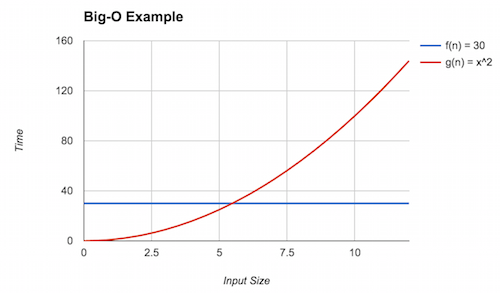
We can see that eventually (the red line) dominates (the blue line), but what is that point? This is the point where . Solving for yields . Thus, we can claim that (rounding up to be safe) and . Here, we see the inequality holds because . With this, we can conclude that .
Big-O provides an upper bound on the asymptotic complexity of a function. For example, in the above example as well. To see this, note that for , . However, this is a weak upper bound because many other classes of functions are "smaller" than factorial, for example, polynomials and linear functions.
We always want to provide the tightest bound possible. Because we are not analyzing pure mathematical functions but, instead, computer programs with arbitrary behavior, it will sometimes be impractical, infeasible, or impossible to give a precise model and, thus, tight bound. We will therefore resort to a less tight bound in these situations. For example, you may suspect that the program has quadratic complexity () but have difficulty proving it, so instead, you may claim a cubic bound () instead which may be easier to show.
A Note on Notation
In our presentation of Big-O, we have been consistent in interpreting as a set of functions in the same complexity class as . in this situation serves as the representative function for that complexity class and some other function \ We then say some other function is also in this class with set inclusion () notation.
While this notation is consistent with the set-theoretic interpretation of Big-O that we present, it is not the traditional way that we write Big-O! Instead, Big-O traditionally written with equality:
The traditional equality notation here obscures the idea that really denotes a set! We'll continue to use set notation throughout this text. However, be aware that in other presentation of Big-O, you'll see equality notation which means the same thing!
Additional Asymptotic Bounds
Big-O notation gives us a way of describing the behavior of a function as its input grows. In mathematics, we formally define this as taking the limit of the function (typically to infinity). Thus, our techniques above are an example of asymptotic analysis where we analyze the limiting behavior of mathematical functions.
The definition of Big-O described previously has many parts to it. By changing this definition we obtain other useful notations for describing the asymptotic behavior of functions. For example, consider flipping the inequality relating and . We obtain the following definition:
When it is that dominates , we write (pronounced " is big-omega of "). Intuitively, this definition states that is a lower bound of . In the context of computational complexity, this means that the algorithm corresponding to performs no better than the algorithm corresponding to . For example, it is known that any comparison-based sorting algorithm is , i.e., no such algorithm can perform better than .
If serves both as an upper- and lower-bound for , we write (pronounced " is big-theta of ").
Here, describes exactly the family of functions in which resides. Often we would like to characterize our models with big-theta bounds. However, it is frequently onerous, difficult, or both to prove that is a lower bound, let alone an upper bound, so we frequently stick with big-O bounds instead of big-theta.
Finally, note in the statements above that we posit that there exists a constant that inflates appropriately. This implies that there may exist some constants where the desired inequality—less than for big-O and greater than for big-omega—does not hold. We can make a stronger claim by asserting that the inequality holds for all constants rather than at least one:
These "little" versions of big-O and big-omega ("little-o" and "little-omega", respectively) make a strictly stronger claim than their big counterparts by asserting that the desired inequality holds, irrespective of the chosen constant. In practice, this means that and are in strictly different families of functions.
Recall that you gave best, worst, and average case mathematical models of the max method in a previous reading:
public static int max(int[] arr) {
    if (arr.length == 0) {
        throw new IllegalArgumentException();   // ignore this case
    } else {
        int ret = arr[0];
        for (int i = 1; i < arr.length; i++) {
            if (ret < arr[i]) {
                ret = arr[i];
            }
        }
        return ret;
    }
}
Give a big-O bound, the tightest possible bound you can, for each of those models.
Recursion and Recurrences
So far, we have analyzed the complexity of programs that contain loops by straightforward counting, e.g., if a loop executes times and performs operations on each iteration, the total number of operations performed is . However, what about recursive programs? How do we account for recursive calls within these programs? To build mathematical models for these programs, we introduce recurrence relations, a particular sort of mathematical function defined in terms of itself, just like recursive programs!
An Example: Factorial
Consider the standard recursive definition of factorial:
public static long factorial(int n) {
    if (n == 0) {
        return 1;
    } else {
        return factorial(n - 1) * n;
    }
}
How do we analyze the complexity of this function? First we must choose what operations we will track and the corresponding "input" to our model. We compute factorial by "stripping" off one unit from the input, , performing a multiplication in the process. Therefore, we should analyze this function by counting multiplications; our input should be itself.
Note that our recursive definition of factorial is defined by a conditional on and in general, you should recognize this as an instance of the general recursive program skeleton:
if (<base case condition) {
    // <base case>
} else {
    // <recursive case>
}
Our model will have similar structure. We will define it in terms of the number of operations performed at the base case (when ) and at the recursive case (when ):
And now we need to give the number of operations that occur in each of these cases. is straightforward: in the base case, we perform no multiplications, so . However, what about ? We perform one multiplication and then perform a recursive call where the input is reduced by one. Our definition for reflects this exactly:
Thus, our complete recurrence relation that models factorial is
From Recurrences to Big-O
So far, we have used Big-O notation to "summarize" the behavior of our model as its input grows in size. We cannot immediately use Big-O notation to summarize our recurrence relations because they are not in the form of one of our standard function classes. We therefore need to either (a) solve our recurrence relation and derive an explicit formula or (b) derive an approximate formula for our relation. Some relations are solvable (i.e., have a closed-form solution), but many others are not, and thus we have to resort to approximations.
It turns out that our recurrence above has an easy closed-form solution that we can derive using the substitutive method in the follow manner:
-
First, let's expand the recurrence a few steps to get a feel for the pattern of its behavior:
-
Next, let's try to rewrite in terms of the number of expansions or unfoldings that we perform of the function. Call this number .
We arrive at this formula by noting that after unfoldings, we add 1s and make a recursive call to in the final unfolding.
-
Finally, we note that the base case of our recursion is when . So we consider the case where the recursive call in the formula above results in the base case. This is when so . Plugging in for gives us an explicit formula for the overall recurrence:
Thus, the explicit formula for the number of multiplications that factorial performs in terms of its input is .
In terms of big-O notation, we say that ---that is, factorial takes linear time with respect to its input.
Sequential Structures
The first of the fundamental data types that we'll study are sequential types. A sequential type is simply a container for data where the container maintains an ordering between elements. As a result, a common operation we can perform over sequential types is to iterate over the elements of the container in-order.
The canonical example of a sequential type built-in to most languages is the array. Arrays have the following properties in addition to being sequential:
- Homogeneous. An array holds elements of the same type.
- Fixed-size. Once created, an array's size cannot change.
Other sequential types differ along these two dimensions. For example, a heterogeneous fixed-size sequential type is called a tuple. We frequently utilize tuples of two elements, pairs, and tuples of three elements, triples.
Tuples are built-in to some languages, but not Java.
So we have to define a class for each tuple type that we're interested in using, e.g., a Point class:
public class Point {
    private int fst;
    private int snd;
    public Point(int fst, int snd) {
        this.fst = fst;
        this.snd = snd;
    }
    public int getFst() { return fst; }
    public int getSnd() { return snd; }
}
Frequently, we do not know the number of elements we need to store into a sequence up front, for example, because the input comes from the user during execution of the program. Fixed-sized types are insufficient in these situations. We instead need a variable-sized type that can grow at runtime to accommodate our storage needs. A homogeneous, variable-sized sequential structure is called a list, the focus of the remainder of our studies in this chapter.
Lists are ubiquitous in programming because they are the simplest variable-sized class of data structures we might consider in programming. In addition to merely serving as the canonical "bag" data structure for holding a bunch of stuff, we will use a list to exploit sequential relationships between data, e.g., ordering.
The List Abstract Data Type
Before we dive into implementation, we must define the interface of this list abstract data type.
What are the kinds of operations that we want to perform over some list type?
And for simplicity's sake, let's say our list just holds int values.
-
We need a way to create a list that is, presumably, initially empty:
public List() { /* ... */ } -
We need a function to add elements to a list, presumably at the end:
public void add() { /* ... */ } -
We need a function to retrieve elements from the list. Like arrays, lists are sequential in nature, so it is natural to want to retrieve their elements by index:
public int get(int index) { /* ... */ } -
Since a list is variable-sized, it'll be useful to know the length of a list at any given point in time.
public int size() { /* ... */ } -
At this point, it might be nice to delete elements (by index) from our list, too:
public int remove(int index) { /* ... */ }
With this interface defined, we can envision how operating over a list should work, even without knowing its implementation!
public static void main(String[] args) {
    List lst = new List();
    System.out.format("The size of the empty list is: %d\n", lst.size());       // 0
    lst.add(5);
    lst.add(9);
    lst.add(7);
    System.out.format("The size of this list is now: %d\n", lst.size());        // 3
    System.out.format("The element at index 1 is: %d\n", lst.get(1));           // 9
    lst.remove(1);
    System.out.format("The element at index 1 now is: %d\n", lst.get(1));       // 7
    System.out.format("And the length of the list is now: %d\n", lst.size());   // 2
}
Such a transcript of how our abstract list can serve as a powerful test-driven development tool. We can write tests like this first and then implement our code, aiming to make all our tests pass!
List Implementations
Now that we know what we are implementing, we must decide how to implement it. A key decision in designing our data structure is how we layout the elements of the data structure in memory. There are two primary ways to do this:
- We keep the elements of the structure physically next to each other in memory. Such data structures are called contiguous data structures.
- We can allow the elements to float freely in memory. In order to find the elements, we must employ some kind of linking scheme to connect the elements in some fashion. These data structures are called linked data structures.
Notably, a contiguous data structure is usually implemented with an array as arrays guarantee that (with some caveats) their elements are next to each other in memory. When implementing linked structures, elements must be equipped with some kind of pointer or reference to one or more other elements in the structure.
These layout choices beget the two different kinds of list implementations we might consider:
- An array list is a contiguous implementation of a list.
- A linked list is a linked implementation of a list.
Array-based Lists
The design of an array-based list comes rather naturally by observing that an array is almost a list! We just need to solve the problem of maintaining the illusion that there is an unbounded amount of space available in the array.
Let's look at an example of adding elements to an array to discover the solution to this problem.
For example, here we add the characters 'a', 'b', and 'c' to an initially empty array:
  [   ][   ][   ][   ][   ]
⇒ ['a'][   ][   ][   ][   ]
⇒ ['a']['b'][   ][   ][   ]
⇒ ['a']['b']['c'][   ][   ]
From the diagram, we can see that we naturally maintain two regions in the array, a used region (currently containing 'a', 'b', and 'c') and an unused region (currently with unknown contents).
We'll enforce as an invariant on our data structure that the used region is always to the left of the unused region, i.e., the used region does not contain any unused "gaps."
While it is clear from inspection of the diagram where these regions lie, we can't "see" this from code directly!
We need some additional state that allows us to immediately tell, in particular, where the used region ends and the unused region begins.
What state do we need? If we inspect the current state of the array:
['a']['b']['c'][ ][ ]
We see that there are three elements in the array we are tracking, and the array has five elements overall.
We can always retrieve the length of the array via its .length field.
However, the number of elements is not immediately known!
Thus, it is sensible to track this value directly.
To distinguish between the two concepts, we'll use the names:
- Capacity to refer to the length of the backing array.
- Size to refer to the number of actual elements in the array list.
['a']['b']['c'][   ][   ]
size = 3
Coincidentally, the size of the array list is also the index of the first available slot in the unused region of the array, which is useful for implementing add.
In general, we should look for opportunities of this nature where a convenient choice of representation, e.g., storing the size of the list or choosing a 0-index versus 1-index-based bound, makes our implementation easier!
With this mind, what happens when our array is full?
['a']['b']['c']['d']['e']
size = 5
To maintain the illusion of unbounded size, we need to grow our array before adding the next element. Growing an array list behind the scenes is the key operation that makes the data structure work! To grow the backing array we:
- Allocate a new array, larger than the original array.
- Copy the elements from the old array to the new array.
- Set the backing array to be the new array.
In Java, we can achieve this with a one-liner thanks to the static helper functions found in the Arrays class.
Note that Arrays is in the java.util package, and so we must important it:
import java.util.Arrays;

public class ArrayList {
    int[] data;
    int size;

    // ...

    private void ensureCapacity() {
        if (size == data.length) {
            data = Arrays.copyOf(data, data.length * 2);
        }
    }
}
We choose to grow the array by a factor of two, i.e., doubling the length of the previous array. While our choice of initial size of the array does not affect the overall runtime, it turns out this choice of growth factor impacts the runtime substantially. We'll revisit this idea later when we analyze the complexity of our list operations and introduce a new tool, amortized analysis, for dealing with the pattern of behavior that array lists exhibit.
Linked-based Lists
While array lists are both relatively easy to implement and versatile, they are infeasible to implement or deploy in many scenarios. The linked list, an implementation of a list that does not guarantee contiguous elements, is our alternative choice in these situations.
Setup
Pictorally, we represent linked lists of data using box-and-pointer diagrams, e.g.
[0][o]-->[1][o]-->[2][o]-->[3][o]-->[/]
This diagram represents the list {0, 1, 2, 3}.
Each pair of boxes represents a single object we'll call a node that holds:
- A value and
- A reference to the next node in the list.
The reference to the final node in the list ([3][o]-->) is null, i.e., a pointer to nothing, and is represented by a pointer to a "null box" ([/]).
In Java, we can capture this structure with a Node class with appropriate fields for these two values:
public class Node {
    int value
    Node next;
    public Node(int value, Node next) {
        this.value = value;
        this.next = next;
    }
}
We could consider a linked list to be a Node because by following the node's next pointer, we can access all the elements of the list.
But we quickly run into a technicality if we take this approach.
In short:
- If a linked list is simply a
Node, then how do we represent the empty list? The natural choice here is that anullNodeis the empty list which aligns with how the last node of the list points tonull. - If we make this choice of representation, then we have an immediate problem: we can't call methods on a
nullobject!
To resolve this issue, we need to add a layer of indirection so that we are not representing an empty list directly as a null reference.
An approach that "works" but isn't, in my opinion, clean, is using a sentinel value, i.e., a dummy first Node that is guaranteed to be non-null that we can call methods on it.
This approach has its own issues that we won't discuss further (but are worthwhile to try out on your own as practice).
Instead, we'll make this layer of indirection distinct from our Node class and directly call it our LinkedList class.
Such an implementation strategy, in my experience, leads to the cleanest linked list code we can write.
We introduce a LinkedList class with a singular field, first, which is a reference to the first Node in the list.
This class serves two purposes:
- The
LinkedListacts as a wrapper for theNodes of the list. If the list is empty, theLinkedList'sfirstfield isnull. - As a wrapper, the
LinkedListallow us to call methods on our list even though there are no nodes present.
public class LinkedList {
    private static class Node {
        int value
        Node next;
        public Node(int value, Node next) {
            this.value = value;
            this.next = next;
        }
    }

    private Node first;

    public LinkedList() {
        first = null;
    }
}
We do not expect that the Node class will by anyone other than the LinkedList class to organize its internal structure.
Thus, in the interest of keeping our code as loosely coupled as possible, we nest the definition of Node within LinkedList and mark it private so that code outside of LinkedList cannot access it.
Furthermore, we also mark the class static so that a Node stands on its own and is not necessarily tied to a particular LinkedList we create.
Producing a list using our LinkedList constructor, e.g., LinkedList l = new LinkedList(), produces the following stack-and-heap diagram:
Stack      Heap
-----      ----
           --------------
l [o]----->| LinkedList |
           | first: o---|-->[/]
           --------------
The single box in the heap is our LinkedList object that has a single field, first, that is initially null.
For simplicity's sake, we'll reduce this LinkedList to a single box that is its first field.
Stack      Heap
-----      ----
l [o]----->[o]-->[/]
If we want to add elements onto our list, we can explicitly modify the pointers of the list and its underlying nodes, e.g., l.first = new Node(0, null) changes the diagram as follows:
Stack      Heap
-----      ----
l [o]----->[o]-->[0][o]-->[/]
To add onto the end of the list, we chain together field accesses to modify the last pointer in the list, e.g., `l.first.next = new Node(1, new Node(2, NULL)):
Stack      Heap
-----      ----
l [o]----->[o]-->[0][o]-->[1][o]-->[2][o]-->[/]
Motions
When applying data structures to real-world problems, we will frequently need to adapt them to particular domains. In order to have the flexibility to write a variety of operations over a data structure, we need to build a vocabulary of basic methods for manipulating that structure, something I call motions. For example, one motion that you are well-acquainted with is array traversal:
int[] arr = /* ... */;
int len   = /* ... */;
for (int i = 0; i < len; i++) {
  ... arr[i] ...
}
This motion is something that should come almost-automatically to you at this point. If you identify that you need to traverse an array, you can produce this skeleton of code without much thought. Furthermore, you can adapt this skeleton to various situations, e.g., traversing every other element starting with the second:
int[] arr = /* ... */;
int len   = /* ... */;
for (int i = 2; i < len; i += 2) {
  ... arr[i] ...
}
In this section, we investigate the three basic motions you need to know to use a linked list: insertion, traversal, and deletion.
Insertion
Suppose that we wish to insert a new element into the front of the list. Concretely, consider the list:
Stack      Heap
-----      ----
l [o]----->[o]-->[1][o]-->[2][o]-->
How can we insert the value 0 into the front of the list?
First, we can create a new node that contains 0 and points to the rest of the list:
Stack      Heap
-----      ----
l [o]----->[o]-->[1][o]-->[2][o]-->
                ^
                |
            [0][o]
Now, to fix up the diagram, we need to make the first pointer of our list point to this new node.
Stack      Heap
-----      ----
l [o]----->[o]   [1][o]-->[2][o]-->
            |     ^
            |     |
            ->[0][o]
Summarizing the required operations
- Create a new node that contains the value to insert and points to the current first node of the list.
- Make the list point to this new node as the head of the list.
We can directly translate them into a method insertFront that inserts an element into the front of the list
public void insertFront(int value) {
    Node n = new Node(v, this.first);
    this.first = n;
}
We can also collapse these two statements into one:
public void insertFront(int value) {
    this.first = new Node(v, this.first);
}
It is worthwhile to understand how this final function works precisely.
Because we evaluate the right-hand side of the assignment first, new Node(...) is passed what this.first initially points to.
The assignment then changes this.first to point to the result of new Node(...).
This compact line can be summarized as the insertion motion for linked lists:
int v;
Node n;
n = new Node(v, n);
We can think the line as saying:
Update
nto point to a new node that appears before whatnis pointing to.
As a final point, it is worthwhile to note that this method works in the case where the list is empty, too:
Stack      Heap
-----      ----
l [o]----->[o]-->
this.first is null which means our new node points to null:
Stack      Heap
-----      ----
l [o]----->[o]-->[0][o]-->
But that is exactly the right thing to do for insertFront!
The lesson here is that it is tempting to resort to covering corner cases, e.g., null checks, but if we design our code in the right way, we can avoid these warts in our code!
Traversal
Next, let's consider writing a function that computes the total number of elements in the list, its size. To do this for our example list:
Stack      Heap
-----      ----
l [o]----->[o]-->[0][o]-->[1][o]-->[2][o]-->
We must traverse each element, counting each element along the way. If we were to perform a similar operation an array, e.g., summing up its elements, we would use a for-loop:
int sum = 0;
for (int i = 0; i < len; i++) {
    sum = sum + arr[i];
}
where the variable i represents the current index we are examining in the array.
We would like to apply a similar sort of logic here, but we cannot directly access a linked list's elements by index. Instead, we will directly hold a pointer to the current node that we are examining:
Stack      Heap
-----      ----
l [o]----->[o]-->[0][o]-->[1][o]-->[2][o]-->
                    ^
                    |
                    cur
Initially this pointer, traditionally called cur, points to the first node in the list.
We can declare this auxiliary variable as follows:
Node cur = this.first;
We then advance the pointer to examine the next element.
How do we advance cur?
Advancing cur means that we need to assign it a new value.
The new value we would like to assign it is a pointer to the node that cur's node is pointing to, i.e., cur->next.
Thus, the line of code to perform the update is:
cur = cur.next;
This results in the following updated diagram.
Stack      Heap
-----      ----
l [o]----->[o]-->[0][o]-->[1][o]-->[2][o]-->
                            ^
                            |
                            cur
We can then continue to advance the pointer in a loop until we reach the end of the list:
Stack      Heap
-----      ----
l [o]----->[o]-->[0][o]-->[1][o]-->[2][o]-->
                                             ^
                                             |
                                            cur
From the diagram, we see that this situation arises when cur is null.
Putting this all together, we can implement the size function as follows;
public int size() {
    int ret = 0;
    Node cur = this.first;
    while (cur != null) {
        ret += 1;
        cur = cur.next;
    }
    return ret;
}
In summary, the traversal motion looks as follows:
Node cur = this->first;
while (cur != null) {
    ... cur-> value ...
    cur = cur->next;
}
Most linked list operations require some form of traversal and each puts their own little spin on it, so it is worthwhile to investigate this motion on another example. Let's next consider how to insert at the end of the list. If we want to insert 3 into the end of the following list:
Stack      Heap
-----      ----
l [o]----->[o]-->[0][o]-->[1][o]-->[2][o]-->
We need to traverse the list to the end in order to modify its last pointer.
Our standard traversal motion stops when cur is null:
Stack      Heap
-----      ----
l [o]----->[o]-->[0][o]-->[1][o]-->[2][o]-->
                                             ^
                                             |
                                            cur
But this is too late!
We need to stop when cur is on the last node, so we can modify its next field.
We can accomplish this behavior by modifying the guard of the while-loop so that we traverse through the list until cur.next is null:
while (cur.next != null) {
However, this introduces one additional complication.
In the case where the list is empty, cur is initially null itself.
Therefore, the first check of this guard will result in a null pointer exception where we try to access the next field of a null pointer, resulting in undefined behavior.
Because of this, our insertEnd function requires two cases: whether the list is empty or not.
void insertEnd(int value) {
    Node n = new Node(v, null);
    if (this.first == null) {
        this.first = n;
    } else {
        Node cur = this.first;
        while (cur.next != null) { cur = cur.next; }
        cur.next = n;
    }
}
In the case when the list is empty, insertEnd behaves like insertFront.
Otherwise, we traverse the list until we cur is on the last node.
At this point, we fix up the last node's pointer to point to our new element.
Many list operations that we write have this basic skeleton:
if (this.first == NULL) {
    // Do the operation on an empty list
} else {
    // Do the operation on a non-empty list
}
It is worthwhile to (a) design our functions with this mindset up-front---what does our operation do on the empty list and non-empty list?---and (b) test our list functions on both empty and non-empty lists.
Deletion
Finally, how do we remove a particular element, call it v, from a linked list?
Let's consider some cases.
First, if there is nothing in the list:
Stack      Heap
-----      ----
l [o]----->[o]-->[/]
Then there is nothing to do.
In a non-empty list, if v is the first element:
Stack      Heap
-----      ----
l [o]----->[o]-->[v][o]-->[0][o]-->[1][o]-->[/]
We must fix up this.first to point to the node that this.first points to.
This pointer is this.first.next, so we have the assignment:
this.first = this.first.next;
That performs the deletion.
However, if v is not the first element:
... -->[0][o]-->[v][o]-->[1][o]--> ...
    ^
    |
    cur
Then we will need to modify our cur's next pointer to point to what cur.next points to.
Like the l.first case, this node is cur.next.next which gives us the assignment:
cur.next = cur.next.next;
These three cases give us the following implementation for remove:
/**
 * Removes <code>value</code> from this list.
 * @param value the value to remove
 * @return true iff the first occurrence of value is removed from the list
 */
boolean remove(int value) {
    if (this.first == null) {
        return false;
    } else if (this.first.value == v) {
        this.first = this.first.next;
        return true;
    } else {
        Node *cur = this.first;
        while (cur.next != null) {
            if (cur.next.value == v) {
                cur.next = cur.next.next;
                return true;
            }
        }
        return false;
    }
}
Deletion from a linked list provides to be tricker than insertion with several cases, but nevertheless, the deletion motion is consistent in each case:
Node n;
// Note: deletes n.next from the list
n.next = n.next.next;
Polymorphism
Previously, we developed two implementations of the list abstract data type: the array list and the linked list. As is, our code has two significant shortcomings:
- The carrier type of the lists, i.e., the type of elements the list holds, is fixed.
- Even though the two lists expose identical methods to users, the list implementations are not interchangeable.
We can address these shortcomings by utilizing Java's support for type polymorphism. Polymorphism literally means "many forms." Type polymorphic code, therefore, is code that can be applied to many types. Java supports two different kinds of type polymorphism that directly address these concerns:
- Parametric polymorphism allows us to parameterize a class or method by a type, similar to how functions parameterize statements by a value.
- Subtype polymorphism allows us to specify a subtyping relationship between types that states in a machine-checkable fashion that one type has all the functionality of another type.
Parametric Polymorphism
As a starting point, let's consider the Node class that supports our LinkedList:
public class Node {
    int value;
    Node next;
    public Node(int value, node next) {
        this.value = value;
        this.next = next;
    }
}
This implementation of Node is fixed to hold int values.
If we wanted to hold other elements in our linked list, we would need to design another Node class, e.g., a StringNode class that holds Strings instead of ints:
public class StringNode
    String value;
    node next;
    public node(String value, node next) {
        this.value = value;
        this.next = next;
    }
You should find this strategy highly offensive!
This approach clearly leads to redundant code.
Notably, we can see from inspection of the Node class (and the LinkedList class, too) that the implementation of the Node class does not depend on the type of value in any way.
In particular, all our linked list data structure does to values are:
- Store values in nodes and
- Shuffle values in and out of methods.
Whenever we encounter code that behaves similarly, i.e., does not care about the type of the values it manipulates, we have an opportunity to use parametric polymorphism to (a) reduce redundancy and (b) enshrine this non-dependency of types in our code.
Generics
Java's generic type mechanism allows us to make our code parametrically polymorphic by parameterizing a chunk of code, either a class or a method in Java, by one or more types. As a first example, we can write our Node using generics as follows:
public class Node<T> {
    T value;
    Node<T> next;
    public Node(T value, Node<T> next) {
        this.value = value;
        this.next = next;
    }
}
We declare a generic class by specifying one or more type paramaters to our class. These type parameters are introduced alongside the name of the class declaration:
public class Node<T> {
Here, we introduce a new type parameter T to our class, exactly analogous to the (value) parameters we specify in function declarations.
T is a type variable that will be filled in or instantiated by a user of the Node class.
Again, analogous to function parameters, we can use T throughout the definition of Node, and all occurrences of T will be replaced with the type that the user specifies upon instantiation.
To instantiate a generic class with an actual type, we use distractingly similar syntax to the class declaration.
For example, to create a Node specialized to String, we would write:
Node<String> n = new Node<String>("hi", null);
We use the same angle bracket syntax to "call" or instantiate a generic class.
Note how we have to do this whenever we use the Node class: as the type of n and to invoke the Node constructor.
The need to provide the type instantiations for all usages of generic classes is quite onerous. Consequently, Java provides rudimentary type inference where it will deduce the instantiating type from the surrounding context, in particular for constructors. Type inference allows us to write the following shorter declaration:
Node<String> n = new Node<>("hi", null);
Where the instantiated type of Node<> is derived from the type of n which is known to be Node<String>.
Interestingly, because the Node is a recursively-defined type—Node objects hold a reference to a Node—we also instantiated the Node type within the Node class, e.g., on the field declaration for next:
Node<T> next;
This occurrence of Node<T> is actually an instantiation of the Node class where we pass the type variable T to the class!
Less common in Java, but an occasionally useful fact is that we can also make individual methods generic. For example, we can write a truly generic swap method as follows:
public static <T> void swap(T[] arr, int i, int j) {
    T tmp = arr[i];
    arr[i] = arr[j];
    arr[j] = tmp;
}
Observe how swap is an excellent candidate for being generic.
swap does not care about what it is swapping, so we would be writing highly redundant code to swap the contents of a String array versus an Integer array.
Note how the syntax for introducing a generic type variable in a method is different from a class.
We introduce type variables by placing the <T> before the return type of the method.
Luckily, to use a generic method, we can simply call the method like normal, and Java will infer the generic type instantiation for us:
String[] arr = /* ... */;
swap(arr, 1, 3);
Finally, we can introduce multiple type parameters to either a generic class or method by providing a comma-separated list of type variables. For example, a generic pair type that holds two elements with potentially different types can be declared as:
public class Pair<T, U> {
    public T first;
    public U second;
    public Pair(T first, U second) {
        this.first = first;
        this.second = second;
    }
}
Write a generic class Cell<T> that is a data structure that holds a single value of type T.
Cell<T> exposes the following public methods that you should implement:
Cell<T>(T value)constructs a cell that holdsvalue.T get()retrives thevalueheld by the cell.void set(T value)mutates the cell so that it holds a newvalue.
Wrapper Classes
You may have noticed that we instantiated our Node<T> class with String, but what about int?
It turns out that we run into issues if we attempt this:
Node<int> n = new Node<>(42, null);
This code produces the following error:
Test.java:13: error: unexpected type
        Node<int> n = new Node<>(42, null);
             ^
  required: reference
  found:    int
This error arises because Java requires that we only pass reference types to generics. In other words, we cannot instantiate generics with our seven primitive types.
But, we clearly want to have generic structures that contain primitives, e.g., linked lists of ints or booleans!
The way to accomplish this in Java are with the standard library wrapper classes, also called boxed types, which wrap up each of the seven primitive types into an object that can be used in generic code:
boolean⟶Boolean.char⟶Character.int⟶Integer.long⟶Long.float⟶Float.double⟶Double.
(These seven classes are in the java.lang package, so they are automatically imported in every Java program, so you can use them without import statements!)
Thus, if we want a Node that contains int, we use the boxed type Integer instead:
Node<Integer> n = new Node<>(/* ... */);
However, how do we create an Integer from an int?
We can explicitly create an Integer from an int using the Integer.valueOf(int value) static method.
Each wrapper class provides similar valueOf static methods for converting from primitive types to the wrapper type.
Dually, the wrapper classes also provide conversion methods in the other direction, e.g., int intValue() of the Integer class returns the int wrapped by this Integer object.
This is yet another pain to go through!
So Java provides a mechanism, autoboxing, that automatically converts between primitive types and boxed types.
Autoboxing allows us to complete the declaration of our node without any extra code (other than using Integer rather than int):
Node<Integer> n = new Node<>(42, null);
int v = n.value;
The 42 here is automatically boxed by Java into an Integer and passed to the Node constructor where it is stored.
On the next line, the 42 stored in n.value as an Integer is automatically unboxed into an int, which is then stored in v.
Using Node<T> as a starting point, make your LinkedList implementation fully generic.
Your LinkedList class should have, at a minimum, the following methods:
LinkedList().void add(T value).T get(int index).int size().
Subtype Polymorphism
Another point of disagreeableness in our list implementation, how they share the same set of methods, and how we can't take advantage of this fact! What do I mean by this? Recall the methods of our list abstract data type (now made parametric polymorphic with generics):
public void add();
public T get(int index);
public int size();
public T remove(int index);
Since both classes implemented these methods, we ought to expect that any code that only uses these list methods should not care about whether we use a LinkedList or an ArrayList.
While the two implementations have different internal behavior—especially when we think about complexity!—they are substitutable with respect to being list.
If I need any list, I should be able to swap out a LinkedList or ArrayList at will with minimal changes to my code.
This need for substitutability becomes very apparent with testing, something you may have noticed when developing your two list implementations. Recall the trace from the previous chapter demonstrating basic usage of the list abstract data type, now realized as a JUnit test:
@Test
public void arrayListBasicUsageTest() {
    ArrayList<Integer> lst = new ArrayList<>();
    assertEquals(0, lst.size());
    lst.add(5);
    lst.add(9);
    lst.add(7);
    assertEquals(3, lst.size());
    assertEquals(9, lst.get(1));
    assertEquals(9, lst.remove(1));
    assertEquals(7, lst.get(1));
    assertEquals(2, lst.size());
}
Now suppose we wanted to write a similar test for our linked list.
Because the linked list shares the same operations as the ArrayList, we expect the test proceeds identically.
That is true!
However, the test is specialized to ArrayList is already.
So our only recourse is to duplicate the test for our LinkedList class:
@Test
public void linkedListBasicUsageTest() {
    LinkedList<Integer> lst = new LinkedList<>();
    assertEquals(0, lst.size());
    lst.add(5);
    lst.add(9);
    lst.add(7);
    assertEquals(3, lst.size());
    assertEquals(9, lst.get(1));
    assertEquals(9, lst.remove(1));
    assertEquals(7, lst.get(1));
    assertEquals(2, lst.size());
}
Ugh. Duplicated code again! We would like to write a helper function where we can pass in any class that has the methods of the list abstract datatype. We can then create two tests, each of which instantiates one of our lists and passes it to our helper:
public void listBasicUsageTest(/* ??? */ lst) {
    assertEquals(0, lst.size());
    lst.add(5);
    lst.add(9);
    lst.add(7);
    assertEquals(3, lst.size());
    assertEquals(9, lst.get(1));
    assertEquals(9, lst.remove(1));
    assertEquals(7, lst.get(1));
    assertEquals(2, lst.size());
}

@Test
public void linkedListBasicUsageTest() {
    listBasicUsageTest(new LinkedList());
}

@Test
public void arraylistBasicUsageTest() {
    listBasicUsageTest(new ArrayList());
}
But, what type can we give to lst, now a parameter to listBasicUsageTest, that means "either ArrayList or LinkedList?"
We need to define such a type using the interface construct of Java.
An interface declaration is similar to a class in that it defines the name of a new type.
However, it differs from a class in that it provides no implementation details.
Instead, an interface specifies a set of method signatures that any implementing class of that interface must define!
In turn, that class can be used where ever the interface type is expected.
We, therefore, first need to define an interface that captures what it means to be a list.
We'll call this the List interface (which, like public classes, would need to exist in its own file, List.java):
public interface List<T> {
    public void add();
    public T get(int index);
    public int size();
    public T remove(int index);
}
We can then specify that our ArrayList and LinkedList classes implement the List interface through an implements clause:
public class ArrayList<T> implements List<T> { /* ... */ }
As a result of this declaration, the compiler will check to ensure that ArrayList implements the four methods specified in the List interface.
For example, here is the implemented size method for ArrayList:
public class ArrayList<T> implements List<T> {
    T[] data;
    int size;
    /* ... */

    @Override
    public int size() {
        return size;
    }
}
Observe that we implement the method in exactly the same way we did beforehand!
The only difference is that modern versions of Java strongly recommend that we acknowledge that methods like size are implementing interface behavior via the @Override annotation.
(If you exclude this annotation, you will get a warning!)
The term "override" comes from the fact that the method participates in dynamic dispatch, a feature of object-oriented languages like Java where the version of a method to invoke is chosen at runtime.
With interfaces, there is only choice, so this decision is easy, but as we shall see later with class inheritance, we can introduce several possible candidate implementations for a method call.
Again, note that while interfaces look like classes, they are not actually classes! In particular, we cannot instantiate an interface:
List<Integer> l = new List<>(); /* Compiler error! */
In this sense, you can think of an interface as a contract that any class can participate in. If a class fulfills this contract (by implementing all the required methods of the interface) then it may be considered the interface type.
Interfaces and Subtyping
With the List interface defined and ArrayList and LinkedList both implementing the interface, we can now complete the definition of listBasicUsageTest:
public void listBasicUsageTest(List<Integer> lst) {
    assertEquals(0, lst.size());
    lst.add(5);
    lst.add(9);
    lst.add(7);
    assertEquals(3, lst.size());
    assertEquals(9, lst.get(1));
    assertEquals(9, lst.remove(1));
    assertEquals(7, lst.get(1));
    assertEquals(2, lst.size());
}
The List interface type becomes the "umbrella" type under which we can provide an ArrayList, LinkedList, or any other class that implements the List interface.
Importantly, interfaces form an important relationship between types.
We say that the ArrayList and LinkedList types are subtypes of the List type.
More generally, if and are types, we write (on paper) to mean that is a subtype of .
If , then values of type are substitutable whenever values of type are expected.
We see substitutability occur within variable assignment, either passing a value to a function or a variable declaration. For example, here is the same substitutability principle in play for variable declarations:
List<Integer> l1 = new ArrayList<Integer>();
List<Integer> l2 = new LinkedList<Integer>();
Our notion of substitutability depends on the programming language in question and its goals. With Java, and most object-oriented programming languages, we can think of substitutability in terms of capabilities:
If we know is a subtype of , then necessarily supports all the operations of a .
Interface implementation clearly satisfies this property. A class that implements an interface necessarily provides all the methods demanded of the interface. Thus, we should be able to use a where ever a is expected!
Static and Dynamic Types
Normally, a variable contains exactly the type of value assigned to the variable. For example:
String s = "hello world!";
s is a variable of type String that is assigned a value that is also a String!
In the presence of subtyping, however, the type of a variable can be different from the type of value assigned to that variable!
For example, revisiting our List variable assignment above:
List<Integer> l1 = new ArrayList<Integer>();
The type of the variable l1 is List<Integer> because we recall the syntax of a variable declaration:
<type> <identifier> = <expr>;
And note that the <type> to the left of the name of the variable is its declared type.
However, the actual value assigned to l1 is not a list—indeed, we can't instantiate a List because it is an interface!
Instead, it is a known subtype of the List type, ArrayList in this case.
In Java, we distinguish these two "kinds" of types as follows:
- The static type of a variable is the variable's declared type. This is the type used the typechecking phase of compilation.
- The dynamic type of a variable is the type of the actual value assigned to the variable. We use the term "dynamic" to denote that this is the type known during runtime.
Static versus dynamic typing can be confusing nomenclature, so I prefer using the less overloaded phrases "variable type" and "runtime identity (of an object)" to distinguish between the two concepts. However, "static" and "dynamic" is the common language used in object-oriented programming, so we should be comfortable with it!
To see the effect of this distinction, suppose that our ArrayList class exposed a method not found in the List interface, e.g., trimToSize() which reduces the backing array to fit exactly the elements of the list.
public class ArrayList<T> {
    private T[] data;
    int size;

    // ...

    public void trimToSize() {
        data = Arrays.copyOf(data, size)
    }
}
If our ArrayList class has this method, observe how we cannot call this method through our List variable, even though we definitively know it is a ArrayList!
List<Integer> l1 = new ArrayList<Integer>();
l1.trimToSize(); /* Compiler error! */
The compiler complains that List does not have a trimToSize method, and this is correct!
What is happening is that the compiler using the declared type of the variable, its static type, to determine if a method call will work.
The runtime identity of the object, its dynamic type, is ignored.
This is because, in general, we don't know the runtime identity of an object until runtime! To see this fact, consider the testing code we refactored in the previous section:
public void listBasicUsageTest(List<Integer> lst) {
    assertEquals(0, lst.size());
    lst.add(5);
    lst.add(9);
    lst.add(7);
    assertEquals(3, lst.size());
    assertEquals(9, lst.get(1));
    assertEquals(9, lst.remove(1));
    assertEquals(7, lst.get(1));
    assertEquals(2, lst.size());
}
Here, lst is a List, so the method can be called with either a LinkedList or ArrayList.
Thus, we can't invoke methods not specified the List interface on lst because we may receive an object that does not implement those additional methods!
The Object Class
When working with generic types, you may have noticed that there are some operations that you call on values of unknown type!
public <T> void exampleFunction(T value) {
    System.out.println(value.toString());   // ...?
}

exampleFunction("Hello");               // hello
exampleFunction(10);                    // 10
exampleFunction(new int[] { 1, 2, 3});  // [I@4edde6e5
The one requirement we have when choosing a generic type that it is a non-primitive type, i.e., a reference type.
However, it turns out that every reference type is considered to be a subtype of the Object class.
(This arises not through interfaces but through a related mechanism, inheritance, that we will discuss later!)
The Object class exposes several methods that will be worthwhile for us to consider overriding.
String toString(): returns a string representation of the object.int hashCode(): returns a has code value for this object. We'll ignorehashCodefor now until we talk about hashing later in the course!boolean equals(Object obj): returns true whether some otherObjectis equal to this one.
toString() is rather self-explanatory: if we want to obtain a printable version of an object, e.g., for debugging purposes, we should @Override the object's toString() method.
For example, consider our generic Pair class from before:
public class Pair<T, U> {
    private T first;
    private U second;
    public Pair(T first, U second) {
        this.first = first;
        this.second = second;
    }
    public T getFirst() { return first; }
    public U getSecond() { return second; }
}
If we try to print out a pair, we get something not useful:
Pair<T, U> p = new Pair<>(0, 0);
System.out.println(p);      // Pair@4769b07b
The default implementation of toString() for a class prints out the name of the class and its address in memory, most likely not the thing we want to see!
We need to override toString to obtain more useful behavior:
public class Pair<T, U> {
    // ...
    @Override
    public String toString() {
        return String.format("(%s, %s)", first.toString(), second.toString());
    }
}

// ...

Pair<T, U> p = new Pair<>(0, 0);
System.out.println(p);      // (0, 0)
As you are aware, Strings are immutable in Java, so if aren't careful, we can take a quadratic amount of time building up a String representation of an object through repeated String concatenation.
String.format is one way to get around this, but, we may be unable to specify a single format string to "print out" an entire object, e.g., because the object contains a list of values that we need to process with a loop.
The Java standard library provides the StringBuilder class (found in the java.util package) which allows you to incrementally build up a string in a mutating fashion.
In essence, the StringBuilder is an array list of characters that you can append to.
When you are done, you can then use the toString method of the StringBuilder to receive the final string.
Here's an example of using StringBuilder to construct a string representation of an array:
public static <T> String arrayToString(T[] arr) {
    StringBuilder buf = new StringBuilder();
    buf.append('[');
    if (arr.length > 0) {
        buf.append(arr[0].toString());
        for (int i = 1; i < arr.length ;i++) {
            buf.append(", ");
            buf.append(arr[i].toString());
        }
    }
    buf.append(']');
    return buf.toString();
}
Also note that the Arrays class of java.util does have an Arrays.toString(arr) method that does return a string for an array in the same way we implemented above!
Just like toString the default equals implementation will check for pointer equality between this object and the other object passed to equals.
This is rarely what we want, so we will want to override equals if we believe we'll ever want to compare our objects for equality!
As an example, let's implement equality over pairs.
Awkwardly, if we look at the method signature for equals:
public class Pair<T, U> {
    // ...
    @Override
    public boolean equals(Object other) { /* ... */ }
}
We see that the other object is not necessarily a Pair!
Perhaps we want to consider a Pair to be equal to some other Pair type, but this is rarely the case.
So, our equals implementation will proceed in two steps:
- Check to see if
otheris aPairobject. - If it is, then check to see if the corresponding fields are
equalsto each other.
To this first point, we can use the instanceof operator to check the type of other.
e instanceof T is a comparison operator that returns true iff the object identity (dynamic type) of the value that expression e evaluates to is T.
With this in mind, here is our implementation of equals for the Pair class:
public class Pair<T, U> {
    // ...
    @Override
    public boolean equals(Object other) {
        if (other instanceof Pair) {
            Pair<T, U> o = (Pair<T, U>) other;
            return first.equals(o.first) && second.equals(o.second);
        }
        return false;
    }
}
Inside of the conditional, we guarantee that other is a Pair, so we can safely cast other to a Pair so that we can access the other pair's fields in a type-safe manner (through the o variable).
(Note: because instanceof works at runtime and generic types are erased during compile-time, we have to provide the raw type Pair to instanceof instead of the fully generic type Pair<T, U>.)
To the second point, we see that we define two pairs to be equal whenever their components are equal (recursively, via calls to the fields' respective equals methods).
Declaring two values equal if their respective components are equal is called structural equality and typically "what we want" when we implement equality between objects.
This leads to the following common template we'll use to implement equals methods for some arbitrary type T:
@Override
public boolean equals(Object other) {
    if (other instanceof T) {
        T o = (T) other;
        return /* compare all fields for equality */;
    }
    return false;
}
The Principle of Least Privilege
Subtyping exposes an important design principle we should follow in our code. Whenever possible, we should author our programs to minimize dependencies between components. By minimizing dependencies—concretely, the methods that one class relies on from another class—we:
- Reduce the amount of code we have to consider if we suspect a bug results from an interaction between the two classes.
- Minimize the disruption caused by a change in the class's set of exposed methods.
In the security world, this concept is also referred to as the principle of least privilege. By granting users the minimal level of access necessary to perform their duties, we minimize both the likelihood of a security issue and the surface area we need to investigate if a security issue arises.
Even though we're typically not operating in a security-oriented setting, the principle of least privilege is an excellent way to design software! We should:
-
Minimize the public methods of a class to only those "necessary" for others to use the class. We do this primarily through privacy modifiers, i.e.,
public, andprivate. -
Hide implementation details of key data structures. We do this primarily through interfaces, in particular:
- Implementing relevant interfaces to advertise capabilities to clients.
- Accessing functionality through interface, rather than concrete types, when possible to limit our own dependency on a particular implementation.
Consider the following toy interface I and classes C1 and C2 that implement that interface:
interface I {
    void f1();
    void f2();
}

class C1 implements I {
    @Override void f1() {
        System.out.println("C1.f1");
    }
    @Override void f2() {
        System.out.println("C1.f2");
    }
}

class C2 implements I {
    @Override void f1() {
        System.out.println("C2.f1");
    }
    @Override void f2() {
        System.out.println("C2.f2");
    }
    @Override void f3() {
        System.out.println("C2.f3");
    }
}
And now consider the following combinations of variable declarations and method calls to those variables:
| declaration/call | v.f1(); | v.f2(); | v.f3(); |
|---|---|---|---|
I v = new C1(); | |||
C1 v = new C1(); | |||
I v = new C2(); | |||
C2 v = new C2(); | |||
C2 v = new C2(); |
For each combination of declaration and method call, write down the output of the method call or the compiler error that arises if you wrote down this combination of declaration and method call.
Amortized Analysis
Recall our basic List interface:
public interface List<T> {
    public void add(T value);   // N.B., add to end of list
    public int size();
    public T get(int index);
    public T remove(int index);
}
Write down the time complexity using Big-O notation for each of our list operations using (a) an array list and (b) a linked list.
Assume that the linked list is singly linked with only a first reference.
The time complexity for most of our sequential operations is straightforward to analyze, observing that we can either directly access the element in question (constant time) or traverse the list to find the element/position in question (linear time).
However, you should have observed that the one interesting case that requires further exploration is add for array lists!
Recall the basic set up for an array list and its add method:
public class ArrayList<T> {
    private static final int INITIAL_SIZE = 2;
    private T[] data;
    private int sz;
    public ArrayList() {
        @SuppressWarning("unchecked")
        data = (T[]) new Object[INITIAL_SIZE];
        sz = 0;
    }
    private void ensureCapacity() {
        if (sz == data.length) {
            data = Arrays.copyOf(data, data.length * 2);
        }
    }
    public void add(T value) {
        ensureCapacity();
        data[sz++] = value;
    }
}
Analyzing the time complexity of add is tricky because its behavior does not follow the standard patterns we've seen up to this point.
In particular, there are two cases that dictate the performance of add:
- If
sz < data.length, then there is room in the backing array for the new element. Adding the element onto the end of the list takes time since it consists of an array copy and an increment. - If
sz >= data.length, then we must make room for the new element in the backing array. We do so by creating a new array that is twice the size, copy the elements over, and then copy in the new element. This takes time (where is the number of elements in the array).
For an individual add operation, the best case is the former case and the worst case is the latter case.
However, what is the average case?
We usually define the average case in terms of the shape of the input, e.g., assuming that the element that indexOf searches for lies in the middle of the list.
Here, there is no "average" shape here---either the backing array is full, or it isn't.
This makes characterizing the average difficult!
Certainly, calling the average case in line with the worst case is not incorrect (we are giving upper-bounds, after all), but such a bound isn't consistent with our intuition as to how add works.
By doubling the array size on every growth, we hope that we will perform many more additions than additions, effectively making the runtime .
Our current definition of time complexity do not support this idea of analyzing the runtime of a method over many invocations—it only considers a single operation in isolation.
Therefore, we need additional machinery to analyze add faithfully.
This machinery is called amortized analysis where we look at not just a single call to add, but many calls to add to understand its "average" complexity.
There are three different basic techniques for performing amortized analysis:
- The aggregate method which directly characterizes the total complexity of a series of operations and then declares the average complexity to be the average of this amount.
- The accounting method which charges cheap operations additional time in order to pay for the time debt incurred by more expensive operations.
- The potential method which builds a potential function that describes the "time" built-up by cheap operations that can be used by more expensive operations. Unlike the accounting method, the potential function is only based on the current state of the data structure, not the history of operations that led to that point.
Here, we will use the accounting method to analyze add because it most closely works with our intuition that the cheap add operations should "pay" for the expensive add operations.
Consider an array list with starting capacity two and a series of add operations on it along with the number of array accesses they perform:
| Add Op | Actual Cost |
|---|---|
| 1 | 1 |
| 2 | 1 |
| 3 | 3 |
| 4 | 1 |
| 5 | 5 |
| 6 | 1 |
| 7 | 1 |
| 8 | 1 |
The third and fifth additions induce array doubling (corresponding to when the backing array is at two and four elements, respectively). Each of these perform array accesses where is the number of elements at the time of the copy plus one additional copy for the new element. The remaining additions perform a single array access.
The goal of the banker's method is to assign a single cost to all the add operations , the charge cost, such that the charge cost allows us to pay for the actual cost of successive add operations without going negative.
For example, suppose we consider which corresponds to charging each add operation one array access.
| Add Op | Actual Cost | Charge Cost | Balance |
|---|---|---|---|
| 1 | 1 | 1 | 0 |
| 2 | 1 | 1 | 0 |
| 3 | 3 | 1 | -2 |
The balance column is the amount of cost left over after using the balance and charge cost to pay for the actual cost.
Because the charge cost is one, the first two operations are paid for without leaving any balance left over.
Unfortunately, this means that when we try to pay for the third operation, our balance is empty, so our charge cost of is not enough to pay the actual cost () of the operation.
This means that does not work as a charge cost for add.
Next, let's try :
| Add Op | Actual Cost | Charge Cost | Balance |
|---|---|---|---|
| 1 | 1 | 2 | 1 |
| 2 | 1 | 2 | 2 |
| 3 | 3 | 2 | 1 |
| 4 | 1 | 2 | 2 |
| 5 | 5 | 2 | -1 |
Note that by charging array accesses per add, we build up enough of a balance to pay off the first expensive addition.
However, the charge cost is not sufficient to pay for the second expensive addition.
Finally, let's try :
| Add Op | Actual Cost | Charge Cost | Balance |
|---|---|---|---|
| 1 | 1 | 3 | 2 |
| 2 | 1 | 3 | 4 |
| 3 | 3 | 3 | 4 |
| 4 | 1 | 3 | 6 |
| 5 | 5 | 3 | 4 |
| 6 | 1 | 3 | 6 |
| 7 | 1 | 3 | 8 |
| 8 | 1 | 3 | 10 |
| 9 | 9 | 3 | 4 |
With , we have enough for the second array copy (at the fifth operation) However, this charge cost also gives us enough left-over balance to pay for the third array copy (at the ninth operation), too! Furthermore, if we look at the left-over balance after each array copy operation, we see that we are left with , so it seems like this pattern might continue indefinitely. We can argue that this pattern will hold indefinitely as follows:
Consider the cost of add when we copy an array.
If the array contains n elements, we must pay one array access to copy each old element along with one addition array access to copy the new element.
From this, we can justify our choice of for each element added to the array:
- One array access goes towards the actual insertion of an element.
- One array access goes towards the first time this element is copied into a larger array.
- One array access goes towards the insertion of one of the elements in the lower half of the array.
Note that if the currently copied array is size , then elements have been added to the array since the last copy. The final charge accounts for the copying of the older into the new array.
Finally, with , we see that we can assign n a constant amount of time that is accurate over many operations of add.
Therefore, we conclude that add has amortized complexity.
Higher-order Sequential Operations
Many of the operations we wish to perform over lists have common structure. In this chapter, we investigate the most common of these patterns and how we can abstract them into powerful generic list manipulation algorithms.
Iteration
The most common operation we perform over a List is the traversal. We walk the list, doing something to each element, e.g., finding the largest element, summing up all the elements, or transforming all the elements. To do this, we normally write a for-loop:
List<T> list = /* ... */ ;
for (int i = 0; i < list.size(); i++) {
... list.get(i) ...
}
If our list is an ArrayList<T>, then this loop has linear time complexity because we perform a
constant-time operation, get, on each element of the list.
However, if the list is a LinkedList<T>,
then this loop has quadratic time complexity because each get now takes linear time.
This additional overhead for linked list traversal seems unnecessary, however. We know that we can implement such a traversal in linear time by performing a standard linked list traversal and
holding onto the current node rather than the current index.
However, the Node class is inaccessible
outside the LinkedList class because we designed the Node class to be private and nested
within the LinkedList class.
It is important to note that hiding the Node class from clients of the LinkedList class is not a hard-and-fast rule; it
is a design choice.
Some libraries such as the .NET library (the standard library of the C# programming language) expose its Node class to clients, trading off uniformity and simplicity of interface for flexibility in manipulating the
structure of the linked list.
We need some mechanism for abstracting the method by which we
traverse a particular list efficiently, whether that list is an array list or linked list.
This mechanism is called iteration and in Java we use an Iterator object to perform the traversal.
We can think of an iterator as a cursor into our list, maintaining our current position as we iterate over the structure.
Initially, the iterator points to the beginning of the list, and we can fetch the element that the cursor currently references.
The List interface of the Java standard library provides a method, iterator(), that produces such an iterator object.
Here is an example of using an iterator object to walk a List:
List<String> list = /* ... */ ;
Iterator<String> iter = list.iterator();
while (iter.hasNext()) {
    System.out.println(iter.next());
}
Iterator itself is an interface with two critical operations:
boolean hasNext()returnstrueif the cursor is pointing to an element of the list, i.e., there are still elements left to process.T next()retrieves the element currently under the cursor and advances the cursor one position forward.
The Java Iterator interface specifies a third, optional method, remove(), which removes the element currently being pointed at by the iterator.
Removal is considered optional because some data structures may not support removal.
Java’s list data structures (ArrayList and LinkedList) support remove, but we might want to iterate over something whose elements cannot be directly modified, e.g., an immutable list.
In this case, remove should throw an UnsupportedOperationException.
The ArrayList and LinkedList provide two implementations of this interface:
- The array list’s iterator object maintains the current index as its cursor.
hasNextchecks to see if the index exceeds the list’s size.nextretrieves the element at the current index and increments the index afterwards. - The linked list’s iterator object maintains a pointer to the current node as its cursor.
hasNextchecks to see if the pointer is pointing tonull.nextretrieves the element stored in the node currently being pointed to and advancing the pointer afterwards.
Consequently, the list iteration code above using an iterator operates in linear time irrespective of the type of list being used!
By using the Iterator class, we can write code that efficiently traverses a list that operates uniformly over both array lists and linked lists.
In addition to this solution being more concise than a traditional for-loop, less can “go wrong” with this code.
There are no indices or
references to worry about—indeed, the iterator object provides exactly the set of operations we need to perform a forward traversal and nothing more.
However, in return, note that the iterator interface constrains us to only move forward through a list.
In particular, we cannot:
- Go backwards in the list.
- Go through two lists pairwise, i.e., look at the first elements from each list together, then the second elements, and so forth.
- Delete elements from the list.
While other kinds of iterators that Java provide backwards movement (e.g., the ListIterator class), in general we cannot capture all the patterns of iteration or behavior we might want to
perform.
However, basic iteration is so common when using sequential structures (indeed, any data structure), that the behavior that an iterator provides is still useful even though it is highly specialized.
Iterator Implementation
How is the Iterator interface implemented?
As described above, the ArrayList and LinkedList
classes each provide their own version of the Iterator interface.
We could perform the iteration using methods of the List interface, but as we noted at the top of this reading, this makes linked list traversal quadratic instead of linear.
Therefore, we must implement the Iterator interface differently for ArrayList and LinkedList.
Array Lists
To see how to implement the Iterator interface for each of ArrayList and LinkedList, it is useful to appeal to the code for traversing these structures.
For example, recall that an array list maintains two fields—size and data.
Using these fields, we can write code to traverse the elements of the list as follows:
int index = 0;
    while (index < size) {
    ... data[index] ...
    index += 1;
}
(Note that we iterate up to the size of the list rather than the length of the array because the
elements of the list are stored at indices 0 to (size - 1).)
To translate this traversal operation into a class, we must recognize the relevant state of the operation and how the operation maps onto the Iterator interface’s methods, hasNext and next.
For array list traversal, the state of its traversal is the index being incremented in the loop.
In terms of this state, hasNext is equivalent to the guard in the while loop and next is a combination of
the array access inside the loop body and the increment of index.
Thus, we can implement the Iterator interface for the ArrayList class as follows:
public class ArrayList<T> {
    private int size;
    private Object[] data;
    // array list implementation...
    private class ArrayListIterator implements Iterator<T> {
        private int index;
        public ArrayListIterator() {
            index = 0;
        }
        public boolean hasNext() { return index < size; }
        public T next() { return data[index++]; }
    }

    public Iterator<T> iterator() {
        return new ArrayListIterator();
    }
}
The ArrayListIterator class implements the array list traversal-specific behavior described above.
With this class, we make two important design decisions which make it an air-tight abstraction:
- It is contained within the
ArrayListclass so that it has access to an array list object’s fields. - It is marked private because clients of the array list class should not be aware of the
ArrayListIteratorclass.
The fact that the ArrayListIterator is hidden from clients seems counter-intuitive.
The whole point of the iterator is to give clients a way to traverse the data structure!
The way we expose this class to users is through the iterator() method of the ArrayList class which creates an ArrayListIterator and immediately returns it to the client.
Note that the iterator() method returns a value of the more general type Iterator, rather than the actual type of the value, ArrayListIterator.
This is sound because ArrayListIterator implements the Iterator interface, so it provides all the behavior expected of any Iterator object.
But by using this particular arrangement, we hide the implementation details of the array list class from clients—namely that it implements its iteration behavior with the ArrayListIterator class—but still expose an iterator for external use.
Linked Lists
Recall that the LinkedList class contains a field first that is a reference to the first Node in the linked list.
The Node class itself has a value—an element of the list—and a next field—a reference to the next node in the list.
With this in mind, we can perform linked list traversal using the following code skeleton:
Node<T> cur = first;
while (cur != null) {
    ... cur.value ...
    cur = cur.next;
}
Unlike the array list, we must keep track of the current node that we are on and advance the
iterator by advancing our “current” reference.
Otherwise, we’ll use the same set up of an inner iterator class exposed with an iterator() method that produces an instance of this class and gives it to the user:
public class LinkedList<T> {
    private static class Node<T> { /* ... */ }
    private Node<T> first;
    // linked list implementation...
    private class LinkedListIterator implements Iterator<T> {
        private Node<T> cur;
        public LinkedListIterator() { cur = first; }
        public boolean hasNext() { cur != null; }
        public T next() {
            T ret = cur.value;
            cur = cur.next;
            return ret;
        }
    }

    public Iterator<T> iterator() {
        return new LinkedListIterator();
    }
}
Note that the next() method of the LinkedListIterator class operates in constant ()
time.
This allows us to iterate over a linked list in linear () time similarly to an array list.
For-each Loops
Because traversal with an iterator is so common in Java (and in general, programming), the language provides special syntax for this through the for-each loop:
List<String> list = /* ... */ ;
for (String str : list) {
    ... str ...
}
A for-each loop is similar in syntax to a for-loop. However, a for-each loop only has two components inside the parentheses:
- The variable that each element of the list is bound to while the loop runs (
strin the above example). - The actual list we are traversing over (
listin the above example).
The above for-each loop is equivalent to the following while-loop:
List<String> list = /* ... */ ;
Iterator<String> iter = list.iterator();
while (iter.hasNext()) {
    String str = iter.next();
    ... str ...
}
In fact, when you use a for-each loop, the Java compiler replaces it with this while-loop!
Such a programming language construct that acts as “shorthand” for some other combination of programming language constructs is called syntactic sugar.
Thus, we say that a for-each loop is syntactic sugar for using the Iterator class to manually perform a traversal.
This behavior is not specific to lists; we can use a for-each loop to iterate over anything produces an Iterator object!
The Java compiler checks for this by seeing if a class implements the Iterable interface.
The Iterable interface requires one method of its implementors:
- Iterator
iterator()` returns an iterator to the “beginning” of this object.
This is precisely the method we use from the List interface to grab our iterators.
If you want your classes to be usable in a for-each loop, then you must:
- Create a structure-specific class that implements the
Iteratorinterface with appropriate traversal behavior for that data structure. - Have the data structure class implement the
Iterableinterface. Theiterator()method you define should return an instance of the class’s correspondingIteratorsubclass.
As a final note, it is worthwhile to realize that iteration is a general concept that applies to any sort of data structure we may encounter, not just lists. If we think of our data structures as containers for data, we will frequently want to access all the data stored in a particular container. While sequential structures provide a very natural implementation of iteration based on the order of their elements, we can extend this notion to the hierarchical and mapping structures that we will encounter later.
Anonymous Inner Classes*
There is one final, slightly unsavory thing about our iterator implementations.
Revisiting our ArrayList iterator implementation:
public class ArrayList<T> {
    // array list implementation...
    private class ArrayListIterator implements Iterator<T> {
        private int index;
        public ArrayListIterator() {
            index = 0;
        }
        public boolean hasNext() { return index < size; }
        public T next() { return data[index++]; }
    }

    public Iterator<T> iterator() {
        return new ArrayListIterator();
    }
}
We see that we create a new class, ArrayListIterator to implement the Iterator interface.
We go through appropriate lengths to hide this class from users of ArrayList.
However, the class is used in exactly one place in our code: as the subject of the return statement in iterator().
In this sense, it seems like overkill to create a whole new class, specifically create a new name, only to use it once.
The Java developers agreed with this sentiment and included a language feature, anonymous classes, for this purpose. We can declare an unnamed, one-time implementing class of an interface at the point we instantiate the class, leading to slightly less verbose code. Using an anonymous class, we can rewrite the array list iterator code as follows:
public class ArrayList<T> {
    // array list implementation...
    public Iterator<T> iterator() {
        return new Iterator() {
            private int index = 0;
            public boolean hasNext() { return index < size; }
            public T next() { return data[index++]; }

        };
    }
}
The syntax of an anonymous class is:
new <interface name>() {
    // interface implementation goes here
}
Above, you can see the interface in question is Iterator.
We can then transplant the body of the ArrayListIterator class definition into the definition of this anonymous implementation of Iterator.
Note that because the class does not have a name, there is no way to provide a constructor for an anonymous inner class.
Instead, we default initialize the index field to be 0.
Write a class called Range that acts as a data structure for a range of numbers.
Range should have one constructor:
Range(k): creates aRangethat represents the range of numbers from zero tok, exclusive.
Additionally, Range should implement the Iterable<Integer> interface so it exposes an iterator() method that allows the user to iterate over this range.
Infinite Sequences
So far, we have studied sequential structures of fixed size—arrays—and variable size—lists. Note that these variable-sized lists, while possessing the capacity to grow, are ultimately finite in length. That is, the size of the list is always some finite value, although it can grow as necessary. Does it make sense to study sequences with a potentially infinite number of values? At first glance, such a structure seems unusable! In the previous section, we identified that the most common operation over a sequence is the traversal, but how can we traverse a structure with an infinite number of values?
Indeed, this is impossible to do as such as a traversal would never end; the best we can do is sample finite prefixes of the infinite sequence. What we’ll do instead is rather than traversing the structure repeatedly to perform operations over it, we’ll build up a collection of computations that will be performed only when we ask for elements from the stream. This lazy model of computation where our transformations over the data do not occur until it is necessary is not just useful for infinite sequences, they are also useful for finite sequences as well.
Stream
A stream is a homogenous, potentially infinite sequence of values. For example, network traffic from the Internet or input from the user can be thought of as a stream because we do not know if the data from the source (the Internet or the user) will ever end. Finite sequences can naturally be thought of as a stream as well, i.e., lists or files. In particular, very, very large sequences of data, say in the gigabytes or terabytes, are effectively infinite streams as we cannot practically traverse them using standard list operations.
In Java 8, the stream package contains a number of classes to create and manipulate streams.
In particular, the Stream class is an abstract data type representing an infinite sequence.
As an example, suppose that we wish to read in data from a file as a Stream object.
To represent this data as a Stream, we have two choices: (1) read in the data into a list and then make a stream out of the list or (2) read in the data as a stream directly.
The first approach should be familiar to you.
In Java, we use the Scanner class to read in a file line by line, word by word, etc., and then place that data into a list.
From there, we can use the stream() method of the List class to create a Stream object that reads from the list.
// throws FileNotFoundException
Scanner src = new Scanner(new File("data.txt"));
List<String> data = new LinkedList<>();
while (src.hasNextLine()) {
        // Assuming that one datum appears per line in the file...
        data.add(src.nextLine());
}
Stream<String> stream = data.stream();
Note that the Stream class, like List, is generic in the carrier type of the Stream.
The alternative approach uses additional Java 8 functionality to perform this line-by-line reading concisely:
// throws IOException
Stream stream = Files.lines(Paths.get("data.txt"));
The Files class exposes a static method lines(path) that creates a stream to a file that will
process it line-by-line.
We must pass the method a relative path to the file in question represented by a Path object.
We create such a Path through the static get method of the Paths class.
While the first method of creating a Stream is more familiar, it also defeats the purpose of using a Stream in the first place!
By creating a List first, we must read the entire contents of the file into memory upfront, whereas if we create the Stream directly, we do not incur this upfront cost.
Stream Processing with Higher-order Functions
With a stream in hand, we do not directly traverse it to perform transformations and analyses over the data.
We instead build up a pipeline of operations to perform to elements of the stream.
These operations are broken up into three sorts corresponding to three methods of the Stream class:
Stream<U> map(Function<T, U> f): transforms the elements of the stream by applying the functionfto each element.Stream<T> filter(Function<T, Boolean> f): filters the stream, keeping all the elements of the stream that producetruewhen given to the functionfU reduce(U init, BiFunction<U, T, U> f): also called fold, reduces the stream to a single value by starting with the given initial value and then applyingfto each element, accumulating a final result in the process.
As an initial example, we can count the number of occurrences of strings in our stream the start with an “h”, ignoring case with:
stream.map(s -> s.toLowerCase())
    .filter(s -> s.startsWith("h"))
    .count()
The call to map makes all the strings lower case.
The call to filter, removes all strings that do not start with “h”.
Note that the map occurs first in our method chain, guaranteeing that all the strings are lower case.
Finally, we then count the number of strings that are left using the count method which is a special case of reduce.
Anonymous Functions
The arguments to map, filter, and reduce are all functions.
As a result, we call these three methods higher-order functions because they are functions that take other functions as arguments.
In Java 8, we create these function-arguments using anonymous function values, also called lambdas.
For example, in the following call to map:
stream.map(s -> s.toLowerCase())
The single argument to map is the lambda s -> s.toLowerCase().
The lambda is a function consisting of a single argument called s.
The body of the lambda is an expression that is evaluated, and the resulting value returned when the lambda is called.
Here, the function produces the lower case version of its argument through the String class’s toLowerCase() method.
This lambda behaves identically to this named static method declaration f:
public static String f(String s) {
    return s.toLowerCase();
}
As a convenience, Java will also infer the types of the arguments and the return type of the lambda so that you don't have to write them down.
Stream Operations
Surprisingly, we can decompose any operation we’d like to perform over a sequential structure as a combination of maps, filters, and folds. By doing so, we gain a concise, readable description of what our operation is doing. As a case in point, consider the example from above that counts the number of words that start with a “h” in a case-insensitive manner:
int count = stream.map(s -> s.toLowerCase())
    .filter(s -> s.startsWith("h"))
    .count();
Versus a more traditional approach with loops:
int count = 0;
for (String s : list) {
    if (s.toLowerCase().startsWith("h")) {
        count += 1;
    }
}
It is immediately clear what the first code snippet is doing whereas we must derive that same meaning by reasoning about the various control structures in the second code snippet.
However, decomposing problems using map, filter, and reduce is not natural at first, especially when we have been trained to program in an imperative style in Java. Let’s take a closer look at these three fundamental operations over sequences to get a better feel for how to use them on real-world problems.
Map
A mapping operation takes a sequence and transforms it into a new sequence by applying a function to every element of that list.
For example, this call to map transforms a stream of strings into the same stream but with all the strings in lower case:
stream.map(s -> s.toLowerCase())
The mapping operation does not necessarily need to preserve the carrier type of the stream.
For example, this call to map transforms a stream of strings into a stream of the lengths of strings:
stream.map(s -> s.length())
We also can chain together map calls together to perform a series of transformations.
This series of map calls produces a stream of booleans that indicate if the string has odd length:
stream.map(s -> s.length()).map(n -> n % 2 == 1)
Note that the map method returns aStream object, so we can chain together calls to map, i.e., call map on the results of map, to apply them in sequence.
When transforming data with map, we sometimes frequently wish to map the elements of a list to multiple datum.
We can do so by utilizing a tuple, a fixed-size heterogeneous sequence.
In older versions of Java, we need to create a class with appropriate getters and setter methods to emulate a tuple.
As of Java 14, the record declaration creates a special kind of class for this particular situation.
For example, here is a record capturing a coordinate pair of numbers:
record Pair<T, U>(T first, U second) { }
This Pair record is a class with:
private finalfields namedfirstandsecondthat are of generic typeTandU, respectively. By being markedfinal, the fields are immutable, i.e., they cannot be assigned to once initialized.- Getter methods for each field that are simply the names of the field, e.g.,
firstr()andsecond(). - A constructor
Pair(T first, U second)that performs simple assignment to the fields. - Sensible default implementations of
equals,hashCodeandtoStringthat perform their operations recursively on their components.
Since a record is shorthand for a class declaration, you can provide additional methods for objects of this class type between the curly braces; we elect not to do so for Pair.
With this, we can map data onto pairs.
For example, perhaps we want to map strings onto whether they are odd length while also preserving the strings themselves.
We can do this with the following calls to map:
stream.map(s -> new Pair<>(s, s.length()))
      .map(p -> new Pair<>(p.first(), p.second() % 2 == 1))
The result of this expression is a Stream<Pair<String, Boolean>> where each pair is a string and a boolean indicating if the length of the string is odd.
Filter
A distinguishing feature of map is that it preserves the structure of the sequence.
That is, it does not delete or add elements to the sequence; it simply transforms the elements of the sequence.
To remove elements from a stream, we appeal to another operation, filter. Like map, filter takes a higher-order function as an argument.
However, unlike map which takes a function from the stream’s carrier type to some other type, filter takes a function from the stream’s carrier type to boolean.
For example, if we have a stream of integers (a Stream<Integer>), we can keep all integers that are non-negative with the following filter expression:
stream.filter(n -> n >= 0)
Note that the function we provide to filter tells us which elements to keep in the stream.
In other words, if the function returns true for an element, filter keeps the element.
If the function returns false for an element, filter removes it.
Reduce
Another distinguishing feature of both map and filter is that they operate on each element of the stream independently.
That is, the functions passed to map and filter cannot make decisions based on anything other than individual elements of the stream.
However, we would like to be able to perform operations that “summarize” the stream by accumulating a value built up by analyzing each element of the stream.
The reduce method allows us to do this by allowing us to supply a function that takes two values:
- The value accumulated so far and
- The current element of the stream
And returns an updated accumulated value.
For example, we can sum up a stream of integers using the following call to reduce:
stream.reduce(0, (acc, n) -> acc + n)
In addition to a function that forms the reduction, reduce also takes an initial value for the accumulated value.
In the event that the stream is empty, the initial value is returned unchanged.
If we wish to sum up the number of elements in this stream, we can change the call to reduce as follows:
stream.reduce(0, (acc, n) -> acc + 1)
Unlike map and filter, reduce is a consuming operation over the stream.
Because it necessarily traverses the elements of the stream, it is not lazily evaluated like map and filter.
Furthermore, unlike map and filter, applying a consuming operation over a stream “uses it up” so that no further operations can be applied to that particular stream.
Finally, the presented reduce method is the simple version where the type of the accumulated
value is the same as the carrier type of the stream.
To accumulate a value of a type different from the input stream, you must use the following three argument version of reduce:
reduce( /* initial accumulated value */
, /* binary function: accumulated value, element -> new accumulated value */
, /* binary function: two accumulated values -> new accumulated value */ )
The third argument, the combiner function, allows reduce to operate over different parts of the
stream and then combine sub-accumulated results into a final solution. (This implies that the binary function must be an asssociative operation befcause the order that the elements are visited is unspecified.)
As a convenience, the Stream class also provides two additional methods that specialize the behavior of reduce to some common cases:
count(): returns the number of elements in the stream.forEach(action): applies theactionfunction—which takes an element of the list and returns no value—to each element of the stream.
Function Types and Functional Interfaces
If a lambda is indeed a value, then it must have a type. What is the type of a lambda? In Java, the answer is (unfortunately) much more complicated than you might expect!
Before lambda expressions and Java 8, developers specified higher-order functions through classes.
For example, the Thread class found in the java.lang package represents a thread of execution in our program.
We can use threads to specify multiple threads of executions to run concurrently—i.e., at the same time—in our program.
The primary Thread constructor takes a Runnable object as input.
Runnable is an interface with the following simple definition:
public interface Runnable {
    public void run();
}
The single method run() is the action that the created Thread will execute.
To create a Thread, we must therefore create a class that implements Runnable to supply to our
thread. Before Java 8, we had two mechanisms for doing this: create a new class whose sole purpose is
to be supplied to our Thread class or use an anonymous inner class which allows us to define an
object that implements an interface without naming a class, much like how a lambda defines an
unnamed function.
As an example, here is how we might use an anonymous inner class to create a Thread without having to create a new class:
Thread t = new Thread(new Runnable() {
    public void run() {
        System.out.println("Hello World!");
    }
});
This thread, when run, will print “Hello World!” to the console.
While anonymous inner classes are useful for classes with potentially complicated behavior, like iterators, they are overkill for situations where our object only needs to provide simple, stateless behavior.
Lambda expressions were introduced in Java 8 to give more concise syntax for these situations. Indeed, we can use a lambda expression instead of an anonymous inner class:
Thread t = new Thread(() -> {
System.out.println("Hello World!");
});
By enclosing the body of the lambda in curly braces, we can specify statements like normal for its body.
For backwards compatibility’s sake, the designers of Java needed to give the lambda expression a type such that we can use a lambda expression in place of a Runnable while still also allowing old code that used anonymous inner classes that implement Runnable to work.
Indeed, we can assign our lambda expression to a variable of type Runnable, and it works as expected:
Runnable lam = () -> {
System.out.println("Hello World!");
};
However, we can also assign the lambda expression to an interface type Action defined as follows:
@FunctionalInterface
public interface Action {
public void action();
}
// ...
Action act = () -> {
System.out.println("Hello World!");
};
How does this work? Java defines a notion of a functional interface which is an interface that:
- Is marked with the
@FunctionalInterfaceannotation in its declaration. - Exposes a single method called its functional method.
The functional method defines the type signature of a particular lambda expression, e.g., the Action functional interface above defines a type signature for lambdas that take no arguments and return no values.
Any lambda that has the same type signature as a functional interface’s method is considered a subtype of that functional interface.
This allows the same lambda to be both assignable to a Runnable and an Action.
Thus, for any lambda, we can cook up an appropriate functional interface to describe its type.
However, to save us that work, the java.util.function package defines a number of generic functional interfaces that cover most of the cases we’re interested in.
For example:
Function<T, R>is the type of lambdas that take aTas input and produce anRas output.BiFunction<T, U, R>is the type of lambdas that take aTandUas input and produce anRas output.Predicate<T>is the type of lambdas that take aTas input and produce abooleanas output.Supplier<T>is the type of lambdas that take no arguments and produce aTas output.Consumer<T>is the type of lambdas that take aTas input and produce no output.
The Stream class as well as other standard library methods that use higher-order functions use these pre-defined functional interfaces in their method signatures.
Hierarchical Structures
So far, we have studied sequential structures that assign each of their elements an index. These indices impose an ordering relationship between elements. Next, we will examine more complex relationships that we can impose between elements in a structure. The first of these is the hierarchy, which establishes child-parent relationships between values.
Hierarchies
Hierarchies occur naturally in all sorts of data. For example, consider the following domains:
- The reporting structure in a large corporation.
- Classification of animals.
- HTML documents, i.e., web pages.
All of these domains possess a hierarchical structure. A corporation’s reporting structure may look like this:
CEO
/ \
/ \
Vice president (Finance) Vice President (Engineering)
/ \ |
/ \ |
Manager Manager ...
/ \ / \
Analyst Analyst Accountant Accountant
The various individual contributors to a company (e.g., analysts, accountants, and programmers) report to their managers. The various managers within a division report to the vice president of the division. Finally, the various vice presidents report to the CEO whom sits at the top of the reporting structure.
Living organisms are classified as follows:
Living things
|
|
-----------------------------------------------
| | | | | |
Bacteria Protozoa Chromista Plantae Fungi Animalia
Biologists divide up living things into a hierarchy of classes: kingdoms, phylums within those kingdoms, classes within those phylums, and so forth.
Finally, HTML documents have a hierarchical structure, too!
Most web browsers allow you to view the source of a webpage in a tree-like format, e.g., in Chrome: Options → More Tools → Development Tools.
Every HTML document begins with an outer <html> ... </html> tag.
Inside this tag are the elements of the webpage.
For example, <head> ... </head> contains header information about the page and <body> ... </body> contains the actual page content.
Here is a barebones HTML document with the hierarchy of tags made explicit:
<html>
|
-------------------------
| |
| <body>
| |
<head> ----------
| / \
<title> <h1> <p>
| | |
My Title Section Header Paragraph
Note that the structure imposed by the hierarchies in all three examples is essential. For example, imagine if we wrote down the corporation reporting structure as a list:
CEO, Vice President (Finance), Manager, Analyst, Analyst, Manager, Account, Account, Vice President (Engineering).
From the list, it isn’t clear who reports to whom in the company! Our list representation of the company loses the reporting structure that the hierarchy captured.
The Tree Abstract Data Type
From our discussion above, it is clear that a list is insufficient for representing data that possesses hierarchical relationships. We instead use a different abstract data type, the tree, to capture these relationships.
A tree is a data type that encodes a hierarchical structure among its elements. The meaning of these relationships is domain-specific. As a result, trees typically don’t have a fixed interface like a list—the operations we’d like to perform depend heavily on what the tree is used for. Nevertheless, we’ll study some essential core operations and programming techniques over trees that we can adapt to any situation.
To begin, we’ll examine the simplest form of a tree to understand these basics. Trees have an elegant recursive definition. A tree is either:
- An empty leaf or
- A node consisting of an element, a left subtree, and a right subtree.
Such a tree is called a binary tree because its nodes feature two children, the subtrees rooted at that node. We can visualize the second case as follows:
v
/ \
/ \
... ...
We typically denote the left and right subtrees left and right, respectively.
Note that these subtrees are simply recursive occurrences of our tree definition—they’ll either be empty or be a tree itself.
As a concrete example, consider the following tree of integers:
5
/ \
/ \
/ \
/ \
/ \
3 9
/ \ / \
/ \ / \
1 2 7 11
/ \ / \ / \ / \
· · · · / · · ·
6
/ \
· ·
The leaves of the tree are denoted by single dots (·). The top-most element of the tree is called its root. Here the element 5 is the root. The root has two subtrees. The left subtree contains the elements 1, 2, and 3. The right subtree contains the elements, 6, 7, 9, and 11. We can identify any of the subtrees by its root, e.g., the subtree rooted at 3 contains itself, 1, and 2. The subtree rooted at 7 contains itself and 6. As a degenerate case, the subtree rooted at 11 only contains itself, but it is still a tree, nevertheless.
For any two elements in the tree we can talk about the relationship induced by the tree’s structure. For example, 7 appears as the root of the left subtree rooted at 9. Therefore, we say that 7 is a child of 9; conversely, 9 is the parent of 7. We’ll use all sorts of similar terminology to denote these parent-child relations as is appropriate for the domain, e.g., subordinate and boss for the corporate domain or subclass and superclass for the living organism domain.
Drawing out the empty leaves is usually unnecessary. Therefore, we frequently leave them out to simplify the diagram:
5
/ \
/ \
/ \
3 9
/ \ / \
1 2 7 11
/
6
Placement of Data
Our initial definition of a tree places the data at the interior nodes of the tree—i.e., the non-leaf nodes of the tree. However, there is nothing essential about this choice. Indeed, we may give an alternative definition of a tree that places the data at the leaves rather than the nodes. Such a tree is either:
- A leaf containing a value or
- A node containing a left and right subtree.
With this definition, our sample tree above may be represented as follows:
·
/ \
/ \
/ \
/ \
· ·
/ \ / \
· 3 / \
/ \ / \
1 2 · ·
/ \ / \
6 7 9 11
While this tree is structurally distinct from our original tree, they both encode the same information. Choosing one representation over another is simply a matter of choosing the representation that best fits the domain that the tree is being used in.
Tree Representation and Operations
Recall that we can adopt a sequential (array-based) strategy or a linked strategy for implementing a structure.
We'll first investigate implementing trees using a linked strategy since the nature of trees admits a natural implementation that builds on top of a linked list.
In essence, a binary tree is a linked list except that instead of a single next field that contains the "rest of the list," it has two fields left and right that contain the "rest of the tree."
Therefore, we adopt a similar strategy to represent a tree in Java—a class to represent the nodes of a tree and a class to represent the tree itself:
// In Tree.Java
public class Tree<T> {
private static class Node<T> {
public T value;
public Node<T> left;
public Node<T> right;
public Node(T value, Node<T> left, Node<T> right) {
this.value = value;
this.left = left;
this.right = right;
}
public Node(T value) { this(value, null, null); }
}
private Node<T> root;
public Tree() { root = null; }
}
Here, the leaves of the tree are represented with a null Node<T> value.
Because our tree, ultimately, is a container for data, we ought to perform similar sorts of operations that we can perform over lists, e.g., adding elements, querying for an element, or checking the size of the container.
Imagine implementing this last operation, size() for a linked list.
We would maintain a cur reference to the current node in the list we are examining and increment a counter for each one.
Let’s try the same approach for our tree:
// In the Tree class...
public int size() {
Node<T> cur = root;
int size = 0;
while (cur != null) {
size += 1;
cur = cur.left;
// But what about cur.right...?
}
return size;
}
However, we run into a problem if we try to apply our linked list traversal techniques to trees.
This attempt at size() traverses the left-hand nodes of the tree but doesn’t visit the right-hand nodes.
But once we leave a node to visit its left subtree, we have no way of "coming back" to visit its right subtree!
To remember these nodes, we need to appeal to an auxiliary data structure, e.g., a list.
// In the Tree class...
public int size() {
List<T> pending = new LinkedList<>();
pending.add(root);
int size = 0;
// Loop invariant:
// pending contains the current frontier of nodes
// that we still need to visit.
while (pending.size() != null) {
Node<T> cur = pending.remove(0);
if (cur.left != null) { pending.add(cur.left); }
if (cur.right != null) { pending.add(cur.right); }
size += 1;
}
return size;
}
Here, we use a list essentially like a queue, adding nodes to be explored to the end of the list and then removing nodes to visit next from the front.
This approach works, however, the use of an auxiliary data structure is undesirable.
Furthermore, our solution does not reflect the recursive definition of the tree.
Because of this, we’ll pursue a recursive definition of the size() operation that mirrors our definition for a tree.
In the absence of a particular programming language, we can define the size operation as follows:
- The size of a leaf is zero.
- The size of a node is one plus the sum of the sizes of its left and right subtrees.
There are several ways to reflect this definition in Java with varying trade-offs of complexity, elegance, and handling of corner cases. Here, we present a particular style that allows our code to reflect this definition directly:
// In the Tree class...
private static int sizeH(Node<T> cur) {
if (cur == null) {
return 0;
} else {
return 1 + sizeH(cur.left) + sizeH(cur.right);
}
}
public int size() { return sizeH(root); }
We establish a static helper function, sizeH, that computes the size of a tree rooted at a given Node<T>.
The method proceeds by case analysis on the shape of that Node<T>—it is either a leaf (null) or a node (non-null).
In this manner, the helper function mirrors the pseudocode definition given above. Finally, we define the actual size method to simply call this helper method starting with the root of the tree.
Tree Traversals
size() is a simple example of a tree traversal method.
To compute the size of a tree, we must visit or touch every element.
With a sequence, there was only one logical way to visit its elements: left-to-right order.
However, because a tree node has two children, we have a choice in the order we perform the following operations:
- "Processing" the value at the node.
- Recursively diving into the node's left subtree.
- Recursively diving into the node's right subtree.
Observe that the order we visit the elements of the tree is irrelevant in calculating the size of the tree because addition is commutative.
But this not always the case!
For example, imagine a method toString that prints the elements of the tree.
Here, the order in which we visit the elements does matter!
Consider the following sample tree:
5
/ \
/ \
/ \
2 8
/ \ / \
1 3 7 9
| |
6 10
And the following pseudocode description of toString:
- If the tree is a leaf, its string representation is the empty string.
- If the tree is a node, its string representation is the string representation of the value, followed by the string representations of the left-hand and right-hand trees, in-order.
This version of toString first “stringifies” the value at a node before recursively descending into its subtrees.
This results in the following output for the sample tree:
[5, 2, 1, 3, 8, 7, 6, 9, 10]
This is an example of a pre-order traversal of the tree where we “visit” the value at the node first, then the left-hand subtree, and the right-hand subtree.
We can exchange this order to obtain two other traversal strategies:
- In-order traversal: Recursively process the left-hand subtree, “visit” the value at the node, recursively process the right-hand subtree.
- Post-order traversal: Recursively process the left-hand subtree, recursively process the right-hand subtree, and “visit” the value at the node.
An in-order traversal of the sample tree yields the list [1, 2, 3, 5, 6, 7, 8, 9, 10].
The post-order traversal of the sample tree yields the list [1, 3, 2, 6, 7, 10, 9, 8, 5].
Each traversal order has several use cases:
- An in-order traversal of a binary search tree, described below, yields the elements of the tree in sorted order.
- Pre-order traversal provides a convenient way for serializing a tree into a linear form appropriate for storage in a file that can be used to recreate the tree later.
- If we interpret the interior nodes of the tree as operators and the leaves as values, post-order traversal yields postfix notation or reverse polish notation (RPN) which does not require expressions to be parenthesized.
For example, the mathematical expression written in traditional infix style
3 × (4 + 5)has the unambiguous representation in RPN:3 4 5 + ×.
Using the definition of the Tree<T> class, write code that manually creates the tree of integers:
5
/ \
/ \
/ \
2 8
/ \ / \
1 3 7 9
| |
6 10
In other words, you should write an expression consisting of new Node(...) calls that constructs this tree.
Store the results of this expression as a local variable called exampleTree.
To access the Node<T> class of Tree<T>, you can write a main method within the Tree<T> class that defines exampleTree.
Binary Search Trees
Before we discuss other tree operations, we must narrow our domain of interest to take advantage of the hierarchical relationships that the tree offers. Recall that linear search over an unsorted sequential structure has time complexity. However, if the structure is already sorted then we can employ binary search, which has time complexity. The catch is that we must now keep the structure sorted which requires additional work on top of the sequential operations we’ve discussed previously.
A binary search tree is a tree-based structure that maintains this sortedness property among its elements. It does this by way of an invariant that is baked into the definition of the tree. A binary search tree is a tree consisting of either:
- An empty leaf.
- A node consisting of a value and left- and right-subtrees with the property that all the elements in the left subtree are less than the value and all the elements in the right subtree are greater than or equal to the value.
We can visualize this binary search tree invariant as follows:
v
/ \
/ \
/ \
{< v} {≥ v}
This invariant gives us guidance as to where to place elements in the tree. For example, consider starting out with an empty binary tree and then adding the elements 3, 5, 2, 6, and 4. Here is the evolution of our tree after each insertion.
3 3
/ \ / \
3 3 2 5 2 5
/ \ / \ / \ / \
3 · 5 2 5 · 6 4 6
In general, our insertion strategy is to traverse the tree according to the binary search tree invariant to find a leaf. We then replace the leaf with a node containing the value to be inserted. In the above example:
- Initially, we replace the single leaf of the empty tree with a node containing the value 3.
- To insert 5, we note that 5 is greater than 3, so we recursively dive into the right-hand subtree, find that it is a leaf, and replace it with a node containing 5.
- To insert 2, we note that 2 is less than 5, so we recursively dive into the left-hand subtree, find that it is a leaf, and replace it with a node containing 2.
- To insert 6, we note that 6 is greater than 3 and 5, so it goes into the right-most subtree.
- Finally, to insert 4, we note than 4 is greater than 3 but less than 5, so goes into the left subtree of 5.
We can generalize these examples into a procedure for inserting elements into a binary search tree.
When inserting a value v into a binary search tree:
- If you are inserting into a leaf, then replace that leaf with a node containing
vand no left or right subtrees. - If you are inserting into a node that contains some value
w, then recursively insert into the left subtree ifv < w. Otherwise, recursively insert into the right subtree.
We may realize this in Java as follows:
public class BinarySearchTree<T extends Comparable<T>> {
// Node class same as before...
private Node<T> root;
public BinarySearchTree() { root = null; }
/** @return the updated tree after inserting h into the given tree */
private static Node<T> insertH(T v, Node<T> cur) {
if (cur == null) {
return new Node<>(v);
} else {
if (v.compareTo(cur.value) < 0) {
cur.left = insertH(v, cur.left);
} else {
cur.right = insertH(v, cur.right);
}
return cur;
}
}
public void insert(T v) { root = insertH(v, root); }
}
The definition of the BinarySearchTree<T> class is identical to our regular Tree class.
The exception is that to maintain the binary search tree invariant, we must be able to compare elements contained within the Tree.
This means that we must constraint the generic type T to be any type that implements the Comparable<T> interface, i.e., T defines how to compare elements against itself.
The definition of insert follows the skeleton we established for size above.
However, unlike size, insert modifies the underlying tree once it finds a leaf—a node that is null.
To avoid having to write null checks for each of the subtrees of a node, we employ a recursive design pattern called the update pattern.
Our recursive method, insertH takes the Node<T> that is the root of the tree as well as the element to insert as input.
The method also returns a value, the updated root, as output.
When we insert into a leaf, the root is null, so the method returns a new node.
When we insert into a node, the root is non-null, so the method simply returns the node that was passed to it.
However, along the way, insertH modifies this node with an updated subtree.
We can think of insertH as returning an updated version of its input Node<T>.
This is why the public version of insert has the following form:
root = insertH(v, root);
We have updated the root of the tree with the result of inserting v into the tree.
Other tree-updating methods, e.g., deletion can also be written this style. We will explore deletion in the lab corresponding to this reading!
Complexity Analysis
Finally, let’s consider the complexity of the various tree operations we’ve discussed in this chapter.
Time Complexity
The various traversals, like their sequential counterparts, visit every element of the structure; they, therefore, all take time, where is the number of elements in the tree.
More interesting is the cost of lookup and insertion into a binary search tree. In the worst case of lookup, we search one path from the root of the tree to one of its leaves. For example, in the following binary search tree:
3
/ \
2 5
/ \
4 6
If we look for the value 4, we’ll visit the nodes 3, 5, and 4 during the search process. Thus, the runtime of lookup is dependent on the length of such a path.
Let’s consider a degenerate example of a binary search tree.
1
/ \
⋅ 2
/ \
⋅ 3
/ \
⋅ 4
/ \
⋅ 5
/ \
⋅ ⋅
This tree is a binary search tree, however, it is far from an ideal one. It is essentially a linked list! Searching this binary search tree takes time in the worst case, the same as linked list search.
Now let’s consider an ideal binary search tree:
5
/ \
/ \
/ \
3 7
/ \ / \
1 2 6 8
This binary search tree has three levels of nodes. The first level contains the element 5. The second level contains the elements 3 and 7. The third level contains the elements 1, 2, 6, and 8. Each of these levels are full, that is, they have the maximum number of possible elements. We call such a tree perfect—all interior nodes have two children and all leaves exist at the same level.
To assess the length of a path in this perfect tree from root to leaf, we must consider the number of nodes at each level of a perfect binary tree. The first level contains 1 element, the second contains 2, the third contains 4, the fourth level contains 8, the fifth level contains 16, and so forth. It is reasonable to hypothesize that the number of nodes at level is . This turns out to be true and provable with a quick proof by mathematical induction:
Proof by induction on the level .
- : at level 0 (the first level), there is one node, the root, and .
- : by our inductive hypothesis, level contains nodes. Because each node of level contributes two nodes, a left and right child, to level , then the number of nodes at level is .
The total number of nodes in a perfect binary search tree of height is therefore given by summing up the nodes at each level:
This sum relates the total number of nodes of the tree with its height. It has a closed-form solution:
Therefore, a perfect binary tree of height has nodes. From this, we can solve for in terms of .
Thus, the height is bounded by . When the tree is perfect, lookup has worst-case time complexity . Note that insertion into a binary search tree operates identically, so it too has worst-case time complexity in this situation.
However, what is the appropriate average case time complexity of lookup? This turns out to be difficult to analyze precisely—what is the layout of the average tree? This depends on the effects of the insertion and deletion operations performed on the tree. In particular, deletion favors the rotation of one side of the nodes, so we might expect that the tree becomes more unbalanced with repeated deletions.
To make progress, we can restrict our question to the layout of the average tree created by only a chain of insertion. It turns out that, on average, the height of such a tree is , i.e., the average height is within some constant factor of the optimal height. Therefore, in this situation, the average case of insertion is . However, even when we consider only insertions, we can still obtain the degenerate binary search tree if we insert elements in-order.
In general, our current insertion policy does not allow us to maintain a balanced tree shape, one that looks roughly like a perfect tree. To get around this problem, we employ various balancing techniques to maintain a balanced tree while maintaining good performance of our fundamental tree operations. Examples of trees employing balancing techniques include AVL trees, red-black trees, and B-trees. All of these structures place additional constraints or invariants on the structure of the tree that ensure that it remains well-balanced.
Space Complexity
None of the operations we’ve examined requires additional heap allocations. However, we must be cognizant of the fact that our recursion itself takes up space—namely space on the stack. With non-recursive functions, we always make a constant number of function calls relative to the input. However, with recursive functions, the number of function calls depends on the size of the input in some way. This means potentially that we require a non-constant amount of stack space to execute our functions!
Recall that the pending function calls in our program occupy one stack frame per call. What is the largest number of pending function calls that we build up while executing our operations over trees? First let’s consider the size operation. Recall we implement size using the following recursive helper function:
private static int sizeH(Node<T> cur) {
if (cur == null) {
return 0;
} else {
return 1 + sizeH(cur.left) + sizeH(cur.right);
}
}
First, note that we will make one recursive call per element of the tree. However, it is not necessarily the case that all of these function calls will be active at the same time. To see this, consider the binary search tree from before:
5
/ \
/ \
/ \
3 7
/ \ / \
1 2 6 8
And consider the implementation of sizeH.
Keeping in mind that we evaluate expressions left-to-right, sizeH descends the left-hand side of the tree (exploring cur.left) and then the right-hand side of the tree (exploring cur.right).
Before we explore the right-hand side of the tree, we return from all the recursive calls corresponding to exploring from the left-hand side.
Dually, any given call to sizeH does not return until its recursive calls to its left and right subtrees return.
That means that the number of recursive calls active at a given node corresponds to the length of the path from the root to that node.
For example, in the above tree, when we make the recursive call to compute the size of the tree rooted at 6, the recursive calls to 7 and 5 are pending.
Thus, the amount of stack space used up by our recursion is proportional to the length of the longest path from root to a leave of the tree.
The length of such a path depends on the tree's shape as discussed in the previous section. With a degenerate tree, the maximal length is ; with a balanced tree, the maximal length is . Thus, we expect that the space complexity of our tree operations is , assuming that the tree is roughly balanced.
Note that this space complexity cost is essential to the operations; it is not an artifact of our implementation choice of recursion.
In particular, if we used iteration to implement sizeH, we would need an explicit stack data structure to hold pending nodes that we must visit.
We can perform a similar analysis to discover that we will need to hold at most nodes in our stack at any given point in time, assuming that the tree is roughly balanced.
On paper, build a binary search tree by inserting the following values into the tree in the order given:
- 5, 8, 1, 3, 9, 10, 2
Show the evolution of the tree after each insertion.
Balancing
We would like the nodes of our trees to be evenly distributed among its branches, i.e., balanced. When this is the case, the height of the tree is where is the number of elements stored in the tree. Consequently, any operation that traverses the tree from the root down to a constant number of its branches is also . For example, finding an element in a binary search tree requires that we traverse down one branch of the tree thanks to the binary search property.
However, we saw that it is very easy to unbalance a tree through naive implementation of our tree-modifying operations such as insertion and deletion. What we would like to do is maintain the balanced nature of the tree as an additional invariant of the structure, similar to the binary search tree invariant. In the previous chapter, we saw how we could maintain the BST invariant locally with insertion, leading to a (relatively) straightforward implementation. In contrast, deletion required non-local changes to the tree in order to maintain the invariant, leading to a more complex operation.
The additional operations required to maintain a balanced tree fall into this latter category. Our usual strategy here will be to perform the modification to the tree, e.g., an insertion or deletion, and then fix up the tree after the fact. This balancing operation requires significant, non-local operations to restore balancing to the tree.
But what does it mean for a tree to be balanced? Unlike the BST invariant which is straightforward to state and enforce, there is much more "play" in how we define "balanced." To see why this is the case, observe how we can likely agree that this tree is maximally balanced:
o
/ \
/ \
o o
/ \
o o
And this tree is maximally unbalanced:
o
\
o
\
o
\
o
\
o
But what about this tree? Is it "balanced enough?"
o
/ \
o o
/ \ \
o o o
/ \
o o
In addition to identifying the right properties the tree on which to hang out definition of "balanced," we must also, by virtue of our definition, weigh in on in-between cases like the above tree. If we are more strict in our definition, we likely improve the results of balancing and thus performance of subsequent operations but at the cost of making the balancing operation itself more complex. A less strict definition leads to potentially less balanced trees and complex balancing.
AVL Trees
To arrive at a suitable balancing invariant, let's try to crystalize the salient property of trees that we are "seeing" when we label a tree balanced versus unbalanced:
o
/ \
/ \
/ \
o o
/ \ /
o o o
/
o
In this example, it appears that the tree is somewhat unbalanced. Note that our perception doesn't have to do with the number of nodes on each side of tree. Relative to the root, the left and right subtrees have the same number of nodes. However, the heights of the subtrees—the maximal lengths of the paths from the root to a leaf—are different! It seems promising to use the heights of the subtrees as the basis for our balancing invariant.
More specifically, let's define the balance factor to be the differences in heights of the left and right subtrees of tree . For example, the balance factor for this tree is .
o
/ \
/ \
/ \
o o
/ \ /
o o o
/
o
And the balance factor of this tree is :
o
\
o
\
o
\
o
\
o
With defined, we now need to determine which balance factors are acceptable. If we enforce the following invariant:
For any subtree of the overall tree, . In other words, the balance factor for any subtree is, at worst, one node.
We arrive at the AVL tree (named after its designers, Gregory Aldeson-Velsky and Evgenil Landis). An AVL tree is a binary search tree that enforces this AVL tree invariant. For example, the first example tree above with a balance factor of is an AVL tree but the second example tree is not because its balance factor is .
Note that operations over an AVL tree that do not modify its nodes, e.g., contains or size, do not change relative to a standard binary search tree.
However, when we insert or delete into the tree, we may invalidate the AVL tree invariant regarding the balance factor of the tree.
As we will explore in the lab exercises for this class, we must employ a series of fixup operations called tree rotations to rebalance the tree efficiently!
Priority Queues
Imagine that you are writing a system to manage tickets—service requests—for an IT department. A natural choice of data structure to hold these tickets is a queue which provides first-in-last-out behavior. Recall that queues provide two important operations:
enqueue(T v): adds the valuevonto the end of the queue.dequeue(): removes and returns the oldest value (the first value in line) from the queue.
This interface is suitable for dealing with the line-like-behavior that our system needs to manage.
However, a queue is insufficient if the tickets also carry along priorities with them. Some tickets are higher priority than others—an electrical fire should take precedence over an accountant's email being down—and our system needs to handle these situations. In particular, we ought to require that dequeue return the highest priority item in the queue, regardless of how long it has been in the structure. If there are multiple items with the same highest priority, then we can service any of them first.
The Priority Queue ADT
A priority queue is an abstract data type that represents a queue-like structure that respects priorities. A priority is defined to be an ordering on the elements contained in the queue. For example, the tickets may have a numeric value associated with them denoting their priority, and we could order the tickets based off this priority.
A priority queue provides the following operations:
void add(T v): adds the valuevinto the queue, respecting priority order (i.e., enqueue).T poll(): removes and returns the value with the highest priority from the queue (i.e., dequeue).T peek(): returns, but does not remove, the value with the highest priority in the queue.
If multiple values have the same priority, then the order in which they are dequeued is unspecified. For example, consider a priority queue for tickets as described above where a ticket is represented by an integer that is its priority. For simplicity's sake, we'll represent a ticket by an integer representing its priority with higher priority tickets needing to be serviced first. For example, if we start with an empty priority queue and add in tickets 10, 5, and 2, the queue has the following shape:
Peeking at the top element of the queue will result in 10 because it is the highest priority ticket. After adding tickets 15 and 7, the queue changes to:
Polling the queue at this point dequeues 15 from the front of the queue, leaving:
Finally, if we add another ticket with priority 5, the queue becomes:
The newest ticket of priority 5, denoted appears after the older ticket, , in the queue.
Note that the higher priority ticket goes to the front of the queue. For simplicity's sake, we show the queue as an ordered list although the data structure we use to represent this priority queue may not maintain this ordering. The only thing it needs to do is ensure that the highest priority element is easily removable when the queue is polled.
Heaps
Our example suggests a simple implementation: an ordered array list where elements are ordered by their priority.
void add(T v): because the list is ordered, we can use binary insertion to insertvinto the list in amortized time.T peek(): because the list is ordered, the head of the list is the highest priority. We can access this element in time.T poll(): poll requires that we remove the head of the list which takes .
Can we do better than this?
Recall that a binary search tree allows us to maintain an ordered list but with time complexity for add and remove.
This sounds good on paper, but the problem is that the time complexity is dependent on the BST being balanced.
If it is balanced, then we obtain the desired complexity.
However, if the tree is degenerate, i.e., a linked list, then we have time complexity instead.
There are general schemes for maintaining a balanced tree that allow us to get complexity but at the cost of higher constant factors in the runtime. However, can we obtain similar performance in this restricted domain of supporting a priority queue without the complexities of a general balancing strategy?
It turns out that we can do this by relaxing the invariant on our binary search tree. Recall that the binary search tree invariant says that for any node in a binary search tree:
- The left branch contains elements that are less than the element at this node.
- The right branch contains elements that are greater than the element at this node.
Because of this invariant, we are forced to unbalance the tree in certain situations, e.g., inserting elements in ascending order. If we relax the invariant, we can hit a sweet spot between enforcing the ordering that we to support a priority queue while allowing us to easily balance the tree.
The Heap Invariants
The data structure we'll use to efficiently implement a priority queue is a called a heap (which has no relation to the heap in memory). A (binary) heap is a tree which maintains two invariants:
- The semantic binary heap invariant says that for any node in the tree, the subtrees of that node only contain elements less than the element at this node.
- The structural binary heap invariant says that the heap is always complete. That is, all the levels but the last of the heap are completely filled in, and the last level is filled from left-to-right.
The semantic invariant is represented graphically as follows:
flowchart TD A[v] --> B[< v] A --> C[< v]
This may seem like a useless property at first! But by enforcing this priority, we implicitly require that all elements greater than appear above it in the tree. By applying this reasoning recursively at each level of the tree, we know that the maximum priority element must be placed at the root of the tree.
The structural invariant is represented graphically as follows:
flowchart TD A[■] --> B[■] A --> C[■] B --> D[■] B --> E[■] C --> F[■] C --> G[■]
Note that with such a tree, the length of any path from the root to a leaf is upper-bounded by which is critical in ensuring that the runtime of our operations will be .
A final note on the semantic invariant of our heaps: by choosing to push smaller elements further down the tree, the maximum element sits at the root. We call such a heap a max heap. In contrast, we could instead have our semantic invariant require that the children of a node only contain elements greater than the value at the node. By doing this, the minimum element sits at the root of tree. Such a heap is a min heap. For the purposes of simplifying our discussion, we will consider a max heap in our discussions below. However, keep in mind that a min heap is obtainable by simply flipping the ordering in our invariant.
Array-based Trees
Because our heaps are complete trees, we are able to use an array to represent the tree rather than a linked structure (compare array lists versus linked lists). The array will contain the contents of the nodes of our tree, and rather than containing references to its children, we will use explicit formulae to find the indices of children and parent nodes given the index of a particular node in the tree.
To arrive at these formulae, we note that a natural way to lay out the elements of a complete tree in an array is to proceed in a top-down, left-to-right fashion. For example, if we have the following tree:
flowchart TD A[1] --> B[2] A --> C[3] B --> D[4] B --> E[5]
We could represent it with the following array:
Keeping in mind that like an array list, only part of the overall array is in use at any given time. Because the tree is complete, this layout strategy ensures we fill the array from left to right. This fact is why we did not previously consider using an array to represent a tree. Most trees will not be complete like a heap and so, there will be many indices of the array that are unused.
If we look at each node in the array:
- 1 is at index 0 with children 2 (index 1) and 3 (index 2)
- 2 is at index 1 with children 4 (index 3) and 5 (index 4)
- 3 is at index 2 with no children (indices 5 and 6).
From this, we can derive the following formulae:
- The left child of the node at index is .
- The right child of the node at index is .
- The parent of the node at index is for nodes that are not the root of the overall tree.
Heap Operations
Now we discuss implementing each of our heap operations in terms of our array-based tree data structure:
Peek
Noting that the root of the tree is the first index of the array, we simply return that element. This takes time to do so!
Add
Adding an element requires a bit more thought than peek.
We must add an element in such a way that the maximum element is the root of the tree.
When we add a new smallest element into the heap, we can simply insert the element in such a way as to maintain a complete tree, i.e., top-down and left-to-right.
For example, if we insert 1 into the following heap:
flowchart TD A[6] --> B[4] A --> C[3] B --> D[2]
Then we can make 1 the right-child of 4 which preserves both the semantic and structural heap invariants.
However, what happens if we need to add an element that won't be a leaf in the tree? For example, if we insert 5 into the tree, it must be in either the left or right subtree of 6, but it must also be the parent of 4 and 3. Because our semantic invariant is relaxed, we have a choice about which branch of the tree we should modify. To preserve the structural invariant, it makes sense to make 5 the direct left child of 6 and make 4 a right-child of it.
flowchart TD A[6] --> B[5] A --> C[3] B --> D[2] B --> E[4]
What happens if we add an element that displaces the root of the tree, e.g., 10? Where should 6 go, and how should its children be shifted to maintain both invariants?
Rather than worrying about preserving both invariants at once, we'll place a new element in the tree in such a way as to preserve one of the invariants immediately and then fix its position in the heap to fix the second. It is relatively easy to place a new element in the heap to obey the structural invariant: just respect the top-down, left-to-right order we've discussed.
flowchart TD A[6] --> B[5] A --> C[3] B --> D[2] B --> E[4] C --> F[10]
Note that this is particularly elegant with our array-based implementation of a heap. Insertion that preserves completeness is simply adding onto the end of the array:
One downside is that like an array list, we will need to grow our backing array, e.g., double its size, when it is full. We also need to make an amortized analysis arguing that this growth operation is irrelevant when considering sequences of add operations. All of these details are identical to those discussed early with array lists, so we won't discuss them here in favor of focusing on details specific to heaps.
With our element inserted into the heap, we must fix up its position to maintain the semantic invariant. To do this, note that in our heap diagram above, 10 is out of position with respect to its parent, 3. We can fix this by simply swapping 10 with 3.
flowchart TD A[6] --> B[5] A --> C[10] B --> D[2] B --> E[4] C --> F[3]
Now 10 is out of position with respect to its new parent, 6. To fix this, we swap them, leaving 10 in its final position at the root of the tree.
flowchart TD A[10] --> B[5] A --> C[6] B --> D[2] B --> E[4] C --> F[3]
This fix-up operation is called sifting or percolation, specifically sift up and percolate up. We repeatedly push the inserted element up the heap until it is in a position where the semantic invariant is preserved. Note that because the element that we swap with its parent is always greater than its parent, the semantic invariant over the other branch is preserved, ensuring correctness of the operation.
Thus, addition into the priority queue with a heap has the following steps:
- Add the element onto the end of the heap.
- Sift/percolate up the element into its proper position in the array.
The first operation takes (amortized) time as it is equivalent to array list addition (to end of the list). In the worst case, the sifting operation takes time because the inserted element may be sifted from leaf to root in the tree which requires a number of swaps equal to the height of the tree. Thus, overall the runtime of add is (amortized) .
Poll
Analogously to add, we have the issue that by removing the root of the tree, we end up potentially disrupting both invariants.
To get around this, we preserve the structural invariant by moving the last element of the priority queue to the root (preserving structure) and then sift down/percolate down the element into its proper position in the priority queue.
Sift down operates analogously to the sift up operation described for add. The only wrinkle is that we have a choice of whether we sift down the left-hand branch or the right-hand branch of the node. Either leads to a correct implementation, however, to minimize the number of potential swaps we need to perform, we should favor the branch with the larger element, increasing the likelihood that we find an element that is less than this one.
Summarizing the poll operation:
- Replace the root with the last element in the heap.
- Sift/percolate down the new root into its proper position in the array.
- Return the old root value.
Like add, the first step takes constant time and the sifting takes time for an overall time complexity of .
Heap Sort
With our heap structure defined, we can readily implement a sorting algorithm using it:
- Insert the elements into a min-heap.
- Repeatedly poll the heap until it is empty, reading off the element in ascending order in the process.
Insertion takes time because for each of the elements, we perform a add. Likewise, we require calls to poll which takes time overall. Thus, the overall run time of heap sort is , same as merge sort and quicksort. The constant factors associated with heap sort are higher than quicksort, in particular, the need for an auxiliary array to hold the heap. However, unlike quicksort which has worse case time for bad pivots, heap sort has consistent performance which may be desirable depending on the problem at hand.
Mapping Structures
Some data exhibit a sequential relationship between elements. Other data exhibit a hierarchical relationship between elements. And yet, some data exhibit a mapping relationship between elements. For example:
- A language dictionary maps words to definitions.
- A bank account database maps account numbers to balances.
- The Dewey Decimal Classification system maps Dewey Decimals to books.
- In an American grade school, students learn how to map states to their capitals.
- An array maps indices to values.
For these data, we have mapping data structures that allow us to efficiently query these elements based on their relationships to each other.
An Example: Language Dictionaries
To get an intuitive feel for the sorts of operations we might ask of our mapping types, let’s consider a concrete example: language dictionaries. What might we do with such a dictionary? Initially, we would start with an empty dictionary, so it would be prudent to put entries into it. For example, we might want to add the definition for cat: "a small domesticated carnivorous mammal with soft fur, a short snout, and retractile claws". If our definition changes (as language is an amorphous beast), we might fix it up by putting a new, updated definition of "cat". _We should also be able to remove the definition of "cat" if the powers-that-be decide that cats are no longer a thing. Finally, after adding a number of definitions, it makes sense to ask for the size of the dictionary which is the number of entries it contains.
The most important operation we can perform on a dictionary is lookup a word for its corresponding definition—alternatively get the definition for a given word. When doing so, we’d like to avoid searching the whole dictionary, e.g., by organizing the dictionary in lexicographical order of the words, we can quickly find where "cat" sits in the dictionary. Our dictionary structure ought to support fast lookup of these words. Note that if the word is not in the dictionary, then we should signal an error that the word was not found. Correspondingly, we would like to be able to check to see if our dictionary contains an entry for the word before we try to perform a lookup.
Finally, we can think of our dictionary as a collection of entries where each entry is a pair of a word and its definition. But alternatively, we can think of it as two separate collections of words and definitions. We may want to get this collection of words and collection of definitions separately to analyze them.
The Map ADT
Each of the operations we'd like to perform on a language dictionary translates directly into a corresponding operation on the map ADT:
Let's turn our intuition of how a language dictionary works into a general abstract data type capturing the essence of a mapping data structure.
The map abstract data type captures a mapping from keys of one type K to values of another type V.
We'll call each key-value pair, (k, v), an entry in the map.
In our concrete example above, our keys are words (strings) and our values are definitions (strings).
Note that the type of keys and values can be distinct.
For example, an account number might be a string, but the value that an account number maps to, the balance, is an integer.
void put(K k, V v): put an entry for keyk(of typeK) in the map, associating it with valuev(of typeK). If an entry forkalready exists in the map, we overwrite the old value with this valuev.V remove(K k): removes the entry for keykfrom the map if it exists, returning its corresponding value.int size(): returns the number of entries in the map.boolean containsKey(K k): returnstrueif the map contains an entry for keyk.V get(K k): returns the valuevassociated with the keyk; throws an error ifkis not present in the map.List<K> keys(): returns a list of the keys of this map.List<V> values(): returns a list of the values of this map.
In Java, we might define the following interface to capture these operations:
public interface Map<K, V> {
public void put(K k, V v);
public V remove(K k);
public int size();
public boolean containsKey(K k);
public V get(K k);
public List<K> keys();
public List<V> values();
}
The Java standard library defines an interface java.util.Map that captures this abstract data type.
It contains these operations (with some slight differences in signatures of methods) along with other methods.
Association Lists
How might we implement this abstract data type?
One way to do it is to realize our map as a list of key-value pairs.
Assuming that we have a way of representing pairs of data, for example, a Pair class:
public class Pair<T, U> {
public T fst;
public U snd;
public Pair(T fst, U snd) {
this.fst = fst;
this.snd = snd;
}
}
We can implement the map abstract data type by using a list of pairs.
Each pair (k, v) is an entry in the map where the first component is a key and the second component is its corresponding value.
Let’s consider an example of using an association list to get a feel for how we would implement these operations.
In our example, we will create a map from strings to integers where the integer is the string's size.
To begin with, note that the empty map is represented by the empty list: [].
With this basis, let us first add ("dog", 5) to map.
This amounts to adding the pair to the list:
[("dog", 5)]
When we insert new key-value pairs, we simply continue to add pairs to the list in-order:
[("dog", 5), ("doghouse", 8), ("cat", 3)]
However, in general, if we add a key that already exists, we must first remove the old key-value pair and then re-add it with the new value. For example, consider fixing our entry for "dog" so that it is correct:
[("doghouse" 8), ("cat", 3)]
--> [("doghouse" 8), ("cat", 3), ("dog", 3)]
In general, when inserting into an association list, we must see if the key already exists in the map. If so, we delete its corresponding key-value pair, and then we perform the addition like normal.
The remainder of the operations are straightforward to implement with association lists.
The size of the map corresponding to the size of the list, e.g., there are currently three entries in the map above.
To see if a list contains a given key k, we must perform a traversal of the list to see if one of the pairs has key k as its first component.
Similarly, if we want to get the value for key k, we perform a similar traversal, returning the corresponding value.
Deletion is like get except we remove the key-value pair from the list.
Finally, generating a list of only the keys or only the values also requires a traversal of the list, adding either the keys or values to a new list to be returned.
Note that the description thus far hasn't taken the sortedness of the keys into account. We might choose to sort the key-value pairs by the key so that we can perform more efficient lookup, e.g., by using binary search. However, maintaining this sortedness on every insertion makes the insertion operation less efficient and complicates our implementation. For now, we'll choose to leave the keys unsorted when talking about the complexity of association lists, leaving sorting to our BST-based implementation that we discuss next.
The complexity of all the map operations using association lists—because the structure is list-based—correspond precisely to the complexity of the structure’s underlying list operations.
For example, to put a key-value pair into the association list, we must check to see if k is already in the list.
In the worst case, we must then remove that old key-value pair in the list and then add the new key-value pair to the list.
The check takes time (where is the number of entries in the map) and the removal takes time—both are linear traversals of the underlying list.
The addition is either or depending on our underlying list data structure and whether we add onto the beginning of the list or its end.
Note that it does not matter where the key-value entry goes for the purposes of our map operations because our list is essentially an unordered container for these key-value pairs.
Overall, this means that the time complexity of put is the sum of complexity of these three operations, or .
The complexity of all the other map operations is also linear, , because they all require linear traversals of the underlying list.
Tree Maps
Instead of a list-like structure, we can require that our keys be comparable. By doing this, we can sort our map "by key" to perform more efficient lookup. However, we must maintain the sortedness of our map on every insertion. A binary search tree allows us to do this easily, so we can alternatively implement a map using a binary search tree, typically called a tree map.
The elements of a binary search tree are not just single values, but key-value pairs like with association lists. By using a binary search tree, we require that the keys are comparable so that we can use them to determine the placement of key-value pairs into the BST. Using the example above, we can compare strings by considering their lexicographical ordering. For example:
"apple" < "banana"sinceaappears beforeband thusa < b."acorn" < "apple"since the first letters are the same, but the second letters are not:c < p."dog" < "dogs"since first three characters are the same, but"dogs"is longer (the empty letter "comes before" any other letter).
In other words, we compare both words, letter by letter.
If the letters are the same, we move onto the next letter.
If they are different, we declare the "smaller" word to be the one that has the "smaller" letter where "smaller" for letters is defined by their underlying character values (which coincides with alphabet order in the case the characters are letters).
In Java, the String class implements the Comparable interface using this algorithm.
We begin with the empty tree.
Inserting the first entry ("dog", 5) gives us the following tree:
flowchart TD A["(dog, 5)"]
After inserting ("apple", 5) and ("cat", 3), we get the following structure (because "apple" < "dog" and "dog" < "cat"):
flowchart TD A["(dog, 5)"] --> B["(apple, 5)"] A --> C["(cat, 3)"]
Note that deleting from the BST is undesirable because it will cause the tree to become more unbalanced. So, to update a key's entry, we simply search for that key in the tree and if we find it, we update the corresponding entry:
flowchart TD A["(dog, 3)"] --> B["(apple, 5)"] A --> C["(cat, 3)"]
Otherwise, like the association list, the remaining operations on maps are implemented in terms of the corresponding operations on BSTs. In particular, when we generate the list of keys of the map, if we traverse the BST in-order to generate the list, we receive a sorted list of the keys which may be convenient for a number of applications.
The complexity of the tree map operations comes directly from the complexity of underlying BST operations used to implement them.
Critically, unlike the association list which has insert and lookup, the BST has time complexity (for balanced trees).
In practice, the BST is implemented with one of the balanced tree structures discussed earlier, e.g. AVL trees or red-black trees.
The java.util.TreeMap class implements the Map interface in Java's standard library and uses a red-black tree structure to maintain balancing.
Integer Maps
Consider a special case of our map data structure where the keys are integers. For example, our map may be recording an inventory where we are mapping product identification numbers (pids) to the count of such items in the inventory. Let's make the following assumptions:
- The range of valid pids is finite and known, e.g., say we only anticipate at most 1000 products in our stock, so our pids range from 0–999.
- The pids are unique, that is, any two products have distinct pids.
With these two assumptions, we can use an array to implement our map. Our keys, here pids, serve as indices into the array. We say that the th element of the array contains the count of the item with pid . Because we know the range of pids is 0–999, it suffices to allocate an array of size 1000 (with indices 0—999) to store these key value pairs.
For example, consider an initially empty inventory. Our backing array would consist of an array of 1000 cells, each containing zero. Note that we obtain this behavior by simply initializing the array as the "zero" initialization value for an int is 0.
[0, 0, 0, 0, 0, ...]
Next, let’s add some values to our inventory. For example, suppose we have five copies of an item with pid 2 in stock. Then we can update the second index in the array:
[0, 0, 5, 0, 0, ...]
If we want to look up the number of copies of the item with pid 2, we simply look at index 2 in the array. We can update another item, e.g., say the item with pid 1 has 10 copies in stock:
[0, 10, 5, 0, 0, ...]
If we want to update one of items, e.g., we sold two copies of the item with pid 2, we simply update the corresponding position in the array:
[0, 10, 2, 0, 0, ...]
With the setup, our key-map operations are very easy to implement:
lookup(k): a single array read at indexk--- time.put(k, v): a single array write at indexkwith valuev--- time.
Because we rely on array indexing, we gain extremely efficient runtimes for lookup and put.
However, we encounter a slight technical hiccup with size.
Technically in the above inventory, even though we haven’t explicitly put a count for the item pid 0, it has the default value zero.
This is likely correct given our interpretation of the data structure—if we have not updated the map for a particular item, then we do not have any of that item in stock.
Thus, we could consider the size of the map to be 1000, corresponding to the 1000 pids that we are accurately capturing with this map.
In general, though, this may not be the case. For example, we may map a pid to its manufacturer which we represent as a string. The default value for string (because it is an object), is null, so our initial array looks as follows:
[null, null, null, null, ...]
Updating a pid, say 2, with its manufacturer updates the backing array as follows:
[null, null, "J&J Produce", null, ...]
The key thing to note is that the entries for pid = , do not contain valid entries.
We can get around this by assigning a sentinel value in the range of the map, i.e., setting aside a value to be the "there no value" value.
For example, in the above map, null could serve as the "no entry" value for a given key.
However, we know that this doesn’t work in all cases, e.g., if it is possible to use all the values of a given type in the map.
To get around this, we can use the Java 8 Optional type which encodes whether we have a value of type T.
You can think of an Optional as a 1-element cell that is either empty or non-empty.
For example, our array above would contain:
[Empty, Empty, Optional("J&J Produce"), Empty, ...]
Where Empty corresponds to an empty optional value (its isPresent() method returns false), and Optional(v) corresponds to an optional value that contains some underlying value (isPresent() returns true and get() produces that value.
The Set ADT
A mathematical set is a collection of elements without duplicates. The set abstract data type is the realization of this concept in a program---it, too, is a collection of elements without duplicates. For example, we may start with an empty set of numbers:
We can add elements to this set:
Trying to add a duplicate, e.g., 4 to this set does not change the set because 4 is already in it.
A set acts similarly to a list in that we can add and remove elements as well as iterate over its contents. Unlike a list, a set is not a sequence, so the elements do not have indices that we can refer to them by. Importantly, a set allows us to query for elements more efficiently than with a list—we ought to be able to check to see if an element is contained by the set in better-than- time.
In addition, we’d like to perform similar operations over our set data type that we would perform over a mathematical set. In particular, we ought to be able to take the union of two sets. The union of two sets (written in formal mathematical notation) is simply the combination of all the elements from both sets, respecting duplicates:
The intersection of two sets (written in formal mathematical notation) is the set of elements found in both sets:
We can summarize these operations as follows:
void add(T v): addsv(of typeT) to set—does nothing ifvis already in the set.boolean remove(T v): removesvfrom the set, returningtrueif the removal succeeds, andfalseotherwise.boolean contains(T v): returnstrueifvis in the set andfalseotherwise.int size(): returns the size of the set.Set<T> union(Set<T> s): returns a new set that is the result of taking the union of this set with the other sets.Set<T> intersect(Set<T> s): returns a new set that is the result of taking the intersection of this set with the other sets.
Sets are seemingly unrelated to the mapping structures discussed previously. However, note that the "no-duplicates" rule of a set is precisely the restriction that map places on its keys—a map may only have one entry per key. Therefore, we can implement a set in terms of a map: a set is simply a map where the values don't matter!
To capture this idea that the "values don't matter", in Java, we may define a type Unit that does nothing and acts as a placeholder value:
public class Unit {
private Unit() { }
public static final Unit value = new Unit();
Because Unit has no fields or behavior, every value of unit is equivalent to itself.
So rather than creating many such empty Unit values (via new), we hide the constructor to Unit by marking it private and then provide a single Unit value to clients of the class via a static field.
This pattern of providing a single instance of a class while disallowing others from creating instances of the class is called the singleton pattern.
With our Unit type in place, we can define a set over type T to simply be a map from T to Unit.
Adding an element v into the set is equivalent to putting the key (v, Unit.value) into the underlying map.
All the other basic set operations act similarly to their map counterparts.
The complexity of these operations depend on the complexity of the underlying set.
In particular, Java provides the Set interface and the TreeSet class which is a red-black tree implementation of the interface.
Tree sets (really, tree maps) provide for insertion, removal, and contains checks.
Union and intersection require a bit more work. We can implement union by repeated insertions. For example, in the below situation:
We can simply create a new, empty set and then insert each of the elements from the left-hand and right-hand sets into this new set. Of the elements, each insert takes time (again, assuming that the tree stays balanced) for an overall runtime of . We can do a similar thing with intersection, but we only insert an element if both sets contain the given element. This approach requires three operations per element—two contains checks and an insertion—which results in an overall runtime of .
Hashing
So far, we have explored a pair of implementations for our map ADT. Association lists gave us lookup, and tree maps gave us lookup. Can we do better than this? Recall that an integer map is a special case of a map where the keys are draw from a finite set of integers. In this situation, we can use an array to efficiently implement the map ADT where keys are indices and values are elements of the array.
In this reading, we'll break apart the assumptions we make when utilizing an integer map to generalize the structure to a wider variety of domains. By doing so, we'll derive a data structure called a hash map which is a very efficient implementation of the map ADT. Along the way, we'll also develop a technique called hashing which is one of the most important techniques in computer science with applications towards fingerprinting, compression, and cryptography, among others.
Revisiting Integer Maps
The first assumption we made when using an integer map was that the space of keys was finite and known. Recall that our running example of an integer map is an inventory where we map product IDs (pids) to inventory sizes. For this example, we assumed that our pids were drawn from the range 0—999. What happens if we don't know what values the space of keys ranges over? For example, we may want to support a number of products beyond 1000.
This seems to pose a problem for our integer map strategy.
By definition, an array can only hold a fixed number of elements.
With a variable number of possible keys, it seems like we cannot use an array to hold them.
This seems like a job for an array list which can hold a variable number of elements, but a deeper problem remains.
Consider the following map where we only hold an entry for key value 10000 (and we use null as our value indicating that this key has no entry in our map):
[null, null, null, ..., v]
^
index 10000
Because we map keys directly onto indices, our array list would need to contain entries for 0—9999 even though only one entry is in the map for key 10000. This is an extreme waste of space—the size of the backing array or array list must be as large as the largest key that we need to support. However, if the space of keys that the map actually needs to store is sparse, i.e., very few keys are required from the range, then we end up wasting lots of space. Ideally, we'd like to avoid using a variable-size structure and instead use a fixed-size structure so that our space usage is not proportional to the size of the key space that we might support (which is very large in practice).
How can we support a variable number of keys using a fixed-sized array? One trick we can try is using the modulo operator to fit the keys into the available space of the array. Suppose that we only allocate an array of size 10 to hold the entries of our map. Then we can simply mod our key by 10 to get an index that fits in the array, e.g.,
- The values , all map to index 0.
- The values , all map to index 1.
- The values , all map to index 9.
If our map contains entries for keys 232, 11196, 555, and 8, then our backing array would look like this:
[null, null, v1, null, null, v2, v3, null, v4, null]
Where v1 is the value associated with key 232, v2 is the value associated with key 555, v3 is the value associated with key 11196, and v4 is the value associated with key 8.
Accessing the entry for key k means that we simply look up index k % 10 in the array.
Of course, the issue here is that if also want to store an entry for key 1992, we have a problem because there is an entry in index 2 already for key 232. This is known as a collision—two keys want to use the same position in the array. There are two primary methods of resolving collisions: probing and chaining.
Probing
When a key's preferred index has already been taken by another key, we can probe the array for another position (presumably empty) to store the key. Probing means systematically searching the array starting from a key's preferred index to find an open position to store its value. A simple probing strategy is to simply search successive elements in the array until we find an empty spot, a technique called linear probing.
To do this, we must augment what our arrays carry as values. Rather than carrying the values of our map directly, each array index will carry both a key and its corresponding value. This is because with our probing strategy, a cell may no longer correspond to a key's preferred index—some other key might have already taken that spot. By carrying the key, we can ensure that we found the appropriate value by comparing the key we found in the array to our target key.
In the example above, consider starting with an array of five elements. For simplicity's sake, we'll just note the key in our diagram, but keep in mind that we are storing an entire key-value pair in each array slot.
[null, null, k1, null, null ,k2 ,k3, null, k4, k5]
Suppose that we are adding the key k6 that has a value of 2.
The key k1 is already in that slot, so we search to the right until we find an empty position and place k6 there.
[null, null, k1, k6, null, k2, k3, null, k4, k5]
When we go to look up k6 in this map, we start at index 2 and scan to the right until we find the entry for k6.
Now, what happens if we add a key k7 that has id 8?
Index 8 in the array is already taken by k4, so we search index 9.
However, that is taken by k5.
We proceed by wrapping around the array and starting our first at the index 0.
This index is empty, so we place k7 there:
[k7, null, k1, k6, null, k2, k3, null, k4, k5]
In general, during put and lookup, our linear search wraps around the array, terminating when we reach the preferred index of the key in question.
Using a probing scheme, we achieve complexity for our fundamental map operations—put and lookup—as long as there are no collisions with our keys.
However, if there are collisions, we'll need to search part of the array to find our key.
In the worst case, all keys have the same preferred index, so we'll need to perform a linear scan of the array which takes time.
Note that discussing the "average case" here is very difficult because it depends on the likelihood of collisions with our keys which is dependent entirely on the specific keys we add into the map.
Chaining
With probing, we maximize the space in our backing array by checking successive indices for open positions. When our map is sparse, this is fine because there's plenty of empty spaces between elements for collisions to be placed. However, if the map is dense, i.e., contains many elements, then probing will need to traverse significant portions of the array to find the key of interest. Rather than doing this, we can elect to store all the keys of a particular id at their associated index. To do this, we store a list of key-value pairs at each index of the array rather than a single such pair. For example, we may have the following map:
[ ][ ][ ][ ][ ]
| | | | |
| | | | |--> [k7]
| | | |--> [k5, k6]
| | --> []
| --> [k4]
-->[k1, k2, k3]
Keys k1, k2, and k3 all have id 0, so they map onto index 0 in the array.
Index 0 contains a list that holds these three key-value pairs.
In contrast, there are no stored keys with id 2, so index 2 holds an empty list.
This method of collision resolution is called chaining, named as such because these lists look like chains hung off of each array index. Alternatively, we can call each index a bucket and the effect of chaining is to store all the key-value pairs of a certain id in their corresponding bucket. In essence, these lists function like the association lists we studied earlier except that all the keys contained in a list have the same id.
By doing this, we no longer have to perform a linear scan of the array. Instead, we perform a linear scan of a bucket's association list. A bucket fills up only with colliding keys, so the amount of keys that we need to traverse is proportional to the number of keys that collide for a particular bucket. In the best case, a bucket contains exactly one key-value pair corresponding to the desired key (in the absence of collisions) for lookup. In the worst case, everything has the same key, so a single bucket contains all the entries in the map. In this situation, lookup takes time. Like probing the average case is dependent on the nature of the collisions of the keys which depends on the specific keys stored in the map.
At first glance, it seems like we do not have resizing issues with chaining like we do with probing. With lists holding each bucket, we never run out of room for the keys. However, because our arrays have finite size, if we store many more keys that we have buckets, the pigeonhole principle tells us we will have collisions. In other words, eventually our map will look as follows:
[ ][ ][ ][ ][ ]
| | | | |--> [ ... ]
| | | |--> [ ... ]
| | |--> [ ... ]
| |--> [ ... ]
|-->[ ... ]
Where each of the buckets contain many keys. In this situation, it is prudent to resize the array, creating more buckets and subsequently more opportunities to spread out keys among the different buckets.
Like probing, we simply cannot create an array of double the size and copy over the elements blindly—we will not respect the new preferred indices of the keys if we do this. Instead, we must create an array with double the size and then rehash the key-value pairs back into the newly created array.
When we choose to resize the array with chaining is different than probing. With probing, we can simply resize the array when it is full. With chaining, we never truly "run out of space"; instead, we must choose an appropriate load factor that consists of the ratio of the size of the number of entries to the number of buckets : . A load factor of 0 indicates that the map is empty. In contrast, a load factor of 1 indicates the map is "full" in the sense that adding any more elements guarantees a collision. With a low load factor, the backing array is sparsely populated meaning that we are likely wasting space with empty array indices without positively affecting our lookup times. A high load factor means that there will likely be many collisions pushing our lookup time to .
Removal
One final operation that we have yet to discuss is removal of key-value pairs. In the case of chaining, removal amounts to removing a key-value pair from an association list which is easy to do. Like an array list, we can choose to leave the backing array sparsely populated or contract it to increase its load factor, saving space in the process.
With probing, removal becomes a more nuanced affair. Consider the following array:
[k1, k2, k3, k4]
Where k2 and k3 both have id 1, and suppose we now remove k2. Because an array must contain a value in each of its indices, we can elect to null out index 1.
[k1, null, k3, k4]
However, what happens when we lookup k3 now?
We'll start at its preferred index, 1, and note that no element is there.
We could pass over index 1 and find k3 at index 2.
But now consider this scenario where the map is empty:
[null, null, null, null]
Here, when we look up at index 1, we note that no element is there. Rather than skipping over to the next element, we want to terminate the search right now, so we don't spend time trying to find an element in this empty map.
Thus, we need to differentiate between an empty index due to a deletion and an empty index due to no key-value pairs being added there yet.
In the former case, we want to move onto the next index while performing lookup; in the latter case, we do not.
To obtain this behavior in Java, we may use the Java Optional<T> class, found in the java.util package.
Instances of Optional<T> either contain a value of type T or nothing.
We can use this class as follows:
- A
nullvalue in the array means there is no corresponding entry in the map. - An empty
Optional<T>value corresponds to a deleted value. - A non-empty
Optional<T>value corresponds to an actual entry in the map.
Transforming Values to Integers
Finally, we need to lift the restriction on our integer maps that our keys must be values. To do this, we develop the fundamental idea of hashing, transforming an arbitrary value into an integer. The resulting data structure that we obtain, the hash map, gives us the constant-time map operations that were seeking over any data type for which we can write a hash function.
The Hash Function
A hash function is simply a function that converts a value of type into an integer. Of course, we must place some restrictions on our hash functions so that they work well for the purposes of a map. To see what these are, let's consider writing a hash function for type char (so ). Here is a simple example of a hash function:
Which transforms every character into the integer 0. This is not a very good example of a hash function because it maps every character into the same index! For example, if we used a chaining scheme and our keys were characters, using this hash function to convert characters into indices nets us the following structure:
[ ][ ][ ][ ][ ]
|
|--> [c1, c2, c3, ...]
Where all the keys sit in the zero bucket! We say that this hash function does not distribute its keys among the space of possible indices effectively.
On the other hand, the following hash function:
Effectively distributes its keys—it indeed chooses a random index in the range 0 through 100 on each invocation. However, the resulting hash value is not consistent meaning that two separate calls to will likely result in two different indices. This makes lookup with such a hash function impossible!
In summary, we need a hash function that:
- Distributes its keys as evenly as possible among the space of possible integers.
- Consistently assigns keys so that if then .
Note that the second requirement says that equal keys produce equal hash values. The converse is not necessarily true! A valid hash function may have but . This is precisely the concept of a key collision that we discussed previously and have methods for resolving after-the-fact. The first hash function we examined—the constant hash function—is valid, but it produces too many collisions.
For characters in Java, the hash function is quite simple: take the character value of the char!
public static int hashChar(char ch) {
return (int) ch;
}
Note that the way that we represent characters in a computer program is by assigning a unique integer to every character (known as the Unicode character encoding standard). Thus, we can simply use this integer as an index into our backing array for keys that are characters.
The function above is certainly consistent as it always returns the same value for, e.g., 'a'.
It is very well distributed because by definition of the Unicode standard, every character has a unique integer value.
We call such a hash function that provably never produces any collisions between elements a perfect hash function.
Hash Functions for Primitives
We can apply similar logic to the different primitive types of Java in order to obtain hash functions for each. Recall that the primitives types in Java are:
intcharbooleanfloatlongdouble
For integers, the hash function can simply be the identity function:
As discussed, the hash function for characters simply takes their character value as the hash:
For booleans, there are only two possible values—true and false—we can simply assign two integers to them.
Floats are trickier to hash. Recall that floats and doubles are floating-point numbers—decimals of finite length—represented using the IEEE floating point standard. As a first attempt, we might try to simply truncate the float to an integer via a cast. However, for certain sets of keys, this is a very bad hash function. For example, if all our keys are drawn from the rationals in the range , then this function will hash them all of them to the zero index in our map.
A better hash function comes from the realization that a float is the same size as an integer—32 bits.
Because of this, there is a one-to-one correspondence between floats and integers (although it is not a natural correspondence because a float is represented differently than an integer).
In Java we can take advantage of this correspondence by using the static method Float.floatToIntBits to convert a float into an integer by reinterpreting the 32 bits of the float as an integer.
For the float this yields the integer .
In contrast, if we simply truncate-cast the float to an int, we receive .
Like char, this hash function for floats is also perfect because it maps every possible float to a unique integer.
In contrast, we cannot do the same thing for longs.
This is because a long is 64 bits whereas an int is 32 bits.
Because there are many more longs than ints, there will be collisions with any hash function that we can design.
There are a variety of possible hash functions we can use, e.g.,
h1(f) = (int) (f \ Integer.MAX_INT): mod thelongby the maximum integer.h2(f) = (int) (f >>> 32): use the most significant 32 bits of thelong.h3(f) = (int) (f << 32 >>> 32): use the least significant 32 bits of thelong—shift the least significant bits to the top, then shift back.
Each of these hash functions are consistent, so they are valid hash functions. However, there are potential problems with each:
- With , the modulo operator is a costly operation which we would like to avoid with our hash function if possible.
- With , Shifting is cheap, however, we ignore the bottom 32 bits of the
long. If all our keys only differed in the bottom 32 bits, then this hash function would send every key to the same hash value, zero. - Likewise with , if the all our keys differed in the top 32 bits, then this hash function would also send every key to the same hash value.
To avoid these difficulties, Joshua Bloch in his book, Effective Java, recommends the following expression for its hash function:
h(f) = (int) (f ^ (f >>> 32))
This is a variation of using the most significant bits of the long that takes into account the least significant bits as well.
It does this by performing a bitwise or with the top 32 bits (the result of the shift) and the bottom 32 bits.
This is also what the Java standard library performs for its hash function for longs.
Again, note that this is not a perfect hash function, but it performs well in practice.
Finally, to hash a double, we can simply combine our strategies for a float and long:
- Convert the
doubleto alongby reinterpreting its 64 bits (usingDouble.doubleToLongBits). - Perform the
longhash function described above to produce anint.
Hash Functions for Objects
Of course, we are unlikely to need to only produce hash values for primitives.
More likely, we will need to hash object values of a particular class type that we have designed that has arbitrary fields.
In Java, the Object class provides a method:
/** @return a hash value appropriate for this object */
public int hashCode() { /* ... */ }
That any class can override to provide appropriate hashing behavior for their instances.
On top of requiring that an implementor's hashCode function must return an integer, Java requires several other properties of such an implementation:
- Like the hash functions discussed previously,
hashCodemust be consistent—it must report the same hash value for any particular object during the execution of the program. - If two objects are deemed equal (via the
equals()method), then their hash values must be identical.
Like hash functions, hashCode is free to return the same value for unequal objects—this is a hash collision and ideally avoided as much as possible.
The default implementation of hashCode() on most versions of Java returns the memory address of the object.
Note that this is a unique representation of the object as only one object can sit at that address in memory.
This is also the default implementation of equals()—using object identity as the definition of equality.
However, we frequently want to override the definition of equality as structural over the fields of the object.
Likewise, to meet condition (2) described above, we must implement hashCode to perform similarly.
This is an important enough rule to codify below:
If a subclass overrides the
equalsmethod, then it must also override thehashCodeas well.
As an example, consider the humble Point class:
public class Point {
private int x;
private int y;
public Point (int x, int y) { this.x = x; this.y = y; }
public boolean equals(Object o) {
if (o instanceof Point) {
Point rhs = (Point) o;
return x == rhs.x && y == rhs.y;
} else {
return false;
}
}
}
Equality over points is defined to be equality over their x- and y-coordinates.
How do we override hashCode to mimic this behavior?
There are two integer fields for Point—how do we combine them into a single hash value?
One solution is to simply add the two fields together:
public int hashCode() {
return x + y;
}
However, this means that the two points and will hash to the same value: 1. We would like to avoid permutation collisions of this nature since they are common for a variety of objects.
Joshua Bloch recommends the following general strategy for implementing hashCode for classes taking into account their fields:
public int hashCode() {
int result = /* a random non-zero integer */;
for (/* each field f in this object */) {
int c = /* the result of hashing the field f */;
result = 31 * result + c;
}
return result;
}
Start with a random non-zero integer. Then for each field of the object, add its hash code to the result after multiplying the current value of result by 31. This approach is essentially taking the linear combination of the hash codes of the fields of the object with the exception of multiplying the accumulated value by 31. According to Bloch, the value 31 is chosen because:
- 31 is an odd prime. An odd prime is chosen to minimize the probability that the multiplication does not result in the hash value and the number of buckets having a similar prime factorization. If this is the case, then the hash values will collide much more frequently.
- 31 is specifically chosen because the compiler can turn operations over this number into series of shifts and subtractions, specifically
31 * i == (i << 5) - i. Although, any odd prime of sufficient size is fine.
For our point class above, we would adopt this strategy into its hashCode method as follows:
public int hashCode() {
int result = 1091;
result = 31 * result + x;
result = 31 * result + y;
return result;
}
Inheritance
So far, we have used interfaces to define the contract between an abstract data type and its implementation. In the context of Java's type system, interfaces also induce a subtyping relationship between interface and implementor type where we say that the implementor type is a interface type. This allows us to substitute an instance of the implementor where ever the interface type is required. We called this flexibility (subtype) polymorphism: the ability to write code that works with many types.
Interfaces are a powerful, fundamental mechanism for establishing such a subtyping relationship. However, they carry with them an important limitation: we cannot provide any implementation to the implementor of the interface. While the intent of an interface is that implementors provide different implementation, sometimes we either want to (1) share parts of the implementation or (2) provide some default implementation that implementors are free to override if desired. To do this, we require another mechanism for sharing implementation in addition to establishing an "is a" relationship between types.
An Example: Shapes
Suppose that we need to represent a collection of shapes such as squares, circles, and triangles in our program. We might design an interface that represents a shape:
// Shape.java
/**
* A shape, e.g., a square, circle, or triangle.
*/
public interface Shape {
/**
* @return the x-coordinate of this shape
*/
public int getX();
/**
* @return the y-coordinate of this shape
*/
public int getY();
/**
* @return the width of this shape
*/
public int getWidth();
/**
* @return the height of this shape
*/
public int getHeight();
/**
* @return the area of this shape
*/
public int getArea();
}
As well as provide some implementations of this interface:
// Rectangle.java
public class Rectangle implements Shape {
private int x;
private int y;
private int width;
private int height;
public Rectangle(int x, int y, int width, int height) {
this.x = x;
this.y = y;
this.width = width;
this.height = height;
}
public int getX() { return x; }
public int getY() { return y; }
public int getWidth() { return width; }
public int getHeight() { return height; }
public int getArea() { return width * height; }
}
// Circle.java
public class Circle implements Shape {
private int x;
private int y;
private int radius;
public Circle(int x, int y, int radius) {
this.x = x;
this.y = y;
this.radius = radius;
}
public int getX() { return x; }
public int getY() { return y; }
public int getWidth() { return 2 * radius; }
public int getHeight() { return 2 * radius; }
public int getArea() { return (int) (Math.pi * (Math.pow(radius, 2))); }
}
Naturally, Square and Circle have different sorts of representation as they are different shapes.
However, they have something in common: the representation of their position as a coordinate pair.
Furthermore, the implementation of this coordinate pair is the same—two fields and two getters for each of the components of the pair.
Because an interface does not let us provide implementation details, we have to duplicate this code in Square and Circle which is undesirable.
Instead of creating an interface to represent the shape abstract data type, we'll instead create an abstract class for this purpose:
/**
* A shape, e.g., a square, circle, or triangle.
*/
public abstract class Shape {
private int x;
private int y;
public Shape(int x, int y) {
this.x = x;
this.y = y;
}
/**
* @return the x-coordinate of this shape
*/
public int getX() { return x; }
/**
* @return the y-coordinate of this shape
*/
public int getY() { return y; }
/**
* @return the width of this shape
*/
public abstract int getWidth();
/**
* @return the height of this shape
*/
public abstract int getHeight();
/**
* @return the area of this shape
*/
public abstract int getArea();
}
A class marked abstract sits between an interface and a class:
- An abstract class cannot be instantiated.
In other words, the expression
new Shape(0, 0)will give a compiler error complaining that you are trying to instantiate an abstract class. This makes sense becauseShapeis an "abstract" entity, i.e., shapes do not exist but instead there are squares, triangles, circles, \etc. - Because an abstract class is a class, it can provide implementation like a normal class.
- An abstract class can optionally mark methods as
abstract. Anabstractmethod does not have an implementation; a class that extends this abstract class will need to provide an implementation of this method.
Like interfaces, we can declare a subtype relation between an abstract class and a normal class. However, rather than implementing an interface, we say that the (normal) class extends the abstract class.
// Rectangle.java
public class Rectangle extends Shape {
private int width;
private int height;
public Rectangle(int x, int y, int width, int height) {
super(x, y);
this.width = width;
this.height = height;
}
public int getWidth() { return width; }
public int getHeight() { return height; }
public int getArea() { return width * height; }
}
// Circle.java
public class Circle implements Shape {
private int radius;
public Circle(int x, int y, int radius) {
super(x, y);
this.radius = radius;
}
public int getWidth() { return 2 * radius; }
public int getHeight() { return 2 * radius; }
public int getArea() { return (int) (Math.PI * (Math.pow(radius, 2))); }
}
By extending the Shape abstract class (using the extends clause on the class declaration), both Circle and Rectangle inherit the state and behavior defined by Shape.
We say that Shape is the parent class or super class of Circle and Rectangle.
Conversely, we say that Circle and Rectangle are subclasses of Shape.
Namely, they both possess two fields, x and y of type int and two getter methods getX() and getY().
To extend the Shape class, Rectangle and Circle must provide implementations for the abstract methods getWidth(), getHeight(), and getArea().
However, since we inherit these fields, how do we initialize them?
Note that because x and y are both declared as private in Shape, we cannot access them from Square or Circle.
This does not mean we do not inherit them, it just means that their names are not visible from within Square or Circle.
To initialize these fields, we must access the constructor of the Shape class.
To do this, we use a super class constructor invocation as the first line of the constructors of Circle and Rectangle.
The syntax of a super class constructor invocation is:
super(<expr>, ..., <expr>);
You can think of super as standing in for the name of the super class.
For example, in Circle, we invoke the Shape constructor that takes values to initialize x and y with the call super(x, y).
By extending Shape, Rectangle and Circle are both considered subtypes of Shape, just like with an interface.
In particular, the following code snippet works as you'd expect:
Shape shape1 = new Square(0, 0, 100, 100);
Shape shape2 = new Circle(10, 10, 100);
System.out.println(shape1.getArea()); // 100 * 100
System.out.println(shape2.getArea()); // pi * 100^2
We can also extend normal classes, not just abstract classes.
For example, if we wish to specialize Rectangle further to a Square, we can extend Rectangle:
public class Square extends Rectangle {
public Square(int x, int y, int length) {
super(x, y, length, length);
}
}
This might seem redundant; we could simply create a square by specifying a Rectangle with equal width and height.
However, by encoding a Square as a class, the type checker can now ensure that the user provides squares when necessary.
Thus we turn what would otherwise be runtime errors into compile time errors.
Restrictions on Class Inheritance
After walking through this example, it seems like class inheritance is strictly more powerful than interface extension.
In addition to providing abstract methods, we can also provide implementation—both fields and methods—with an abstract class.
So what's the downside?
The downside is that a class may only extend a single class, but it may implement multiple interfaces. Java elects to be a single-inheritance object-oriented programming language because it turns out there are lots of complications involved with multiple inheritance, e.g., what happens if two super classes provide a field or method with the same name? Rather than dealing with these problems (the diamond problem), Java tries to keep things simple by requiring that a class can only inherit from at most one super class.
Visibility and Dynamic Dispatch
Previously, we explored a particular case study of using inheritance over interface implementation: we want to share some implementation details between subclasses. It turns out that this one addition complicates the mechanics of our program greatly. We'll now turn our attention to looking at these mechanics in detail. In particular we'll look at three language features:
- Visibility with subclasses.
- Accessing and invoking subclass state and behavior.
- Overriding subclass behavior.
Visibility with Subclasses
Recall that a member marked private was only accessible to code within the declaring class, for example,
public class C {
private int x;
private int foo() { return 0; }
public C() { this.x = 5; }
public static void test() {
C c = new C();
System.out.println(c.x); // 5
System.out.println(c.foo()); // 0
}
}
class Bad {
public static void test() {
C c = new C();
System.out.println(c.x); // error: x not visible
System.out.println(c.foo()); // error: foo not visible
}
}
We use privacy modifiers to hide implementation details from clients of a class.
However, subclasses (established with inheritance and extends) sit somewhere between "client" and "author".
On one hand, they are a client of their superclass in the sense that they are using its functionality.
On the other hand, it is plausible that they will need direct access to some of these implementation details, e.g., to update a field based on the subclass's refine behavior.
Therefore, we need a refined accessibility modifier that allows subclasses to access superclass members without exposing those members to everyone.
This accessibility modifier is protected.
For example, consider modifying a subset of our Shape class from before with protected members:
public abstract class Shape {
protected int x;
protected int y;
public Shape(int x, int y) {
this.x = x;
this.y = y;
}
/**
* @return the x-coordinate of this shape
*/
public int getX() { return x; }
/**
* @return the y-coordinate of this shape
*/
public int getY() { return y; }
}
Now, our Rectangle subclass can modify the x and y fields directly:
public class Rectangle {
// ...
public void translate(int dx, int dy) {
this.x += dx;
this.y += dy;
}
}
So why not make all our variables private instead of protected?
Again, this becomes a question of least priviledge.
Exposing, in particular, a field allows us to perform two operations:
- Writing to the field.
- Reading from that field.
If a superclass does not wish to allow subclasses both of these behaviors, then the field should be private instead of protected.
This is desirable because if there's some invariant that exists between the superclass's fields (e.g., in our ArrayStack implementation, that the top field always pointed to the top of the stack in the data array), we would like to not give a subclass the opportunity to mess it
up.
As a rule of thumb, if you predict that your subclasses will not need to both read from and write to a field (and you do not need to "wrap" the reading/writing, e.g., to perform a pre-condition check), then that field should be marked private rather than protected to prevent this behavior.
This is the same logic that you should apply to determining if a field ought to be public.
In practice, this means few of your fields will be marked protected or public because you will rarely want to expose fields in this manner.
Overriding Subclass Behavior
One of the important benefit of extending a class is to inherit its (public and protected) fields and methods. However, what if we wish to override the behavior of one of these methods? The canonical example is a superclass that provides some default behavior with the intention that a subclass provide more refined behavior. As a toy example, consider a small class hierarchy for animals.
public abstract class Animal {
private boolean alive;
public Animal() {
this.alive = true;
}
public boolean isAlive() { return alive; }
public void makeNoise() { System.out.println("Ding"); }
}
public class Dog extends Animal {
public Dog() { /* Implicitly calls super() */ }
}
public class Cat extends Animal {
public Cat() { /* Implicitly calls super() */ }
@Override
public void makeNoise() { System.out.println("Meow"); }
}
public class Lion extends Cat {
public Lion() { /* Implicitly calls super() */ }
@Override
public void makeNoise() { System.out.println("Roar"); }
}
Here, we have a class hierarchy consisting of four classes. The relationship can be drawn as follows:
flowchart TD A[Animal] --> B[Cat] A --> C[Dog] B --> D[Lion]
Where Animal is the top-most superclass, a Cat is an Animal, a Dog is an Animal (but is not a cat), and a Lion is a Cat.
Animal provides a private field and public method for determining if an Animal is alive.
Cat, Dog, and Lion all inherit these members.
However, Animal also specifies a method makeNoise with a generic sound suitable as a default for any Animal.
The Dog class inherits this generic sound, so the following code produces the expected result:
Dog d = new Dog();
d.makeNoise(); // Ding
This is, of course, not the sound that a Dog makes.
We need some way of providing our own class-specific behavior makeNoise.
Cat and Lion both do this by overriding the makeNoise method to provide their own implementation.
For example, the following code:
Cat c = new Cat();
Lion l = new Lion();
c.makeNoise(); // Meow
l.makeNoise(); // Roar
Produces refined behavior for makeNoise based on the type of the object we call the method on: "Meow" for cats and "Roar" for
lions.
To override a method in a subclass, we simply include an implementation of that method in the subclass.
However, we also include an annotation on this method, @Override, to note that this method declaration intentionally overrides the makeNoise method declared in the superclass.
(Note that the @Override annotation is a new addition in Java 1.5 and is
technically optional.
However, you should always use @Override to be explicit when you are overriding superclass behavior.)
Method overriding seems straightforward. However, things quickly become less clear when we combine method overriding with subtyping. Consider the following variable declarations, method calls, and their results:
Animal a1 = new Dog();
Animal a2 = new Cat();
Animal a3 = new Lion();
Cat c = new Lion();
a1.makeNoise(); // Ding
a2.makeNoise(); // Meow
a3.makeNoise(); // Roar
c.makeNoise(); // Roar
Note that even though the type of the variable is Animal in the first three cases, we use the actual type of the object assigned to the variable to determine which method to call.
We distinguish between the two sorts of the types accordingly:
- The static type of a value is the type of the value as it is known to the compiler. In the case of variable declarations, this is the type of the declared variable. The static type determines what is the allowable set of methods we can call on an object.
- The dynamic type of a value is the actual type of the object. The dynamic type determines what implementation of a method we actually invoke.
For example, for the above code, here are the static and dynamic types for the various combinations of variable declarations and assignment that our subtyping relationships allow:
Animal a1 = new Dog(); // static type: Animal, dynamic type: Dog
Animal a2 = new Cat(); // static type: Animal, dynamic type: Cat
Animal a3 = new Lion(); // static type: Animal, dynamic type: Lion
Cat c1 = new Cat(); // static type: Cat, dynamic type: Cat
Cat c2 = new Lion(); // static type: Cat, dynamic type: Lion
Lion l = new Lion(); // static type: Lion, dynamic type: Lion
Dog d = new Dog(); // static type: Dog, dynamic type: Dog
We can use this information to determine which of the method implementations actually fire for any call to makeNoise.
Determine the output of each of the following calls to makeNoise to animals from our animal class hierarchy:
Animal a1 = new Dog();
Animal a2 = new Cat();
Animal a3 = new Lion();
Cat c1 = new Cat();
Cat c2 = new Lion();
Lion l = new Lion();
Dog d = new Dog();
a1.makeNoise();
a2.makeNoise();
a3.makeNoise();
c1.makeNoise();
c2.makeNoise();
l.makeNoise();
d.makeNoise();
The Mechanics of Dynamic Dispatch
Recall the rules for resolving overridden method calls:
- We use the static type of an expression to determine whether the method call typechecks.
- We use the dynamic type of an expression to determine which method we actually invoke.
Note that the static type is usually a more general type (the supertype) than what we have and the dynamic type is the more specific type (the subtype).
This rule helps us resolve method calls. However, this resolution process becomes tricky with trickier set ups of inheritance hierarchies. To better understand the process of resolving overridden method calls, we'll study how this is implemented in Java with our mental model of computation.
Objects on the Heap
Recall that all objects are allocated on the heap. An object is a collection of fields along with a tag that says what type the object is, its dynamic type. More concretely, consider the following basic class hierarchy:
public class C1 {
public int x;
public void foo() { System.out.println("C1.foo()"); }
}
public class C2 extends C1 {
public int y;
@Override
public void foo() { System.out.println("C2.foo()"); }
public void bar() { System.out.println("C2.bar()"); }
}
public class C3 extends C1 {
public int z;
@Override
public void foo() { System.out.println("C3.foo()"); }
public void baz() { System.out.println("C3.baz()"); }
}
public class C4 extends C3 {
@Override
public void foo() { System.out.println("C4.foo()"); }
}
Instances of each of these classes look like this on the heap:
------- ------- ------- -------
| C1 | | C2 | | C3 | | C4 |
|x| 0 | |x| 0 | |x| 0 | |x| 0 |
------- |y| 0 | |z| 0 | |z| 0 |
------- ------- -------
The process of resolving overridden methods is called dynamic dispatch.
How does the dynamic dispatch process work?
The key insight is that the type tag associated with each object is in actually a pointer to a table containing the methods for that class.
For example, for C3 we have:
-------
| C4 |------> [vtable for C4]
|x| 0 |
|z| 0 |
-------
This table of methods is called a virtual table, or vtable, owing from its C++ roots where overridable methods are annotated with the virtual keyword.
The vtable for a class contains an entry for every overridden method in the class as well as a pointer to the superclass's vtable:
-------------- -------------- --------------
| C4 vtable | ----> | C3 vtable | ----> | C1 vtable |
-------------- | -------------- | --------------
|super vtable| ----| |super vtable| ----| |super vtable|
| C4.foo() | | C3.foo() | | C1.foo() |
-------------- | C3.baz() | --------------
--------------
Suppose that we have a variable declaration and method invocation:
C1 c = new C4();
c.foo();
How does dynamic dispatch proceed?
We first note that this code typechecks and compiles because C1, its static type, declares a foo() method.
Then, at runtime, we:
- Follow the vtable pointer of the object we invoke the method.
- Lookup the desired method in the vtable.
- If the method exists, we invoke that method.
- Otherwise, we follow the superclass vtable pointer and repeat the process.
For the above code, this amounts to looking at the vtable pointer for the C4 object.
In the corresponding table, we find an entry for C4.foo() so we invoke this version of foo().
In contrast, consider this method invocation instead:
C1 c = new C4();
c.baz();
We follow the vtable pointer for the C4 object and look up an entry for baz().
We do not find such an entry, so we follow the superclass vtable pointer to C3's vtable.
We then look for a baz() entry, find such an entry, C3.baz(), and invoke that method.
As an exercise it's a good to consider all the possible combinations of variable assignments we can have with our subtyping relationship and invocation of methods on those variables. Those combinations should either result in a type error at compile time or the invocation of one of the versions of these methods. Try writing out these various combinations and use this mental model of dynamic dispatch to predict the result.
Consider the class hierarchy consisting of C1, C2, C3, and C4 above.
For each variable declaration and method call, determine whether the snippet typechecks.
If it does, write down the output of the method call.
If not, describe why the snipper does not typecheck.
C1 c = new C4(); c.foo();C2 c = new C3(); c.foo();C4 c = new C3(); c.baz();C1 c = new C4(); c.baz();
The Object Class
While C2, C3, and C4 above have superclasses, it appears that C1 does not.
However, this turns out to be untrue; C1 has an implicit superclass called Object.
Object is the root of the class hierarchy in Java—all objects are ultimately subclasses of the Object class.
Because of this, we say that Java has a unified class hierarchy where all classes have a common base class.
The Object class provides a number of methods available to all objects in Java.
These include the familiar toString() method that returns a String representation for an object.
All objects in Java have this method, and it is used to implicitly convert an object to a String, e.g., when printing it with System.out.println.
Another important method is the equals() method.
Here is the signature for equals along with the implementation provided by Java:
/** @return true if this object is "equal" to the other object */
public boolean equals(Object obj) {
return this == obj;
}
By default, equals uses reference equality which checks to see if the argument is the exact same object as the one we invoke equals on.
If we want to determine equality between objects that we define, we ought to override equals behavior to be appropriate for the objects in question, typically structural equality where we check to see if the fields of two objects are equal recursively.
To see this in action, consider adding an equals method for our good old Point class
public class Point {
private int x;
private int y;
// ...
}
Intuitively, how should we implement equality between two points? The interpretation of structural equality for points says two points are equal if and only if their components are equal.
This is easy enough to state, but we immediately run into problems implementing this behavior in our equals method:
// in class Point
@Override
public boolean equals(Object obj) { /* ... */ }
The problem is that the type of the argument is Object so that if we tried to access the x field of the argument, we get a type error:
public boolean equals(Object obj) {
boolean isXEq = this.x = obj.x; // type error: Object doesn't have an x field
}
This is because we may call equals with an argument that is not a Point—any class is a subclass of Object after all.
So as a first step, we must check to see if the argument is actually a Point object.
To do this, we use the instanceof operator:
public boolean equals(Object obj) {
if (obj instanceof Point) {
// compare fields
} else {
return false;
}
}
Think of instanceof as a binary operator that takes an object on the left-hand side and a class name on the right-hand side.
instanceof evaluates to true if the object on the left-hand side is an object that is a subtype of the right-hand side.
When the input is not a Point, we can immediately return false.
When the input is a Point, we know that obj is really a Point even though its static type is Object.
We need a way to tell the compiler "hey, I know this thing is really a Point—trust me".
The mechanism we use to do this is a class cast.
public boolean equals(Object obj) {
if (obj instanceof Point) {
Point p = (Point) obj;
return this.x == p.x && this.y == p.y;
} else {
return false;
}
}
A class cast looks like a normal cast except that it casts objects between types.
This particular kind of cast is called a downcast because we are casting from a more general type—Object—to a more specific type—Point.
In other words, we are casting down the class hierarchy.
The class cast makes a runtime check to ensure that expression evaluates to an object value that really is the one promised by the cast, throwing a ClassCastException if this is not the case.
However, we know by virtue of the instanceof check that we indeed have a Point object, so this cast is safe.
In general, our overridden equals methods have the following form:
public boolean equals(Object obj) {
// Check to see if input has the appropriate object type
// Downcast to the object type
// Perform a structural equality check on this object and the input
}
Is-a Versus Has-a Relationships
When designing a program in an object-oriented programming language, we decompose the program into a collection of objects. In our programs, objects are related in two primary ways:
- Has-a relationships, e.g., an employee has an age.
- Is-a relationships, e.g., an engineer is an employee.
We realize the first kind of relationship with fields.
For example, an Employee class would have an age field.
We realize the second kind of relationship with interface implementation or class inheritance.
For example, we may have either an Employee interface or class and an Engineer class that implements or extends Employee, respectively.
How do we choose between the two sorts of relationships? In some cases, the choice is obvious just by considering the words "has-a" and "is-a". In the above examples, it seems very wrong to consider an employee an "age" or say that an engineer has an employee. In this sense, the natural meaning of the objects defines the relationship between objects.
However, we can concoct scenarios where we could interpret the potential relationship between objects in multiple ways. For example, we might say:
- An engineer is an employee.
- An employee has a title that is "engineer".
Both are perfectly reasonable interpretations of the relationship between "engineer" and "employee". We can either represent an engineer as a class that inherits from/implements the employee class/interface, or a "title" field of the employee class. But which of them do we choose?
When our semantic interpretation of our objects' relationships is ambiguous, we must resort to reasoning about the operational implications of our design choice. In other words, if we recognize the relationship as a field (has-a) or a subtype (is-a), what is the effect on the rest of our program? What are we able to do with one programming construct that we cannot do with the other? What difficulties do we encounter using one construct over the other?
Recall that the primary feature that both interface implementation and class inheritance provide is subtyping. That is, we can substitute a subtype (a class that implements an interface or inherits from a superclass) anywhere that a supertype is expected. This gives us the ability to write (subtype) polymorphic code—code that operates over many types. Note that this feature has to do with the (Java) type of an object. So if a disputed property could function as part of the type of an object, then this sort of question between is-a and has-a arises.
For example, we may decide that all employees receive a salary.
Therefore, we can enforce this by specifying a getMonthlySalary() method in the Employee class.
When we need to gather up the total amount of money we need to pay out to the company, we can simply call the method uniformly on each Employee:
List<Employee> employees = /* ... */ ;
int total = 0;
for (Employee e : employees) {
total += e.getMonthlySalary();
}
System.out.println("The total is: " + total);
Implicitly throughout this code, the subtyping relationship between Employee and its subclasses is enforced at compile time via typechecking.
In contrast, if we had a field of type String denoting the title of the employee, we would need to write the getMonthlySalary() method of the Employee class as follows:
public int getMonthlySalary() {
if (this.title.equals("Engineer")) {
return 10000;
} else if (this.title.equals("CEO")) {
return 50000;
} else if (/* other cases */) {
// ...
} else {
return /* Some default amount... */
}
}
Note that this method is very brittle. Because the case analysis is over Strings, we cannot ensure at compile time that:
- We provide the names of the titles correctly, i.e., there are no typos, and
- We have provided cases for all possible titles.
In addition to substitution via subtyping, we also gain static typechecking by using inheritance to model this relationship. Thus if we need to take advantage of subtype polymorphism, we ought to do so via interfaces or inheritance.
However, otherwise if there's no compelling reason to use subtype polymorphism, we ought to stick with has-a relationships and fields, also known as composition. Composition has the benefit of being:
- Simpler. We spent little time talking about the mechanics of fields because they are straightforward to understand relative to inheritance.
- Flexible. Exploiting inheritance requires that we create classes which must be built at compile time unless we use a complicated mechanism like reflection to load classes dynamically. A field on the other hand can take easily take any value that its domain allows.
Imagine in our employee example that we did not know the full set of job titles ahead of time, e.g., because we're working on a general-purpose employee management system not tied to any one corporate structure. Here, we are unlikely to be able to take advantage of typing checking because the set of possible jobs is not fixed at compile time. In this situation, it may make sense to use composition rather inheritance to represent these positions.
There is a modern maxim that you will likely hear:
Favor composition over inheritance.
This is sound advice at a surface level. Composition is less complicated than inheritance, so you should favor the simpler thing over the more complicated thing. However, as we have seen, there are specific circumstances when you want inheritance over composition: when the relationship involved can be construed as "type-defining" and the benefits of inheritance—subtype polymorphism and static type checking—make sense in context.
The Expression Problem
When we have identified a relationship between objects as being "type-like", this raises questions of whether we identify the relationship as is-a or has-a. One particular situation where this arises is when we need to specify behavior that performs case analysis on a set of types. In this situation, using an is-a relationship via interface implementation or inheritance shines because we can really put the type system to work for us. Although sometimes, exploiting this relationship is less intuitive than you might imagine.
For example, consider the employee example that we've used throughout our discussion of inheritance. Suppose that we did not use inheritance and, instead, defined the type of employee by their job title, a field. And now suppose that we wanted to define a method to retrieve the salary of the employee based on their job title. The method would look like this:
public int getSalary(Employee e) {
if (employee.getTitle().equals("engineer")) {
return 100000;
} else if (employee.getTitle().equals("chef")) {
return 75000;
} else if (employee.getTitle().equals("ceo")) {
return 1000000;
} else {
// A default salary
return 0;
}
}
This method is unsatisfying for a pair of reasons:
- By encoding the title as a string, we may have some flexibility in specifying jobs at runtime that we didn't anticipate at compile time. However, because of this, we lose the ability to check that we have specified the correct job title at compile time. For example, we may do something silly like misspell "engineer".
- Related, in addition to being unable to check for simple typos like this at compile time, we are also unable to check for exhaustiveness—did we cover all the possible cases of employees?
There is also a third reason why this approach is unsatisfying. In addition to typos and exhaustiveness, any errors that we introduce with this approach occur at runtime. Furthermore, the errors are silent. For example if we misspell or forget "engineer", then the method return 0 which will not manifest itself as an error until we do some calculation involving the engineer's salary. This is nearly a worst-case scenario for us! We want errors checked at compile time at the point where they occur, not checked at runtime potentially far away from their origin.
We could add inheritance into the mix.
However, inheritance alone is not enough, for example, if we introduced Engineer, Chef, and CEO classes that extend Employee, we might try the following:
public int getSalary(Employee e) {
if (employee instanceof Engineer) {
return 100000;
} else if (employee instanceof Chef) {
return 75000;
} else if (employee instanceof Ceo) {
return 1000000;
} else {
// A default salary
return 0;
}
}
However, this code is only marginally better than the previous approach. The fact that the different jobs are encoded as types means that the compiler will catch typos. However, exhaustiveness is not checked and errors are still silent.
To cover all of these bases, we must combine inheritance with dynamic dispatch. Thus, we arrive at the initial example we used to motivate dynamic dispatch:
public abstract class Employee {
public abstract int getSalary();
}
public class Engineer extends Employee {
@Override
public int getSalary() { return 100000; }
}
public class Chef extends Employee {
@Override
public int getSalary() { return 75000; }
}
public class Ceo extends Employee {
@Override
public int getSalary() { return 1000000; }
}
This final approach allows us to check for typos and exhaustiveness at compile time.
Note that exhaustiveness is checked because the abstract class requires that any subclass implement the getSalary() method.
If we need to implement other operations that also perform case analysis on the possible job types, we:
- Introduce the method in the superclass. If default behavior is required, we give a default implementation. Otherwise, we mark it abstract so that implementors are forced to override the method.
- Override the method in each subclass with the case-specific behavior.
This sort of design—defining data by cases and then operations over that data via case analysis—is common place in computer programs. To summarize, the key features of good design in this space is:
- Extensibility of new cases.
- Extensibility of new operations.
- Statically (type) checked.
- Separate compilation, the ability to write new code without having to recompile existing code.
Note that the approach that we have settled on does not cover all of these desiderata. While we have static typechecking, the ability to add new cases via additional subclasses, and separate compilation when adding new subclasses, adding new operations is a bit of a bother. Every new operation we add becomes a new method in the superclass and a series of overridden methods in the subclasses. The addition of this new method requires that we recompile all of the subclasses since they have been modified to accommodate this new method. Furthermore, the logic for this operation is spread out among all the subclasses which is problematic for code understanding.
From a programming language design perspective, this problem is known as the expression problem. It is difficult to satisfy all four of these desiderata simultaneously and different languages (in particular, language paradigms such as object-oriented versus functional programming) make trade-offs in various dimensions when solving this problem. In Java, as long as we leverage inheritance and dynamic dispatch, we can get close, although you should be aware that the approach is still unsatisfying in the ways we have discussed.
Consider the following method that reports the title of an Employee from the Employee class hierarchy (with Engineer, Chef, and Ceo subclasses):
public static String getTitle(Employee e) {
if (employee instanceof Engineer) {
return "Engineer";
} else if (employee instanceof Chef) {
return "Chef";
} else if (employee instanceof Ceo) {
return "Ceo";
} else {
return "Employee";
}
}
Write a minimal implementation of the Employee class hierarchy that uses inheritance and dynamic dispatch to refactor this method.
You only need to provide enough implementation details of the various Employee classes to capture the implementation of getTitle.
Case Study: Exceptions
Previously, we discussed how to raise exceptions using the throw statement:
throw new IllegalArgumentException();
The subject of the throw statement is an expression that evaluates to an exception object.
This led to the question of whether we could define our own exceptions.
Indeed we can via subclassing; exceptions turn out to be a great—if not controversial—example of inheritance in Java.
Defining Exceptions
In Java, we define our own exception by writing a subclass for the Throwable class or one of its subclasses.
The Throwable class hierarchy looks like this:
flowchart TD A[Throwable] --> B[Exception] A --> C[Error] B --> D[1.] B --> E[RuntimeException] C --> F[3.] E --> G[2.]
You can create subclasses for your exception at any of the three points indicated above. Each point represents one of three possible types of exceptions in Java:
- Checked exceptions are subclasses of
Exception(or its subclasses—technically any subclass ofThrowablethat is not also a subclass ofErrororRuntimeException). Checked exceptions are exceptional conditions that a program ought to anticipate and recover from. For example, theScannerclass's constructor throwsFileNotFoundExceptionif the given file does not exist on disk. This is an exceptional condition, but one that is easily recoverable from—inform the user and exit or ask the user for another file. - Unchecked exceptions or runtime exceptions are subclasses of
RuntimeException. These exceptions arise from conditions internal to the application that are not recoverable from. An example of an unchecked exception is theIllegalArgumentExceptionthat we've thrown when a pre-condition on a method is violated. In such a scenario, we don't want to try to recover from this error as the condition should never occur. - Errors are subclass of the
Errorclass. They are similar to unchecked exceptions in that they are situations in which the program cannot recover, but the conditions in which they occur are external to the application, rather than internal. For example, if we run out of memory—a situation that is not a problem with our program, per se, and is not recoverable—Java will throw aVirtualMachineError.
In many cases, the exceptions provided by the Java standard library are sufficient.
For example, the descendants of RuntimeException such as IllegalArgumentException, NullPointerException, and IllegalStateException, cover a lot of the common cases of pre-condition and invariant violation that we might encounter in our code.
However, if we would like to provide a more specific exception, e.g., a BankAccountNegativeException for when the invariant that our bank account balance goes negative, we can create a subclass of the appropriate type.
Handling Exceptions
Checked exceptions require that we recover from them in some way. Java provides two mechanisms for this:
- The
throwsclause on methods indicating that a method generates an exception and that any caller of this method must handle it. For example, when we created a newScannerwith a File, we had to addthrows FileNotFoundExceptionto indicate that the method that contained this code could throw this exception. - Try-catch statements which allow us to try to execute some code that may throw an exception and then catch any exceptions that arise from them.
In Java, all checked exceptions must be dealt handled in one of these two ways—throws clauses or try-catch. While you can use these mechanisms to document and catch runtime exceptions and errors, it is strongly advised not to do so—these exceptions occur specifically because you cannot recover from them.
The try-catch construct has the following form, e.g., to properly create a Scanner from a File:
import java.io.FileNotFoundException;
// ...
Scanner in = null;
File file = new File("foo.txt");
if (file.exists() && !file.isDirectory()) {
try {
in = new Scanner(new File("foo.txt"));
} catch (FileNotFoundException e) {
System.out.println("Error: file not found " + e.getMessage());
}
if (in != null) {
// Use the scanner...
}
}
Here, we try to create a scanner that reads from foo.txt.
If no exception is thrown, then in is loaded with an appropriate Scanner object.
If the line in = new Scanner(new File("foo.txt")) throws a FileNotFoundException, then control flows to the exception handler for the FileNotFoundException, i.e., the block of code that prints the error message.
In either case, control flows to the line after the try-catch block—the if-statement.
We check to see if in is null after the try-catch block because if FileNotFoundException is thrown, then in will never be loaded with a Scanner object.
Note that even though we check to see if the file exists, we still need to use a try-catch to catch the potential FileNotFoundException.
This is because FileNotFoundException is a checked exception, but it is marked as such because even though we have done the proper check, the file might be deleted from disk or made unavailable after the check executes!
Also note that we cannot declare the Scanner variable inside the try-catch block.
This is because of a technicality with scoping.
If we wrote this code:
import java.io.FileNotFoundException;
// ...
if (file.exists() && !file.isDirectory()) {
try {
Scanner in = null;
File file = new File("foo.txt");
in = new Scanner(new File("foo.txt"));
} catch (FileNotFoundException e) {
System.out.println("Error: file not found " + e.getMessage());
}
// Error: `in` not in scope!
if (in != null) {
// Use the scanner...
}
}
We receive a compiler error stating that the occurrence of in in the conditional is not in scope.
This is because the lifetime of a local variable is the curly braces that enclose it.
Therefore, the lifetime of in in this case is the try-block.
We want in to exist outside of the try-block, so we have to declare it outside of the try-block.
We can catch any number of exceptions in a try-catch block by nesting branches, e.g.:
try {
// Code that throws either FileNotFoundException
// or IndexOutOfBoundsException...
} catch (FileNotFoundException e) {
// If FileNotFoundException is thrown...
} catch (IndexOutOfBoundsException e) {
// If IndexOutOfBoundsException is thrown...
}
Furthermore, a catch block catches a specified exception as well as any of its subtypes.
FileNotFoundException is a subtype of IOException, so we could use IOException in its place if we also anticipated other subtypes of IOExceptions to be thrown or an IOException itself (usually reserved for general IO problems):
try {
// Code that throws any IOException...
} catch (IOException e) {
// Catches any IOException or a subclass of IOException.
}
Because of subtyping, we could theoretically catch any exception—checked or unchecked—by catching Exception.
This is typically used as a "catch-all" catch case:
try {
// Code that can throw an exception
} catch (Exception e) {
// Handles any (checked) exception...
}
However, this is usually undesirable because if you are required to handle a particular (checked) exception, you will likely want to handle it in its own specific way, e.g., issuing an error to the user. Using this "catch-all" style does not allows this. Worse yet, is combining "catch-all" with swallowing the exception:
try {
// Code that can throw an exception
} catch (Exception e) {
// Do nothing if we receive an exception
}
This silently handles any checked exception that is raised by the code in the try-block. While convenient, again, you will likely need to have some recovery logic for each specified checked exception that is raised. At the very least, you will want to avoid swallowing the unchecked exceptions that this code could throw as these represent unrecoverable errors.